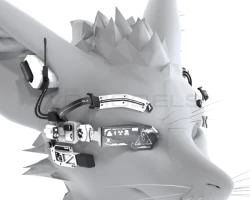


Rexouium Head Augmentation
To download the model, you need to log in.
Description
Hi !
Here is a new asset for the rexouium!
The package contains the latest version of the asset.
/!\ This version is not and will not be a Support/Premium version /!\
You will therefore not have the additional skins or assets that may be offered by the creators.
What is required to import your package (Additional elements given by the creator may be provided):
- The unity package was made in unity version 2019.4.31f1 using a different version can cause issues.
- Make sure you are using the latest Avatar SDK. Or the Creator Companion.
- Import the Head Augment Unity package and drag the scene onto your existing scene.
- Toggle one side or keep both.
- Parent the bones of the jacket to the correct bones of the avatar or use the Apply Accessories plugin (use with caution).
- Another plugin that works well is VRCFury.
- If you scaled your ears down, you can create an empty game object on the scaled bone and parent the ear armature of the Augment under that bone and scale it up until it looks nice.
- Toggle parts with the Blendshapes.
- If you hide parts of the mesh with Blendshapes make sure to use the AO - Explosion version of the materials.
- Upload your Avatar!
! Additional Information !
For any problems with your unity project, I am NOT responsible for your import errors or synchronization errors with your shaders.
~Anikii~
Here is a new asset for the rexouium!
The package contains the latest version of the asset.
/!\ This version is not and will not be a Support/Premium version /!\
You will therefore not have the additional skins or assets that may be offered by the creators.
What is required to import your package (Additional elements given by the creator may be provided):
- The unity package was made in unity version 2019.4.31f1 using a different version can cause issues.
- Make sure you are using the latest Avatar SDK. Or the Creator Companion.
- Import the Head Augment Unity package and drag the scene onto your existing scene.
- Toggle one side or keep both.
- Parent the bones of the jacket to the correct bones of the avatar or use the Apply Accessories plugin (use with caution).
- Another plugin that works well is VRCFury.
- If you scaled your ears down, you can create an empty game object on the scaled bone and parent the ear armature of the Augment under that bone and scale it up until it looks nice.
- Toggle parts with the Blendshapes.
- If you hide parts of the mesh with Blendshapes make sure to use the AO - Explosion version of the materials.
- Upload your Avatar!
! Additional Information !
For any problems with your unity project, I am NOT responsible for your import errors or synchronization errors with your shaders.
~Anikii~
