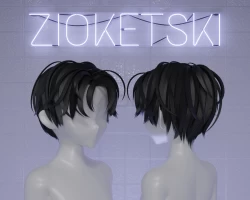


Boyish Bedhead
To download the model, you need to log in.
Description
A hairstyle that reflects the effortless charm of "I woke up like this."
☁︎ Model is 100% Made-from-Scratch.
☁︎ Rigged & weight-painted!
☁︎ UV mapped to vertical hair textures
☁︎ 9,539 Tris. 1 Material. 89 Unique Bones (+ 1 head bone for merging).
☁︎ 13 Included Textures:
。⋆ ☆ Edgy
。⋆ ☆ Flamin'
。⋆ ☆ Frosty
。⋆ ☆ Funky Purple
。⋆ ☆ White
。⋆ ☆ Pink
。⋆ ☆ Cotton Candy
。⋆ ☆ Baby Blue
。⋆ ☆ Lavender,
。⋆ ☆ Skunk
。⋆ ☆ Black,
。⋆ ☆ Blond
。⋆ ☆ Macchiato
☁︎ Normal map & emission mask included.
【Tips For Use】
☁︎ Setting Blend Mode (Blender)
For the hair material, I recommend using the "Alpha Hashed" or "Opaque" blend mode for this model (for use in Blender).* This can be changed in the "Material Properties" tab in Blender.
Because the blend method is not written to the FBX file at export, Blender will import it with "Alpha Blend" mode as default. This can be easily changed here:
☁︎ *Unity
For shading, I recommend using an opaque option on this model, due to Unity's limitations in overlaying transparencies.
If using PhysBones, be sure to set your Y endpoint position. (I have not included endbones for the sake of optimization.)☻I used default PhysBone settings in my showcase. (With Y endpoint set.)
Nothing says "making the internet a little more wholesome" than enforcing your views on others.
☁︎ Model is 100% Made-from-Scratch.
☁︎ Rigged & weight-painted!
☁︎ UV mapped to vertical hair textures
☁︎ 9,539 Tris. 1 Material. 89 Unique Bones (+ 1 head bone for merging).
☁︎ 13 Included Textures:
。⋆ ☆ Edgy
。⋆ ☆ Flamin'
。⋆ ☆ Frosty
。⋆ ☆ Funky Purple
。⋆ ☆ White
。⋆ ☆ Pink
。⋆ ☆ Cotton Candy
。⋆ ☆ Baby Blue
。⋆ ☆ Lavender,
。⋆ ☆ Skunk
。⋆ ☆ Black,
。⋆ ☆ Blond
。⋆ ☆ Macchiato
☁︎ Normal map & emission mask included.
【Tips For Use】
☁︎ Setting Blend Mode (Blender)
For the hair material, I recommend using the "Alpha Hashed" or "Opaque" blend mode for this model (for use in Blender).* This can be changed in the "Material Properties" tab in Blender.
Because the blend method is not written to the FBX file at export, Blender will import it with "Alpha Blend" mode as default. This can be easily changed here:
☁︎ *Unity
For shading, I recommend using an opaque option on this model, due to Unity's limitations in overlaying transparencies.
If using PhysBones, be sure to set your Y endpoint position. (I have not included endbones for the sake of optimization.)☻I used default PhysBone settings in my showcase. (With Y endpoint set.)
Nothing says "making the internet a little more wholesome" than enforcing your views on others.
