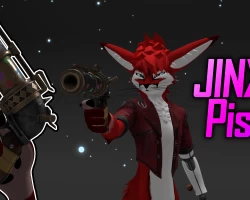


Jinx's Pistol from Arcane
To download the model, you need to log in.
Description
This asset uses the new VRC Constraints System added in SDK 3.7.0
Please make sure you are using 3.7.0 or newer!
Drag the Jinx Pistol prefab onto your avatars root. [No need to unpack the prefab]
Position the "Right Hand Constraint" to where the gun sits comfortably in your hand.
Position the "Left Hand Constraint" to where the holographic Bullet fits in your hand.
The hologram Bullet model is only reference so you know what it looks like in your hand!
It will be auto deleted in play mode or when uploading.
Position the "Hip Constraint" on your avatars hips to where the Bullet holsters sit on your hips.
You can scale the prefabs root incase you need it to be bigger or smaller.
Disable the prefab.
Done! VRCFury does the rest!
If any issues are found, please let me know of them on discord @pointless.support
Please make sure you are on the latest SDK before contacting my support!
If you want to specify a location for the asset to create its menu button, you can edit the prefab and type in a Prefix. If left blank, the asset will place the menu button in your avatars main menu.
- For example if i wanted it to go to a sub menu named "Toys", you'd type "Toys" in the Prefix.
- If you have more than 8 assets on one prefix like "Toys", it will automatically create a "Next" sub menu inside "Toys" where it will continue to store more menu buttons and so on.
- VRCFury Documentation site for further explanations.
Please make sure you are using 3.7.0 or newer!
Drag the Jinx Pistol prefab onto your avatars root. [No need to unpack the prefab]
Position the "Right Hand Constraint" to where the gun sits comfortably in your hand.
Position the "Left Hand Constraint" to where the holographic Bullet fits in your hand.
The hologram Bullet model is only reference so you know what it looks like in your hand!
It will be auto deleted in play mode or when uploading.
Position the "Hip Constraint" on your avatars hips to where the Bullet holsters sit on your hips.
You can scale the prefabs root incase you need it to be bigger or smaller.
Disable the prefab.
Done! VRCFury does the rest!
If any issues are found, please let me know of them on discord @pointless.support
Please make sure you are on the latest SDK before contacting my support!
If you want to specify a location for the asset to create its menu button, you can edit the prefab and type in a Prefix. If left blank, the asset will place the menu button in your avatars main menu.
- For example if i wanted it to go to a sub menu named "Toys", you'd type "Toys" in the Prefix.
- If you have more than 8 assets on one prefix like "Toys", it will automatically create a "Next" sub menu inside "Toys" where it will continue to store more menu buttons and so on.
- VRCFury Documentation site for further explanations.
