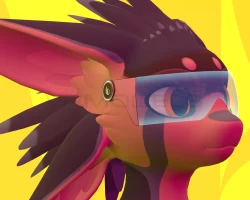


Spiri'vali tech glasses
To download the model, you need to log in.
Description
Tech glasses for your Spiri'vali avatar!
This product does not include the original base model and should be acquired here
I didn't made the asset Android compatible.
Key features
1746 triangles, 2 materials
Holographic shader effect
Supports LTCGI
Supports AudioLink (Can be turned off in the shader settings)
Supports video player texture (This feature only works on more recently updated video players, like ProTV 3.0)
Mute icon.
XSOverlay support : Shows a little Desktop environment if you open the XSOverlay's overlay, see the last picture above.
Customizable.
Shaders made with the Amplify shader editor.
Installation
Install VRCFury via VCC I was using version 1.835. This is required to merge the animator with the FX animator.
Install LTCGI via VCC otherwise you'll get shader errors, I was using version 1.4.1. You can turn off LTCGI in the shader.
Install AudioLink via VCC, I was using version 1.2.1.
In your armature, find the Head bone. Then drag and drop the "CyberGlasses" prefab as a child of the Head bone. Make sure the position is set to (0,0,0).
There are two versions of that prefab, one uses 19 parameters, the second one 2:
The one with two parameters doesn't have any settings in the expression menu, those parameter is only used to sync the mute state of the player and the XSOverlay.
The one with 18 parameters has 3 settings in the expression menu, under "Customization > Cyber glasses",
This product does not include the original base model and should be acquired here
I didn't made the asset Android compatible.
Key features
1746 triangles, 2 materials
Holographic shader effect
Supports LTCGI
Supports AudioLink (Can be turned off in the shader settings)
Supports video player texture (This feature only works on more recently updated video players, like ProTV 3.0)
Mute icon.
XSOverlay support : Shows a little Desktop environment if you open the XSOverlay's overlay, see the last picture above.
Customizable.
Shaders made with the Amplify shader editor.
Installation
Install VRCFury via VCC I was using version 1.835. This is required to merge the animator with the FX animator.
Install LTCGI via VCC otherwise you'll get shader errors, I was using version 1.4.1. You can turn off LTCGI in the shader.
Install AudioLink via VCC, I was using version 1.2.1.
In your armature, find the Head bone. Then drag and drop the "CyberGlasses" prefab as a child of the Head bone. Make sure the position is set to (0,0,0).
There are two versions of that prefab, one uses 19 parameters, the second one 2:
The one with two parameters doesn't have any settings in the expression menu, those parameter is only used to sync the mute state of the player and the XSOverlay.
The one with 18 parameters has 3 settings in the expression menu, under "Customization > Cyber glasses",
