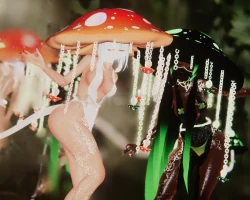


Misty
 The link to the model was removed from the site at the request of the copyright holder
Description
How to use this package and upload to VRChat.
1. Open Unity 2019.4.31f1
2. Import VRChat Avatar SDK (3.0).
3. Import a Shader you want to use, Poi is recommended
4. Import Dynamic Bones.
5. Import The Avatar Package.
Avatar Special Features
Original Version Toggles
- Hair: Long and short hair/Adjust Bang length
- Adjust dress opacity (see through and non see through)
- Adjusting hat size
- Clothing toggle (Dress and two piece with panties and pasties)
- Veil on and off
- Color Toggles: Hair: White and Black (eyelashes change color with hair)/Regular red/white mushrooms and glow in the dark version
- Hueshifts for mushroom, hair, and eyes
Particle Version
- Everything in the original version with extras
- Spore particles:Hands/Feet/Tail/Ground
- Springjoint:Right hand/Left Hand/Stationary near head
- Zep's Version of GPU particles
1. Open Unity 2019.4.31f1
2. Import VRChat Avatar SDK (3.0).
3. Import a Shader you want to use, Poi is recommended
4. Import Dynamic Bones.
5. Import The Avatar Package.
Avatar Special Features
Original Version Toggles
- Hair: Long and short hair/Adjust Bang length
- Adjust dress opacity (see through and non see through)
- Adjusting hat size
- Clothing toggle (Dress and two piece with panties and pasties)
- Veil on and off
- Color Toggles: Hair: White and Black (eyelashes change color with hair)/Regular red/white mushrooms and glow in the dark version
- Hueshifts for mushroom, hair, and eyes
Particle Version
- Everything in the original version with extras
- Spore particles:Hands/Feet/Tail/Ground
- Springjoint:Right hand/Left Hand/Stationary near head
- Zep's Version of GPU particles

Due to spam in the comments, comments have been disabled.
All comments already added to this material have been hidden.Comments disabled: NomNom
We apologise for any inconvenience.