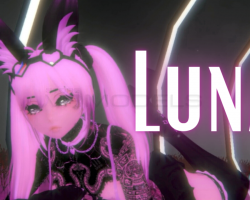
Home » Avatars » Luna

Model info

Content type:Avatars
Сreated by: Yuri
SDK: 3.0 (VRChat)
Platform: PC
Рhysbones: No
Face Tracking: No
Full body: Yes
Nsfw: Yes
DРS \ SPS : No
Views: 18 713
Luna

To download the model, you need to log in.

Description

How to use this package and upload to VRChat.

1. Open Unity 2019.4.31f1
2. Import VRChat Avatar SDK (3.0).
3. Import a Shader you want to use, Poi is recommended
4. Import Dynamic Bones.
5. Import The Avatar Package.

Avatar Special Features
- Custom gestures
- Fullbody ready
- Marker
- fixed locomotion
- Toggles: Bra, Corset, Ears/Tail, Skirt, Pasties, Gloves, Pant
Screenshots of model Luna in the game
Comments: 5
Add comment

Information

To add your comment you need to log in.

  • foto
    d3monxx #5
    +2
    You need to add the “crystal shader” to your assets and it should automatically go to the glasses. Cookiies,
    You can get the crystal shader here

    No you need the crystal shader it’ll automatically fix the glasses. Sohvl,
    18 December 2021 09:10
  • foto
    vrchatgirl #4
    0
    Cookiies
    You have to make a whole new material and drag it onto the broken shader, then choose the color you want it to be, or if you have a material you wanna use.
    18 December 2021 08:22
  • foto
    Remor #3
    0
    Cookiies,
    put a shader on them
    18 December 2021 08:18
  • foto
    Cookiies #2
    0
    How to fix glasses being pink?
    18 December 2021 07:44
  • foto
    GripThroat #1
    0
    <3 so cute
    18 December 2021 06:37