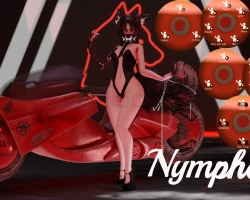


Akira - Cyber Wolf
To download the model, you need to log in.
Description
How to use this package and upload to VRChat.
1. Open Unity 2019.4.31
2. Import VRChat Avatar SDK (3.0).
3. Import a Shader you want to use, Poi is recommended
4. Import Dynamic Bones.
5. Import The Avatar Package.
Avatar Special Features
❥ Polycount: 700,762
❥ Material Count: 62
Performance: Very Poor
Physics: Hair, Breasts, Butt, Ears, Tail
Full Body Tracking Ready
Toggles:
❥ Clothes: Shorts, Bodysuit, Jacket, Shoes
❥ Accessories: Wolf Mask, Claws, Robot Arm, Robot Spine, Wolf ears and tail, Smoke breath, Robot wolf legs, Choker
❥ Motorcycle you can place down in the world
❥ Gun that can change into a sword and also shoots fire
❥ Hue shifts:
❥ Eyes, Hair, Outfit
❥ 4 Different skin tones in the radial menu
1. Open Unity 2019.4.31
2. Import VRChat Avatar SDK (3.0).
3. Import a Shader you want to use, Poi is recommended
4. Import Dynamic Bones.
5. Import The Avatar Package.
Avatar Special Features
❥ Polycount: 700,762
❥ Material Count: 62
Performance: Very Poor
Physics: Hair, Breasts, Butt, Ears, Tail
Full Body Tracking Ready
Toggles:
❥ Clothes: Shorts, Bodysuit, Jacket, Shoes
❥ Accessories: Wolf Mask, Claws, Robot Arm, Robot Spine, Wolf ears and tail, Smoke breath, Robot wolf legs, Choker
❥ Motorcycle you can place down in the world
❥ Gun that can change into a sword and also shoots fire
❥ Hue shifts:
❥ Eyes, Hair, Outfit
❥ 4 Different skin tones in the radial menu
