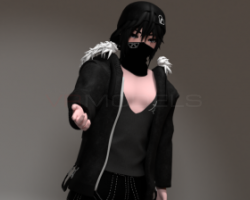


Blaise v1.1
To download the model, you need to log in.
Description
How to use this package and upload to VRChat.
* If you enjoy the uploads,
Give the post a heart or something *
1. Open Unity 2018.4.20f1.
2. Import VRChat Avatar SDK (3.0).
3. Import a Shader you want to use, Poiyomi is recommended.
4. Import Dynamic Bones.
5. Import The Avatar Package.
Enjoy the Avatar
-Avatars Are Not Worth 40 Dollars
From Avatar creator:
"A little peeved that by someone with your username put the avatar up here, sure I used assets I didnt make"
___
ragon Boi#0001
♥ SDK 3.0 Avatar
♥ Shirt Dissolve
♥ Pants Dissolve
♥ Tank Top Dissolve
♥ Mask and Shoes Dissolve
♥ Controllable Blendshape for the Boxers with NSFW at 100%
♥ Locomotion Toggle in Menu
♥ VRLabs Marker, adjustable color, width, and eraser, with the ability to stick it to parts of your body.
♥ Throwjoint by Cam
♥ Custom Gestures with Write Defaults off
♥ All materials are using Ambient Occlusion and Metallics and Specular to reflect the lighting of the world accurately, no Matcaps.
* If you enjoy the uploads,
Give the post a heart or something *
1. Open Unity 2018.4.20f1.
2. Import VRChat Avatar SDK (3.0).
3. Import a Shader you want to use, Poiyomi is recommended.
4. Import Dynamic Bones.
5. Import The Avatar Package.
Enjoy the Avatar
-Avatars Are Not Worth 40 Dollars
From Avatar creator:
"A little peeved that by someone with your username put the avatar up here, sure I used assets I didnt make"
___
ragon Boi#0001
♥ SDK 3.0 Avatar
♥ Shirt Dissolve
♥ Pants Dissolve
♥ Tank Top Dissolve
♥ Mask and Shoes Dissolve
♥ Controllable Blendshape for the Boxers with NSFW at 100%
♥ Locomotion Toggle in Menu
♥ VRLabs Marker, adjustable color, width, and eraser, with the ability to stick it to parts of your body.
♥ Throwjoint by Cam
♥ Custom Gestures with Write Defaults off
♥ All materials are using Ambient Occlusion and Metallics and Specular to reflect the lighting of the world accurately, no Matcaps.
