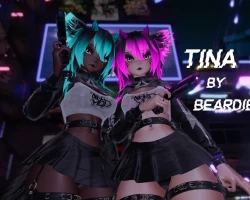


Tina
To download the model, you need to log in.
Description
Tina for VRChat Personal use. Creator companion compatible and Physbones.
Very Poor PC Version only! Not Quest compatible!
DPS by Raliv and Poiyomi Pro 8.2 shaders are required to make this model work correctly! Don't use 7.3/8.1 Pro the model will break! Use Latest Poiyomi Toon if you don't have the $10 for 8.2 Pro!
Features:
Dissolves for main clothes toggles and accessories all toggle
Tech outfit with alternative clothing options, Thigh high, Yoga pants, Rigged Skirt, Shorts, Harness and Animal Paws
Pistol that can be fired, thrown and placed on the world
Interact-able headphones and Mask with light up synced speech emissions
HUE for Main clothing and accessories with Black toggle, HUE for Emissions and HUE for Eyes, Emission and Glitter sliders
Audiolink on the emissions with toggle, flashes to music in supported worlds
Boob size slider and boob squish animation
Futa with soft to erect animation, Floppy toggle, Grab-able, Pose-able, Cum particles and Scale slider
Full DPS setup with 15 orifice options with constraints for reduced lights, 2 UWU animated holes with finger interaction and tummy bulge
Contacts for Booty slap, Nose boop, Head pat, Kiss animation all with sounds
Gogo Locomotion ready
Lots of beans, Foot, Thigh high, Nipple and Animal Paw beans
2 Prefabs with different skin tones
Yoga ball that drops anywhere on the ground with squish animations that can be used by friends
Optimization:
UV discard toggles with dissolves for main clothes
Meshes joined and main outfits materials combined (under 32 materials total) low draw calls
Toggles and radials converted to Blendtrees where parameter drivers, dissolves or motion times are not needed to reduce time to get through the FX layer causing less lag
Decals and HUE used for color changes no material swap animations
Body/Head joined then separated and normals transferred to give clean appearance but keeping them separate to optimize the blendshapes on meshes which are heavy
Less Lights: Constraints used for DPS lights
1 material used for DPS animations, so only one single 16MB Raliv data file and 1 Body material no swaps
Legs hidden with UV discard to reduce any clipping with tight clothes
Less than 200MB Texture Vram, Most textures marked down to reduce size with crunch compression to maintain quality vs size
No blendshapes used on clothing to hide things
Quality:
Substance PBR texture sets used and setup in Poiyomi with glossy maps
Face FX layer does not allow face to over animate or over blink e.g. headpat will cancel gestures so your face does not look cursed
Head capped so you can't see how empty your head is
Alternative outfits on 1 mesh and hidden by default so when you are hidden your fallback shaders and meshes look normal
Parameter drivers used for toggles to deal with clipping when wearing non compatible clothes, e.g. Pants on toggle will auto take the skirt off for you etc
Time taken to sculpt the base, hands and feet to improve the appearance
Clean and simple menus with icons
Anchor overrides and Bounding boxes set
Future updates for fixes and improvements, I wear and update my avatars
Time taken to dial in the wiggles so they react to movement well
Hand animations for the gun with trigger press with synced animations so everyone see what you see
Write defaults off work flow so adding things won't break it (WD has to be used in Blendtrees only)
I just copy and paste sorry if it looks jank <3
Very Poor PC Version only! Not Quest compatible!
DPS by Raliv and Poiyomi Pro 8.2 shaders are required to make this model work correctly! Don't use 7.3/8.1 Pro the model will break! Use Latest Poiyomi Toon if you don't have the $10 for 8.2 Pro!
Features:
Dissolves for main clothes toggles and accessories all toggle
Tech outfit with alternative clothing options, Thigh high, Yoga pants, Rigged Skirt, Shorts, Harness and Animal Paws
Pistol that can be fired, thrown and placed on the world
Interact-able headphones and Mask with light up synced speech emissions
HUE for Main clothing and accessories with Black toggle, HUE for Emissions and HUE for Eyes, Emission and Glitter sliders
Audiolink on the emissions with toggle, flashes to music in supported worlds
Boob size slider and boob squish animation
Futa with soft to erect animation, Floppy toggle, Grab-able, Pose-able, Cum particles and Scale slider
Full DPS setup with 15 orifice options with constraints for reduced lights, 2 UWU animated holes with finger interaction and tummy bulge
Contacts for Booty slap, Nose boop, Head pat, Kiss animation all with sounds
Gogo Locomotion ready
Lots of beans, Foot, Thigh high, Nipple and Animal Paw beans
2 Prefabs with different skin tones
Yoga ball that drops anywhere on the ground with squish animations that can be used by friends
Optimization:
UV discard toggles with dissolves for main clothes
Meshes joined and main outfits materials combined (under 32 materials total) low draw calls
Toggles and radials converted to Blendtrees where parameter drivers, dissolves or motion times are not needed to reduce time to get through the FX layer causing less lag
Decals and HUE used for color changes no material swap animations
Body/Head joined then separated and normals transferred to give clean appearance but keeping them separate to optimize the blendshapes on meshes which are heavy
Less Lights: Constraints used for DPS lights
1 material used for DPS animations, so only one single 16MB Raliv data file and 1 Body material no swaps
Legs hidden with UV discard to reduce any clipping with tight clothes
Less than 200MB Texture Vram, Most textures marked down to reduce size with crunch compression to maintain quality vs size
No blendshapes used on clothing to hide things
Quality:
Substance PBR texture sets used and setup in Poiyomi with glossy maps
Face FX layer does not allow face to over animate or over blink e.g. headpat will cancel gestures so your face does not look cursed
Head capped so you can't see how empty your head is
Alternative outfits on 1 mesh and hidden by default so when you are hidden your fallback shaders and meshes look normal
Parameter drivers used for toggles to deal with clipping when wearing non compatible clothes, e.g. Pants on toggle will auto take the skirt off for you etc
Time taken to sculpt the base, hands and feet to improve the appearance
Clean and simple menus with icons
Anchor overrides and Bounding boxes set
Future updates for fixes and improvements, I wear and update my avatars
Time taken to dial in the wiggles so they react to movement well
Hand animations for the gun with trigger press with synced animations so everyone see what you see
Write defaults off work flow so adding things won't break it (WD has to be used in Blendtrees only)
I just copy and paste sorry if it looks jank <3
