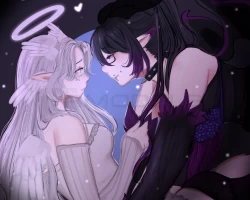


Model info
Content type:Avatars
Сreated by: LittleSaku
SDK: 3.0 (VRChat)
Unity version: Unity 2022
Platform:
PC + Quest
Рhysbones: Yes
Face Tracking: No
Full body: Yes
Nsfw: Yes
DРS \ SPS : No
Views: 80 131
*✦ Dragonissa & Angelique ✦*
To download the model, you need to log in.
Description
︵‿︵‿︵‿︵Our love will last forever ︵‿︵‿︵‿︵
♡・Quest compatible!
♡・ Custom Menu Icons
♡・Toggles for everything
♡・Hue shift in hair/eyes/accesories/skin/emissions/ clothes/ dark mode
♡・Crow Pet
♡・floor particles+ trail feathers + feathers world + shareable halo + Fire Breath
♡・NEW Gogogloco
︵‿︵‿︵‿︵ What do you will need ︵‿︵‿︵‿︵
✘・Latest SDK avatar ( you can fin it in the vrchat page in dowloads)
✘・Poyomi ( you can use pyomi pro or poyomi 8v but i made it with poyomi pro)
✘・This doesn't include dps!
︵‿︵‿︵‿︵ How To Install ︵‿︵‿︵‿︵
︵‿︵PC Version
1・Open ccAvatar companion
2・Create a new project (avatar) +ADD THE VRC FURRY ADDON
3・Add the poyomi shader ( i used poi_Toon_7.3.50_To_8.1.155)
4・Import the avatar package
5・Open The tab with the sdk (top left) and log in
6・Click ^upload for windows^
IF YOU GET BLUEPRINT ERROR DEATATCH THE BLUEPRINT CLIKCING IN YOUR AVATAR!!
︵‿︵Quest Version
1・Open ccAvatar companion +ADD THE VRC FURRY ADDON
2・Create a new project (avatar)
3・Import the avatar package
4・Open The tab with the sdk (top left) and log in
5・Click ^upload for QUEST^
IF YOU GET BLUEPRINT ERROR DEATATCH THE BLUEPRINT CLIKCING IN YOUR AVATAR!!
♡・Quest compatible!
♡・ Custom Menu Icons
♡・Toggles for everything
♡・Hue shift in hair/eyes/accesories/skin/emissions/ clothes/ dark mode
♡・Crow Pet
♡・floor particles+ trail feathers + feathers world + shareable halo + Fire Breath
♡・NEW Gogogloco
︵‿︵‿︵‿︵ What do you will need ︵‿︵‿︵‿︵
✘・Latest SDK avatar ( you can fin it in the vrchat page in dowloads)
✘・Poyomi ( you can use pyomi pro or poyomi 8v but i made it with poyomi pro)
✘・This doesn't include dps!
︵‿︵‿︵‿︵ How To Install ︵‿︵‿︵‿︵
︵‿︵PC Version
1・Open ccAvatar companion
2・Create a new project (avatar) +ADD THE VRC FURRY ADDON
3・Add the poyomi shader ( i used poi_Toon_7.3.50_To_8.1.155)
4・Import the avatar package
5・Open The tab with the sdk (top left) and log in
6・Click ^upload for windows^
IF YOU GET BLUEPRINT ERROR DEATATCH THE BLUEPRINT CLIKCING IN YOUR AVATAR!!
︵‿︵Quest Version
1・Open ccAvatar companion +ADD THE VRC FURRY ADDON
2・Create a new project (avatar)
3・Import the avatar package
4・Open The tab with the sdk (top left) and log in
5・Click ^upload for QUEST^
IF YOU GET BLUEPRINT ERROR DEATATCH THE BLUEPRINT CLIKCING IN YOUR AVATAR!!
