

Model info
Content type:Avatars
Сreated by: ❀LittleSaku❀
SDK: 3.0 (VRChat)
Unity version: Unity 2022
Platform:
PC + Quest
Рhysbones: Yes
Face Tracking: No
Full body: No
Nsfw: No
DРS \ SPS : No
Views: 49 343
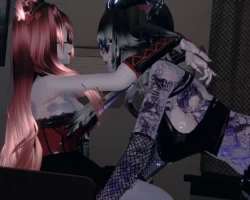
ꕥPandoraꕥ + ✧Eira✧ Bundle Couple!
To download the model, you need to log in.
Description
✘・Quest compatible
✘・ Custom Menu Icons
✘・Toggles for everything
✘・Hue shift in hair/eyes/accesories/skin/emissions
✘・Lot Of Toys
✘・World Dropeable
✘・Particles
✘・Springjoints
✘・Gogogloco + fake index
︵‿︵‿︵‿︵TOGGLES︵‿︵‿︵‿︵
PANDORA
☆・Top:
Smol Cute Top
☆・Middle:
Corset, Cute Lace Bodysuit
☆・Lower:
Skirt, Cute short, Long pants, Overalls, Panties
☆・Shoes:
Socks with beans, Cute Heels, Garters
☆・3 Hairstyles:
Long hair and back, Twintails back, Short Hair
☆・Accessories:
Glases round, Glasses square, Glasses Cute, Rings, Choker delicated, Chains Choker, Eyepatch, Fishbone, Headband, Parasol
☆・Animal Parts:
Bone Tail, Buny Tail, Bunny Ears, Horns, Elf Ears, Kitty Ears, Kitty Tail, Wolf Tail, Elf ears
EIRA
☆・Top:
Gothic Top, Top Bokini, Hoodie Comfy
☆・Bodysuits:
Bat Bodysuit, Comfy Onesie
☆・Lower:
Skirt, Shorter, Short
☆・Shoes:
High Heels, Platform Boots
☆・3 Hairstyles:
Ponytail, Long Hair, Short Hair
☆・Accessories:
Necklace, Glasses
☆・Animal Parts:
Doble Ears, Horns, Tail
︵‿︵‿︵‿︵COLORS/FUN︵‿︵‿︵‿︵
Pandora
☆・Skin Swap, Eye Hue, Hair Colours, Hair Hue, Top hue + colours, Middle hue + colours, Lower hue + colours, acc hue + colours
☆・Paw Prints when you walk, Kitty Srpinjoints, Blood Springjointss, Kitty Follower, Kitty Plushie, Boop!, Ribbons , Kitty wool and toy
Eira
☆ Skin Swap, Eye Hue, tattoo toggle, Tattoo Hue,Hair Colours, Hair Hue, General Hue, Emission Hue, Swaps, Scelars Black
☆ Emissions, Dance Blood, BeanBag, Springjoints, Pole
︵‿︵‿︵‿︵ What do you will need ︵‿︵‿︵‿︵
☆・Latest SDK avatar ( you can fin it in the vrchat page in dowloads)
☆・Poyomi ( you can use pyomi pro or poyomi 8v but i made it with poyomi pro)
☆・This doesn't include dps!
︵‿︵‿︵‿︵INSTRUCTIONS︵‿︵‿︵‿︵
︵‿︵‿︵‿︵ How To Install ︵‿︵‿︵‿︵
︵‿︵PC Version
1・Open ccAvatar companion
2・Create a new project (avatar) +ADD THE VRC FURRY ADDON
3・Add the poyomi shader ( i used poi_Toon_7.3.50_To_9.0.36)
+for this avi (add MochiesShader and Unlit_WF_Shader)
4・Import the avatar package
5・Open The tab with the sdk (top left) and log in
6・Click ^upload for windows^
IF YOU GET BLUEPRINT ERROR DEATATCH THE BLUEPRINT CLIKCING IN YOUR AVATAR!!
︵‿︵Quest Version
1・Open ccAvatar companion +ADD THE VRC FURRY ADDON
2・Create a new project (avatar)
3・Import the avatar package
4・Open The tab with the sdk (top left) and log in
5・Click ^upload for QUEST^
IF YOU GET BLUEPRINT ERROR DEATATCH THE BLUEPRINT CLIKCING IN YOUR AVATAR!!
