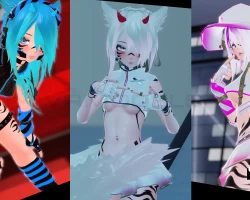


Model info
Content type:Avatars
Сreated by: OpenRevolt
SDK: 3.0 (VRChat)
Unity version: Unity 2022
Platform:
PC
Рhysbones: Yes
Face Tracking: No
Full body: No
Nsfw: Yes
DРS \ SPS : Yes
Views: 48 369
Stryke
To download the model, you need to log in.
Description
Features:
Most Outfits are Physbone Interactable!
You may toggle by grabbing directly in-game or through menu manually
You can toggle them ON & OFF just by pulling!
These outfits have sliding effect
This pulling on the cap is NOT the only thing you can pull off on this avatar
MAXIMUM Avatar Modification/Customization Options, includes:
Color Change for Hair (Main Color and Emission)
Length Change for Hair (Front hair and Pony tail)
Color Change for Eyes
Color Change for Outfit (Main and Secondary Colors)
Skin Tan!!!!!! & Skin Wet!!!!!
Body Shape Modification (Make a Femboy or a thick girl!)
Light Boost for Dark Environment
VRCFury Penetrator playability + PP & Toy Playability
MMD Blendshapes available! Avatar can dance with facial expression on!
Upload Tutorial:
You need: Unity 2022.3.6f1, VCC (VRChatCreatorCompanion), Poiyomi (Version 7.3.50 - 8.2.030, free version/Pro version both work) and VRCFury Penetrator (VRCFury is free. Link is here). (You need to get these yourself! They are not included in the pckage!)
Create a new project on Unity and have the project added on VCC; or create a project directly on VCC (!If you don't use a brand new empty project, it might cause error!!)
On VCC, go to "Manage project" for the project you just added. Import "VRChat SDK - Avatar" (It will also import other files together but don't worry about it!) and "VRCFury"
Addtionally, you can also add Hai's recalculate normal (click link for tutorial, you need another tool to make it work. Read Hai's tutorial!). You need to add Hai's Prefabulous avatar add-on on VCC. This will help you elimating the weird shading on slim/femboy body. HIGHLY RECOMMENDED!
Open the project on Unity, Import Poiyomi, THEN the avatar package.
Find the scene "Open Me" available in the main asset folder (On your bottom left of Unity), open and upload!
Additionally, you can select the thumbnail available in the folder when upload the avatar; you just have to find the file path yourself. It will locate in your unity project folder: Assets -> Stryke
V1 IS ALSO INCLUDED. SO ITS V1 AND V2
Most Outfits are Physbone Interactable!
You may toggle by grabbing directly in-game or through menu manually
You can toggle them ON & OFF just by pulling!
These outfits have sliding effect
This pulling on the cap is NOT the only thing you can pull off on this avatar
MAXIMUM Avatar Modification/Customization Options, includes:
Color Change for Hair (Main Color and Emission)
Length Change for Hair (Front hair and Pony tail)
Color Change for Eyes
Color Change for Outfit (Main and Secondary Colors)
Skin Tan!!!!!! & Skin Wet!!!!!
Body Shape Modification (Make a Femboy or a thick girl!)
Light Boost for Dark Environment
VRCFury Penetrator playability + PP & Toy Playability
MMD Blendshapes available! Avatar can dance with facial expression on!
Upload Tutorial:
You need: Unity 2022.3.6f1, VCC (VRChatCreatorCompanion), Poiyomi (Version 7.3.50 - 8.2.030, free version/Pro version both work) and VRCFury Penetrator (VRCFury is free. Link is here). (You need to get these yourself! They are not included in the pckage!)
Create a new project on Unity and have the project added on VCC; or create a project directly on VCC (!If you don't use a brand new empty project, it might cause error!!)
On VCC, go to "Manage project" for the project you just added. Import "VRChat SDK - Avatar" (It will also import other files together but don't worry about it!) and "VRCFury"
Addtionally, you can also add Hai's recalculate normal (click link for tutorial, you need another tool to make it work. Read Hai's tutorial!). You need to add Hai's Prefabulous avatar add-on on VCC. This will help you elimating the weird shading on slim/femboy body. HIGHLY RECOMMENDED!
Open the project on Unity, Import Poiyomi, THEN the avatar package.
Find the scene "Open Me" available in the main asset folder (On your bottom left of Unity), open and upload!
Additionally, you can select the thumbnail available in the folder when upload the avatar; you just have to find the file path yourself. It will locate in your unity project folder: Assets -> Stryke
V1 IS ALSO INCLUDED. SO ITS V1 AND V2
