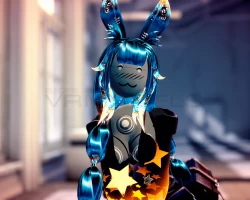


Model info
Content type:Avatars
Сreated by: Lil Miss Pasta
SDK: 3.0 (VRChat)
Unity version: Unity 2022
Platform:
PC + Quest
Рhysbones: Yes
Face Tracking: No
Full body: Yes
Nsfw: No
DРS \ SPS : No
Views: 13 608
R0-B4BE
To download the model, you need to log in.
Description
💖 Quest Compatible!
💖 Audiolink emissions everywhere!*
💖 Push the button to hear her speak!*
💖 FBT ready, with Gogo Loco setup
💖 Hue shifts and Disco Mode
💖 Phys bones and colliders in all the right places
💖 Full inventory system, with Dissolves*
💖 Super optimized!
💖 Objectively the perfect E-girl
💖 Will steal your man
💖 Microwave Safe
💖 OWO
* Marked features are PC only! uwu
Before purchasing, please ensure that you have:
Unity 2022.3.6f1
VRChat Creator Companion (VCC, VRChat website)
Poiyomi Toon 9.0.40
PC upload Instructions:
1. Create a new Unity Avatar project using VCC, and log into the SDK
2. Import Poiyomi Toon 9.0.40
3. Import the R0-B4BE PC Avatar Package
4. Open the "OPEN ME" scene in the R0-B4BE folder
Ready to upload!
Quest upload instructions:
1. Create a new Unity Avatar project using VCC, and log into the SDK
2. Import the R0-B4BE Quest Avatar Package
3. Open the "OPEN ME" scene in the R0-B4BE folder
4. Remember to Copy/paste the blueprint ID from your PC upload to this one, for the fallback to sync
Ready to upload!
💖 Audiolink emissions everywhere!*
💖 Push the button to hear her speak!*
💖 FBT ready, with Gogo Loco setup
💖 Hue shifts and Disco Mode
💖 Phys bones and colliders in all the right places
💖 Full inventory system, with Dissolves*
💖 Super optimized!
💖 Objectively the perfect E-girl
💖 Will steal your man
💖 Microwave Safe
💖 OWO
* Marked features are PC only! uwu
Before purchasing, please ensure that you have:
Unity 2022.3.6f1
VRChat Creator Companion (VCC, VRChat website)
Poiyomi Toon 9.0.40
PC upload Instructions:
1. Create a new Unity Avatar project using VCC, and log into the SDK
2. Import Poiyomi Toon 9.0.40
3. Import the R0-B4BE PC Avatar Package
4. Open the "OPEN ME" scene in the R0-B4BE folder
Ready to upload!
Quest upload instructions:
1. Create a new Unity Avatar project using VCC, and log into the SDK
2. Import the R0-B4BE Quest Avatar Package
3. Open the "OPEN ME" scene in the R0-B4BE folder
4. Remember to Copy/paste the blueprint ID from your PC upload to this one, for the fallback to sync
Ready to upload!
