Home » Avatars » Frey

Model info

Content type:Avatars
Сreated by: funsize
SDK: 3.0 (VRChat)
Unity version: Unity 2019
Platform: PC
Рhysbones: Yes
Face Tracking: No
Full body: Yes
Nsfw: Yes
DРS \ SPS : Yes
Views: 23 951
Frey

To download the model, you need to log in.

Description

• Fullbody ready
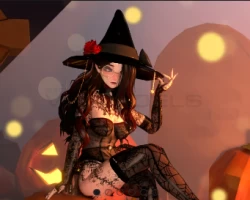
• Particles and Witchy items
• Phys bones ready
• 2 Hairstyles to choose from ( Wavy, long)
DPS Ready
• Clean unitypackage, prefab + FBX included

Upload Instructions
•VRSDK 3.0 only
Poiyomi Toon 7.3.50
•Raliv DPS if you want it. (have to import yourself)
•Import Unity Project
Screenshots of model Frey in the game
Comments: 8
Add comment

Information

To add your comment you need to log in.

  • foto
    Ashegao #8
    0
    nunnfreak, is it possible for you to upload your fixed version?
    16 June 2024 12:39
  • foto
    Ashegao #7
    0
    Nirai how did you fix it?
    16 June 2024 06:35
  • foto
    nunnfreak #6
    0
    Looks like the paramaters are a mess too. Gotta take Toggles off of the parameter names and add glasses, ghost, and pumpkin to the list and correct 'glasses' spelling in menu and in fx params. or just spell it wrong in the parameters too.
    15 June 2024 09:35
  • foto
    nunnfreak #5
    0
    It was a pain, but I deleted the vrc3 creator(or something like that) folder in the project and then replaced the vrchat.blackstartx.gesture-manager folder in the package folder with one from a different project and reopened the project. Open your project folder in explorer and find the blackstartx folder it inside the 'packages' folder. Then delete it. "project>packages>blackstartx folder. Copy/paste a blackstartx folder from a different project to replace the one you deleted. With blackstartx copied over and with the creator folder removed(it shows up when you import the Frey package) it should work okay. Also I'm not sure if the two follower objects are supposed to be outside of the Frey avatar. Also the avatar menu and parameters were not placed on the avatar below the descriptor when I imported the project. It had the goloco stuff in there. I just imported goloco separately and used fury. Its as easy as adding fury and goloco to the project and dropping the goloco fury prefab onto the avatar.
    15 June 2024 08:11
  • foto
    Nirai #4
    0
    nvrm i fixed
    14 June 2024 09:48
  • foto
    Nirai #3
    0
    ye its broken af, lmk if anyone gets a fix
    14 June 2024 09:05
  • foto
    nascasho #2
    0
    I seem to be getting this error:

    error CS1704: An assembly with the same simple name '0Harmony' has already been imported. (C:/File Location/Harmony.dll') or sign them to enable side-by-side.

    Anyone have ideas?
    13 June 2024 14:10
  • foto
    withextrasauce #1
    0
    does the hair have physics?
    13 June 2024 09:18