

Model info
Content type:Avatars
Сreated by: Peachiibao
SDK: 3.0 (VRChat)
Unity version: Unity 2022
Platform:
PC
Рhysbones: Yes
Face Tracking: No
Full body: Yes
Nsfw: No
DРS \ SPS : No
Views: 28 424
ღ Shayu
To download the model, you need to log in.
Description
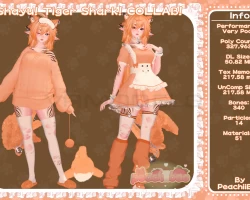
♡ Performance: Very Poor
♡ Polycount: 327,963
♡ DL Size: 50.82 MB
♡ UnComp Size: 217.58 MB
♡ Texture Memory: 164.94 MB
♡ Bones: 340
♡ Particles: 14
♡ Materials: 51
Features / Toggles:
♡ Clothes: Dress / Sweater / Warmers / Shorts / Bikini
♡ Accessories: Collar / Cuffs / Garter / Yarn / Mask + Position
♡ Shoes: Boots / Slippers
♡ Species: Double Ears / Tail / Tail Wag / Follower
♡ Custom: Skin Radial / Eye Hue / Hair Hue / Clothes Hue / Yarn Hue / Follower Hue
♡ Contacts: Headpat / Noseboop / Eye Pokes
How to upload!
1. Open VRChat Creator Companion (VCC)
2. Create a new Avatar project (2022) (Version 2022.3.22f1)
3. Import Poiyomi Toon 7.3.50 To 8.1.167
4. Import Unlit Fur Shader
5. Import Avatar Package.
6. Open the Scene in Avatar Folder.
7. Open the VRC SDK panel and press the Build & Publish for Windows button
♡ Polycount: 327,963
♡ DL Size: 50.82 MB
♡ UnComp Size: 217.58 MB
♡ Texture Memory: 164.94 MB
♡ Bones: 340
♡ Particles: 14
♡ Materials: 51
Features / Toggles:
♡ Clothes: Dress / Sweater / Warmers / Shorts / Bikini
♡ Accessories: Collar / Cuffs / Garter / Yarn / Mask + Position
♡ Shoes: Boots / Slippers
♡ Species: Double Ears / Tail / Tail Wag / Follower
♡ Custom: Skin Radial / Eye Hue / Hair Hue / Clothes Hue / Yarn Hue / Follower Hue
♡ Contacts: Headpat / Noseboop / Eye Pokes
How to upload!
1. Open VRChat Creator Companion (VCC)
2. Create a new Avatar project (2022) (Version 2022.3.22f1)
3. Import Poiyomi Toon 7.3.50 To 8.1.167
4. Import Unlit Fur Shader
5. Import Avatar Package.
6. Open the Scene in Avatar Folder.
7. Open the VRC SDK panel and press the Build & Publish for Windows button
