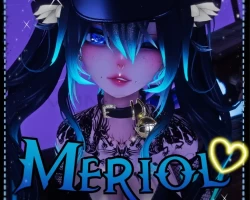
Home » Avatars » Meriol ☾

Model info

Content type:Avatars
Сreated by: Mochiko
SDK: 3.0 (VRChat)
Unity version: Unity 2022
Platform: PC
Рhysbones: Yes
Face Tracking: No
Full body: Yes
Nsfw: Yes
DРS \ SPS : No
Views: 41 667
Meriol ☾

To download the model, you need to log in.

Description


꒰ᐢ. .ᐢ꒱Meriol
2022 Unity, PC only - SPS&GOGO (VRCFURY)

Features ฅᨐฅ
༄ animated face expressions
༄ highly customizable(hair, ears, nails, skin, tattoo, makeup hue)
༄ kitty dumpling in case you get hungry
༄ tail/ears animation
༄ cute ear blendshape for the hat
༄ different outfits and 3 hairstyles
༄ physbones and colliders where needed
༄ FBT ready and GOGO&SPS setup
Screenshots of model Meriol ☾ in the game
Comments: 12
Add comment

Information

To add your comment you need to log in.

  • foto
    Halurya #12
    0
    Just check for missing scripts and delet it
    28 August 2024 11:26
  • foto
    WinterPhee #11
    0


    just delete the sps its useless anyway
    25 August 2024 00:27
  • foto
    Matsuko_san #10
    0
    LarexGame, Solo con el sps configurator solucionas el problema, no es necesario instalar todo.
    24 August 2024 20:06
  • foto
    LarexGame #9
    0


    [ENG] The VCC let me upload the Avatar using the following configuration without having to move anything to the Avatar

    [ESP] El VCC me dejo subir el Avatar utilizando la siguiente configuracion sin necesidad de moverle nada al Avatar[quote=LarexGame]

    [ENG] The VCC let me upload the Avatar using the following configuration without having to move anything to the Avatar. What cannot be seen is the (Non-Destructive Modular Framework)

    [ESP] El VCC me dejo subir el Avatar utilizando la siguiente configuracion sin necesidad de moverle nada al Avatar. Lo que no se deja ver es el (Non-Destructive Modular Framework)
    23 August 2024 01:48
  • foto
    ZED Steam #8
    0
    Zechx94, I deleted 2 sps components in the database
    22 August 2024 11:44
  • foto
    Foxxy #7
    0
    jeff274, You have to go to the avatar hierarchy, find the thigh job and double handjob dropdowns under the sps, then remove the missing script on thighjob socket and double handjob socket. Just click on the drop down on either double handjob, or thighjob, then it'll show three more, click on the socket for both, and remove the missing script. That was my issue, and it worked flawlessly afterwards. Hope this helps or I wasn't too late, I just wasn't home for a bit :>

    -Foxxy
    21 August 2024 23:11
  • foto
    Antivast #6
    0
    jeff274, Clear blueprint ID in avatar descriptor
    21 August 2024 21:38
  • foto
    Zechx94 #5
    0
    ZED Steam, what did u do?
    21 August 2024 15:00
  • foto
    ZED Steam #4
    +1
    Easy
    21 August 2024 12:43
  • foto
    Helgelending #3
    Quote: Equinon
    jeff274, if anyone finds the solution to this let me know! I tried using 2019 unity instead which usually fixes the problem, but vrfury cant really be used on that version anymore.


    You’re missing a dependency. Could be GoGo, Wholesome Configurator, or something. Should say Missing prefab and then refer to something.

    I’ll look at it when I get home.
    21 August 2024 07:52
  • foto
    ghost_1 #2
    0
    jeff274, Just attach a new one, the ID your using is already being used.
    20 August 2024 21:56
  • foto
    jeff274 #1
    0
    im getting blue print ID error how fix?
    20 August 2024 19:17