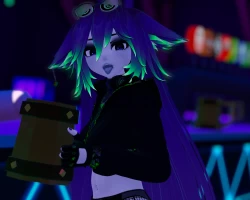


Model info
Content type:Avatars
Сreated by: Gravity Squeeze
SDK: 3.0 (VRChat)
Unity version: Unity 2022
Platform:
PC
Рhysbones: Yes
Face Tracking: No
Full body: Yes
Nsfw: Yes
DРS \ SPS : Yes
Views: 36 502
Yakui the Hypnotic
To download the model, you need to log in.
Description
Does not require Poiyomi Pro or DPS, but requires VRCFURY
Features:
Facetracking Ready - for this you will need to import ADJerry's Facetracking Template
Physbones (Everywhere you'd expect
All gestures and layers included
FBT Ready using Constraints
Avatar designed with Audiolink in mind
Hollow/Hypno Shader
Expressions can be combined to create even more expressions
Bounds and Anchor set to avoid meshes disappearing, and so light settings are consistent across the whole model
Reveal Dynamic
Boop and Headpat Dynamics
Base has Toe Bones which are constrainted to Finger Bones
Toggles are setup with Param drivers so if anything conflicts it will Automatically turn off
Lighting:
Brightness Radial
Greyscale Lighting Radial
Emission Radial
Receive Casted Shadows Radial
Force Fallback - Toggles on/off a forced cubemap for reflections, generally for use if a map hasn't set them up well
Minimum Brightness - Toggles on a set minimum for brightness so you'll never go completely dark in maps
Toggles:
Dissolves:
Clothing - Hoodie, Top, Garter Belt, Cargo Pants, Fishnet Shorts, Shorts, Panties, Socks, Hightops, Gloves
Accessories - Holster/Gun, Headphones, Earring
Extra - Ears, Tail, Pasties
Quick Toggles for Full Outfit and No Outfit
Clothing Hue's etc:
Outfit Hue 1 Radial
Outfit Hue 2 Radial
Outfit White
Hoodie Hue Radial - Also controls Gloves
Top Hue Radial
Socks Hue Radial - Also controls Holster
Cargo Hue Radial
Plain Cargo Toggle
Top Striped Toggle
Hair/Ears Style:
Base Colour - Black, White or Hue
Base Hue Radial - Grey to Hue - This also controls Aniso Hue 1
Emission Hue Radial - White to Hue - This also controls the Rimlight Silhouette Hue and Aniso Hue 2
Sharpness Radial - Soft to Sharp
Saturation Radial
Hair Length Radial
White Tips Toggl
Outline Toggle
Dithering Toggle
More Emission Toggle
Eyes:
Base Texture or Eye Shader
Eye Hue
Sclera - Black or White
Skin Variations:
Saturation - 0.25 Above, None, -0.25, -0.5, -0.75, -1, Total Saturation , Blue Tint
Rimlight Style - Additive or Replace
Head/Body:
Freckles Toggle
Eye Shadow Toggle
Lip Piercing Toggle
Womb Tattoo Toggle
Womb Tattoo Hue Radial
Belly Piercing Toggle
Nail Hue Radial
Upper Body Radial
Lower Body Radial
Glasses:
Position - Up or Down
Glasses Toggle
Effects etc:
Rimlight Silhouette Radial
Base Outline Toggle
RGB Toggle
Pull Toggle
Spank Toggle
Toe Constraint Toggle - Only functions when barefoot
Audiolink:
AL Toggle
AL Hair Dissolve Toggle - This effect occludes as you move away from it
AL Hair Outline Toggle
AL Accessory Outline Toggle
AL Outfit Distortion Toggle
AL Vertex Offset Toggle - Headphones move to AL Band
AL Spectrum Toggle for CRT Screen
AL Type - Bass, Low Mid, High Mid, Treble - Sets all AL effects to this sound type
Features:
Facetracking Ready - for this you will need to import ADJerry's Facetracking Template
Physbones (Everywhere you'd expect
All gestures and layers included
FBT Ready using Constraints
Avatar designed with Audiolink in mind
Hollow/Hypno Shader
Expressions can be combined to create even more expressions
Bounds and Anchor set to avoid meshes disappearing, and so light settings are consistent across the whole model
Reveal Dynamic
Boop and Headpat Dynamics
Base has Toe Bones which are constrainted to Finger Bones
Toggles are setup with Param drivers so if anything conflicts it will Automatically turn off
Lighting:
Brightness Radial
Greyscale Lighting Radial
Emission Radial
Receive Casted Shadows Radial
Force Fallback - Toggles on/off a forced cubemap for reflections, generally for use if a map hasn't set them up well
Minimum Brightness - Toggles on a set minimum for brightness so you'll never go completely dark in maps
Toggles:
Dissolves:
Clothing - Hoodie, Top, Garter Belt, Cargo Pants, Fishnet Shorts, Shorts, Panties, Socks, Hightops, Gloves
Accessories - Holster/Gun, Headphones, Earring
Extra - Ears, Tail, Pasties
Quick Toggles for Full Outfit and No Outfit
Clothing Hue's etc:
Outfit Hue 1 Radial
Outfit Hue 2 Radial
Outfit White
Hoodie Hue Radial - Also controls Gloves
Top Hue Radial
Socks Hue Radial - Also controls Holster
Cargo Hue Radial
Plain Cargo Toggle
Top Striped Toggle
Hair/Ears Style:
Base Colour - Black, White or Hue
Base Hue Radial - Grey to Hue - This also controls Aniso Hue 1
Emission Hue Radial - White to Hue - This also controls the Rimlight Silhouette Hue and Aniso Hue 2
Sharpness Radial - Soft to Sharp
Saturation Radial
Hair Length Radial
White Tips Toggl
Outline Toggle
Dithering Toggle
More Emission Toggle
Eyes:
Base Texture or Eye Shader
Eye Hue
Sclera - Black or White
Skin Variations:
Saturation - 0.25 Above, None, -0.25, -0.5, -0.75, -1, Total Saturation , Blue Tint
Rimlight Style - Additive or Replace
Head/Body:
Freckles Toggle
Eye Shadow Toggle
Lip Piercing Toggle
Womb Tattoo Toggle
Womb Tattoo Hue Radial
Belly Piercing Toggle
Nail Hue Radial
Upper Body Radial
Lower Body Radial
Glasses:
Position - Up or Down
Glasses Toggle
Effects etc:
Rimlight Silhouette Radial
Base Outline Toggle
RGB Toggle
Pull Toggle
Spank Toggle
Toe Constraint Toggle - Only functions when barefoot
Audiolink:
AL Toggle
AL Hair Dissolve Toggle - This effect occludes as you move away from it
AL Hair Outline Toggle
AL Accessory Outline Toggle
AL Outfit Distortion Toggle
AL Vertex Offset Toggle - Headphones move to AL Band
AL Spectrum Toggle for CRT Screen
AL Type - Bass, Low Mid, High Mid, Treble - Sets all AL effects to this sound type
