

Model info
Content type:Avatars
Сreated by: Sunbae
SDK: 3.0 (VRChat)
Unity version: Unity 2022
Platform:
PC + Quest
Рhysbones: Yes
Face Tracking: No
Full body: Yes
Nsfw: Yes
DРS \ SPS : Yes
Views: 71 213
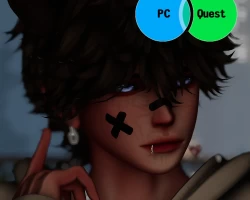
Pookie
To download the model, you need to log in.
Description
Pookie Release! Cozy and Comfy during Fall Season!
Nice comfy Avi to cuddle up to your Pookie bear, I wanted to give out a nice cuddly Avatar that is quest compatible to wear so we can all have good vibes this fall season. Enjoy guys - Sunbae
Special thanks to Bad for pics
Features
☯ 30+ Toggles
☯ Materials swaps
☯ Newest Version of Gogoloco
☯ SPS with Toggle off animations
☯ Full Body Tracking ready
☯ Custom Fake Index Gestures
☯ Slow Blink Animation
Upload Guide This Avatar uses VRChat Creator Companion make sure to setup as shown below:
☯ Choose Unity 2022 Avatar Project version 2022.3.22f1
☯ Poiyomi Toon Shader newest version
☯ lilToon Shader newest version
☯ VRC Fury newest version
Follow these steps if you don't have your repository packages setup in Creator Companion
☯ Unity Import IN ORDER
☯ Import the Poiyomi Toon Provided
☯ Import the lilToon Provided
☯ VRC Fury newest version( Download and install VRCFury)
☯ Once Project is all prepared -> In Unity Import/Drag n drop Avatar Package
☯ Upload Avatar
☯ For Quest On a Separate Project Repeat steps above, Make sure SDK is set for Android Build upload and for it the be the same avatar make sure you Copy and paste the same blueprint ID as the PC version.
I do not offer Upload services at this point in time
Nice comfy Avi to cuddle up to your Pookie bear, I wanted to give out a nice cuddly Avatar that is quest compatible to wear so we can all have good vibes this fall season. Enjoy guys - Sunbae
Special thanks to Bad for pics
Features
☯ 30+ Toggles
☯ Materials swaps
☯ Newest Version of Gogoloco
☯ SPS with Toggle off animations
☯ Full Body Tracking ready
☯ Custom Fake Index Gestures
☯ Slow Blink Animation
Upload Guide This Avatar uses VRChat Creator Companion make sure to setup as shown below:
☯ Choose Unity 2022 Avatar Project version 2022.3.22f1
☯ Poiyomi Toon Shader newest version
☯ lilToon Shader newest version
☯ VRC Fury newest version
Follow these steps if you don't have your repository packages setup in Creator Companion
☯ Unity Import IN ORDER
☯ Import the Poiyomi Toon Provided
☯ Import the lilToon Provided
☯ VRC Fury newest version( Download and install VRCFury)
☯ Once Project is all prepared -> In Unity Import/Drag n drop Avatar Package
☯ Upload Avatar
☯ For Quest On a Separate Project Repeat steps above, Make sure SDK is set for Android Build upload and for it the be the same avatar make sure you Copy and paste the same blueprint ID as the PC version.
I do not offer Upload services at this point in time
