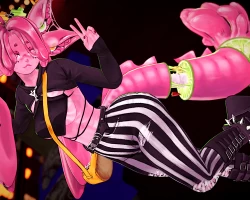


Model info
Content type:Avatars
Сreated by: Lil Miss Pasta
SDK: 3.0 (VRChat)
Unity version: Unity 2022
Platform:
PC + Quest
Рhysbones: Yes
Face Tracking: No
Full body: Yes
Nsfw: Yes
DРS \ SPS : Yes
Views: 55 317
Sangria
To download the model, you need to log in.
Description
PC and Quest features:
🩷 Fully functional giant drink parasol!
❤️ All custom, hand-painted textures
🧡 Big drink glass and toothpick swords
💛 Axel the Axolotl follower!
💚 Interactable bantu knots
🩵 Chest scale slider
💜 FBT ready, with Gogo Loco setup
🩷 Phys bones and colliders in all the right places
❤️ All clothes and hair work on Quest!
PC only features:
💜 Eye pokes, boops and headpats
🩷 See-through jelly effect
❤️ Stretchy, grabbable cheeks and swords
🧡 Green optimized version included
💛 DPS/SPS compatible
💚 Invisibility toggle
🩵 Realistic flip flops
Parasol:
Sangria's parasol uses VRC Constraints, and is fully compatible with Quest!
The parasol can be opened by grabbing and pushing up the inside mechanism, then clicking your trigger at the desired position.
To dual grab: Grab the handle with both hands, make a fist with left hand and click your left trigger
To let go: Open your left hand.
To lean on shoulder: Lean the parasol against either shoulder, make a fist with the right hand and click your right trigger.
To remove from shoulder: Dual grab the parasol.
To world drop: Open your right hand while not leaning the parasol against your shoulder
To pick back up: Grab the handle with your right hand, and make a fist.
To spin: Make a RnR gesture with your right hand.
Giant glass:
When putting down the glass, it will follow your position by default. Toggle 'world drop' to lock it to the world. You can now sit in the glass, and disabling 'world drop' will make the glass follow your position again, but keeping any changes in position that were made while dropped.
If the glass is lost, press 'reset' to fetch the glass back to your position!
Bantu knots:
Sangria's 'bantu knots' hair style is poppable! You can gently pop the knots in front, and if you have her glasses up, they will react accordingly. Give her head a big bop to pop all of them at once!
Hand animated expressions:
All of Sangrias facial expressions are hand animated, for that beautiful jelly V-tuber look!
She has lots of gestures on both hands - and they are all Quest compatible too.
Loads of color options:
Sangria has three color channels, so her outfits will always look stunningly cohesive!
On Quest, she comes with pre-made textures for 8 different color schemes to choose from before upload.
Before purchasing, please ensure that you have:
Unity 2022.3.22f1
VRChat Creator Companion (VCC, VRChat website)
Poiyomi Toon 9.0.40
Additionally, please have basic knowledge of how to upload an avatar to VRChat.
PC upload Instructions:
1. Create a new Unity Avatar project using VCC, and log into the SDK
2. Import Poiyomi Toon 9.0.40
3. Import the Sangria PC Avatar Package
4. Open the "OPEN ME" scene in the Sangria folder
Ready to upload!
Quest upload instructions:
1. Create a new Unity Avatar project using VCC, and log into the SDK
2. Import the Sangria Quest Avatar Packag
3. Open the "OPEN ME" scene in the Sangria folder
4. Remember to Copy/paste the blueprint ID from your PC upload to this one, for the fallback to sync
Ready to upload!
