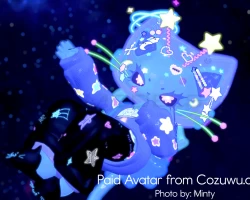
Home » Avatars » STARLIGHT

Model info

Content type:Avatars
Сreated by: Cozu
SDK: 3.0 (VRChat)
Unity version: Unity 2022
Platform: PC + Quest
Рhysbones: Yes
Face Tracking: No
Full body: Yes
Nsfw: No
DРS \ SPS : No
Views: 50 988
STARLIGHT

To download the model, you need to log in.

Description


indicates
✮┋ Color Toggles:
Body Hue, Body Brightness*, Body Saturation*, Clothes Hue, Clothes Brightness*, Clothes Saturation.*
✮┋ Clothing Toggles:
Helmet, Sweater, Pants, Leg Decorations, Leg Warmers, Slippers, UFO
✮┋ Special Features:
FACE TRACKING - [Only works if you OWN a Face Tracking Headset!]
UFO - Flies around you on PC and Quest.
RNG flick - all whiskers, antenna and ears.
Iris idle shape change
Gogo Loco

Taken by: LightIceQueen, Saohira, Merec, Murk
Screenshots of model STARLIGHT in the game
Comments: 9
Add comment

Information

To add your comment you need to log in.

  • foto
    XxKitty_TheBlackCatBatxX #9
    0
    awwwieee
    4 January 2025 06:31
  • foto
    Wtg20 #8
    0
    katskull, Installing Scripts if you are using creator companion

    Step 1
    DL and Install VRCFURY into Creator Companion (C.C)
    ➡️ vcc://vpm/addRepo?url=https%3A%2F%2Fvcc.vrcfury.com
    (copy link, post in chrome, pop up press yes to import and put it into your creator companion)

    Step 2
    DL and Install Modular Avatar into Creator Companion (C.C)
    ➡️ vcc://vpm/addRepo?url=https://vpm.nadena.dev/vpm.json
    (copy link, post in chrome, pop up press yes to import and put it into your creator companion)

    Step 3
    - In your Hierarchy, find the Models prefab and right-click on it.
    - Select "Thry" -> "Material" -> "Lock All" to lock some of the materials automatically.

    it should fix that problem it works for me so good luck
    10 October 2024 23:09
  • foto
    Alex6639 #7
    0
    katskull, It's a facetracking prefab issue, open up the avatar in the hierarchy until you see this "world Object" and delete that. If you need more help cozu corrected it in her server with pictures as guides, go look in there.
    8 October 2024 19:32
  • foto
    ForheadKisses #6
    0
    cute as hell
    8 October 2024 02:12
  • foto
    katskull #5
    +1
    anyone have a way to fix the blueprint issue? plz
    6 October 2024 19:52
  • foto
    CUTENFUN #4
    0
    yeah it didnt work, still automatically attaches a blueprint
    6 October 2024 01:46
  • foto
    CUTENFUN #3
    +1
    lokii, i know how to detach it, but when i click the upload button, the blueprint is put back on and it gives me an error..
    Quote: CUTENFUN
    lokii, i know how to detach it, but when i click the upload button, the blueprint is put back on and it gives me an error..

    i plan to try again on a new project so ill update if it works !!
    5 October 2024 13:10
  • foto
    lokīī ༒ #2
    +1
    Avely, you can detach the blueprint tho
    4 October 2024 15:29
  • foto
    Avely #1
    0
    The blueprint id is not cleared out sadly, Would love the avatar tho.
    4 October 2024 14:58