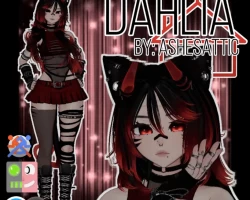


Model info
Content type:Avatars
Сreated by: AshesAttic
SDK: 3.0 (VRChat)
Unity version: Unity 2022
Platform:
PC
Рhysbones: Yes
Face Tracking: No
Full body: Yes
Nsfw: Yes
DРS \ SPS : Yes
Views: 80 666
Dahlia
To download the model, you need to log in.
Description
You must use VCC and VRCFury to upload, please do this before opening your new unity project!
1.Create a new Unity project (Version 2022.3.22f1)
YOU CAN EITHER :
2.Import Poiyomi Toon (Version 8.1.167) through VCC
OR
2.Import Poiyomi Toon (Version 8.1.167) through the unity package on poiyomi's github
3.Import wholesome© SPS Configurator (version 2.0.9) through VCC
OR
3.Import wholesome© SPS Configurator (version 2.0.9) through the unity package on Wholesome's gumroad
FOR VRCFT - add VRCFT Jerry's Templates through VCC
4.Import "Dahlia by AshesAttic"
5.In the Folder titled "!Dahlia by AshesAttic" in unity, open the scene titled "!Dahlia Scene"
6.Upload the avatar and be sure to remove the blueprint ID if there is one!
1.Create a new Unity project (Version 2022.3.22f1)
YOU CAN EITHER :
2.Import Poiyomi Toon (Version 8.1.167) through VCC
OR
2.Import Poiyomi Toon (Version 8.1.167) through the unity package on poiyomi's github
3.Import wholesome© SPS Configurator (version 2.0.9) through VCC
OR
3.Import wholesome© SPS Configurator (version 2.0.9) through the unity package on Wholesome's gumroad
FOR VRCFT - add VRCFT Jerry's Templates through VCC
4.Import "Dahlia by AshesAttic"
5.In the Folder titled "!Dahlia by AshesAttic" in unity, open the scene titled "!Dahlia Scene"
6.Upload the avatar and be sure to remove the blueprint ID if there is one!
