Home » Avatars » NEMUI

Model info

Content type:Avatars
Сreated by: King Nex
SDK: 3.0 (VRChat)
Unity version: Unity 2022
Platform: PC
Рhysbones: Yes
Face Tracking: No
Full body: Yes
Nsfw: Yes
DРS \ SPS : No
Views: 40 364
NEMUI

To download the model, you need to log in.

Description

♰♰ Features: (Unoptimized; VRCFT, PC & (Quest - soon)) ♰♰
⛧ Fur / Snout toggles for black wolf / snow leopard options!
⛧ All clothing is toggleable, and offers several outfit options.
⛧ Hue Shift, Tattoo Toggles, Hair Color, Blushed / White Belly
⛧ Outlines, Lighting Settings, Audiolink, Star Particles, & More
⛧ Facial Gestures & Gesture Toggle, Pat / Kiss / Boop Contacts
⛧ARKIT style facial tracking!! Showcased using the Quest Pro
⛧ Both versions have SPS, Gogo, Lollipop. No VRCFT has PCS
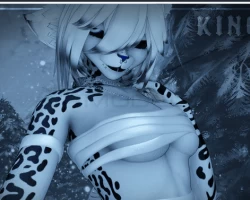
Screenshots of model NEMUI in the game
Comments: 10
Add comment

Information

To add your comment you need to log in.

  • foto
    cyanidecyanide #10
    0
    "avatar uses unsupported shader" on q version
    31 December 2024 05:59
  • foto
    LostDodo89 #9
    +1
    For some reason Unity crashs after I'm opening the scene and the shaders try to load in for the avatars. After that I can't open the project anymore. Did someone have something like that? Or does someone know what happened there and how to fix it?
    2 November 2024 09:40
  • foto
    snowy- death #8
    0
    Sylvr Strykr, dont upload it without the same ID upload it as a new avatar as usual
    2 November 2024 06:42
  • foto
    Sylvr Strykr #7
    0
    snowy- death, I still get the error avatars, and the error I mentioned before. Think it might just have to be with the file I got, I might just have to redownload it
    2 November 2024 03:43
  • foto
    snowy- death #6
    0
    Sylvr Strykr, this happens to me every now and again its nothing you did its failing validation for some reason what i usually do is import it to a project ive already uploaded without issues and upload it as normal and it fixes it idk why but it works for me
    1 November 2024 07:44
  • foto
    Hima #5
    0
    you may need to detached the ID
    31 October 2024 21:37
  • foto
    Sylvr Strykr #4
    0
    Still gives me this error:
    "Broken text PPtr in file(Assets/!! NEMUI/3.0/DESCRIPTOR/!NEM FX VRCFT.controller). Local file identifier (-1829481736478358689) doesn't exist!"
    31 October 2024 13:31
  • foto
    Sylvr Strykr #3
    0
    DaiStar, ah, ill try that, usually it doesnt do this when I remove the facetracking but maybe this avatar is a special case and needs it
    31 October 2024 09:54
  • foto
    Bondrewd #2
    0
    Sylvr Strykr, try keeping face tracking in the package, normally its a toggle and sometimes removing it breaks the upload
    31 October 2024 08:46
  • foto
    Sylvr Strykr #1
    0
    Not sure what im doing wrong, but its uploading into this error avatar. Havent had this happen before, I removed the facetracking because I dont use it, but both versions still upload into the error avatar. The simple answer might be "get good at unity" but I have been uploading avatars for over a year and this is the first time this has happened to me
    31 October 2024 06:50