

Model info
Content type:Avatars
Сreated by: Lil Miss Pasta
SDK: 3.0 (VRChat)
Unity version: Unity 2022
Platform:
PC + Quest
Рhysbones: Yes
Face Tracking: No
Full body: Yes
Nsfw: No
DРS \ SPS : No
Views: 24 815
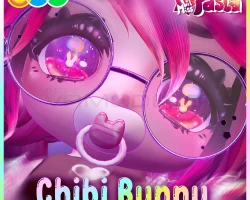
˚ಇ˚ Chibi Bunny ˚ಇ˚
To download the model, you need to log in.
Description
"Don't touch my treats! I'll bonk ya!"
PC and Quest features:
✨ Cutie patootie priviliges
✨ Phys bones keep your arms from clipping
✨ Interactable pacifier - yoinking it is mean :(
✨ Inventory system, with Dissolves*
✨ Magic ring pop that reacts with sounds and particles to other rings*
✨ Gummy hammer with adjustable size
✨ Audiolink* and Disco Mode
✨ Customizable hair style
✨ Sleep mode
✨ Gogo Loco
✨ Full range of skin tones and hue shift
✨ Nose boop, eye pokes and headpats
* Marked features are PC only
PC upload Instructions:
1. Create a new Unity Avatar project using VCC
2. Import Poiyomi Toon 9.0.57
3. Import the Chibi Bunny PC Avatar Package
4. Open the "OPEN ME" scene in "Assets"
Ready to upload!
Quest upload instructions:
1. Create a new Unity Avatar project using VCC
2. Import the Chibi Bunny Quest Avatar Package
3. Open the "OPEN ME" scene in "Assets"
4. Remember to Copy/paste the blueprint ID from your PC upload to this one, for the fallback to sync
Ready to upload!
PC and Quest features:
✨ Cutie patootie priviliges
✨ Phys bones keep your arms from clipping
✨ Interactable pacifier - yoinking it is mean :(
✨ Inventory system, with Dissolves*
✨ Magic ring pop that reacts with sounds and particles to other rings*
✨ Gummy hammer with adjustable size
✨ Audiolink* and Disco Mode
✨ Customizable hair style
✨ Sleep mode
✨ Gogo Loco
✨ Full range of skin tones and hue shift
✨ Nose boop, eye pokes and headpats
* Marked features are PC only
PC upload Instructions:
1. Create a new Unity Avatar project using VCC
2. Import Poiyomi Toon 9.0.57
3. Import the Chibi Bunny PC Avatar Package
4. Open the "OPEN ME" scene in "Assets"
Ready to upload!
Quest upload instructions:
1. Create a new Unity Avatar project using VCC
2. Import the Chibi Bunny Quest Avatar Package
3. Open the "OPEN ME" scene in "Assets"
4. Remember to Copy/paste the blueprint ID from your PC upload to this one, for the fallback to sync
Ready to upload!
