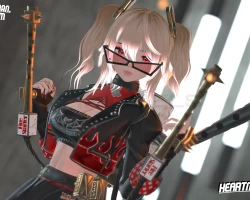


Model info
Content type:Avatars
Сreated by: Heartmarksman
SDK: 3.0 (VRChat)
Unity version: Unity 2022
Platform:
PC
Рhysbones: Yes
Face Tracking: Yes
Full body: Yes
Nsfw: Yes
DРS \ SPS : No
Views: 40 547
Blair the Arsonist
To download the model, you need to log in.
Description
Avatar is made using the newest Poi 9.0 ❤️ (Included for easy use and upload!)
Exclusive assets with overall Ornage rated texture memory ❤️ (All Clothing Assets and Props will stay exclusive to this product!)
Custom Fully Functional Flamethrower! ❤️(With Optional real time light effects)
- 4 Custom Outfit fully made from Scratch ❤️ (Outfit Parts can be freely fixed and matched together!)
Base Outfit
Biker Outfit
Casual/Gym Outfit
Overlord Outfit
- Outfit saturation Toggle ❤️
- Outfit Presets ❤️ (lets u throw on one of 4 Preset Oufit options!)
- Hue Shift ❤️
Eyes
Outfit/Particle Effects
Hair Emission
Hair Base Color
- Base Hair Color Options ❤️
Blond, Brown, Grey and Black
Strong and Pastel for Hue Shift
Uploading 🔥
Unity 2022.3.22 is needed!
1. Create new project using the Creator Companion
2. Make sure to use ⚠️SDK Version 3.7.2⚠️
3. (Face Tracking Only!) Install Jerry's Template via VRCFury --> https://adjerry91.github.io/VRCFaceTracking-Templates/
4. Install VRCFury using VRChat Creator Companion! Head here for instructions --> https://vrcfury.com/download/ (DONT USE BETA VERSION) ❤️
5. Open Project
6. Import Included poi_Toon_7.3.50_UpTo_9.053
7. Import my avatar package
8. Open Scene called: OPEN HERE!
9. Log in to your account through the VRCSDK and upload!
10. Have fun! ❤️
Exclusive assets with overall Ornage rated texture memory ❤️ (All Clothing Assets and Props will stay exclusive to this product!)
Custom Fully Functional Flamethrower! ❤️(With Optional real time light effects)
- 4 Custom Outfit fully made from Scratch ❤️ (Outfit Parts can be freely fixed and matched together!)
Base Outfit
Biker Outfit
Casual/Gym Outfit
Overlord Outfit
- Outfit saturation Toggle ❤️
- Outfit Presets ❤️ (lets u throw on one of 4 Preset Oufit options!)
- Hue Shift ❤️
Eyes
Outfit/Particle Effects
Hair Emission
Hair Base Color
- Base Hair Color Options ❤️
Blond, Brown, Grey and Black
Strong and Pastel for Hue Shift
Uploading 🔥
Unity 2022.3.22 is needed!
1. Create new project using the Creator Companion
2. Make sure to use ⚠️SDK Version 3.7.2⚠️
3. (Face Tracking Only!) Install Jerry's Template via VRCFury --> https://adjerry91.github.io/VRCFaceTracking-Templates/
4. Install VRCFury using VRChat Creator Companion! Head here for instructions --> https://vrcfury.com/download/ (DONT USE BETA VERSION) ❤️
5. Open Project
6. Import Included poi_Toon_7.3.50_UpTo_9.053
7. Import my avatar package
8. Open Scene called: OPEN HERE!
9. Log in to your account through the VRCSDK and upload!
10. Have fun! ❤️
