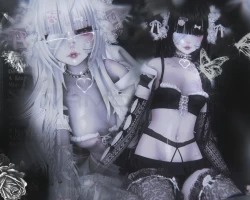
Home » Avatars » Ririko

Model info

Content type:Avatars
Сreated by: Moonfish
SDK: 3.0 (VRChat)
Unity version: Unity 2022
Platform: PC + Quest
Рhysbones: Yes
Face Tracking: No
Full body: Yes
Nsfw: No
DРS \ SPS : No
Views: 37 846
Ririko

To download the model, you need to log in.

Description

MENU:
-Clothes: top slider(3 options), sleeves, hoodie, arm frills, bottom slider(3 options), thigh highs, socks
-Accessories: glasses, hairclips, bone, waist chain, backpack, lollipop, choker, septum, eye banage, cheek patch, cheek heartpatch, nose patch
-Hair: hair radial (twintails, short, long), hair colour radial, ear lace color, bangs length
-Customization: eye color, hoodie color (pink, white, black), B&W clothes color switch
-Gogoloco

HOW TO UPLOAD:
-Open the VRChat Creator Companion, and create a new avatar project (2022)
-VRCFury
-SHADERS included in the package
-Avatar unity package
-Click the scene or drag it into the hierarchy

[if encountering any issues, create a new empty project, and try importing everything again in the correct order]
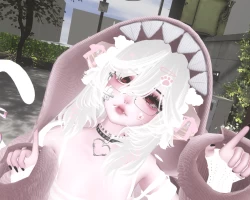
Screenshots of model Ririko in the game
Comments: 37
Add comment

Information

To add your comment you need to log in.

  • foto
    Мясо #37
    0
    Beautiful avatar, thank you

    I've seen some people who can't upload an avatar.
    Select the correct shaders for the materials and remove the GoGoLoco All object (it will be at the very bottom) from the avatar.
    (This is where individual things in the avatar are located, such as hair, clothes, and so on, and GoGoLoco All is located there, which prevents it from loading)
    12 September 2025 22:04
  • foto
    pink.bunny #36
    +1
    HIII!! I managed to upload this! These were the steps I took!

    PC:
    VCC - Avatar 2022
    VRChat SDK
    VRCFury
    lil toon
    Gesture manager
    PoiToon

    Add those in the VCC and then open project
    Import the avi (MAKE SURE TO UNCHECK GOGO BEFORE FULLY IMPORTING IT!)
    Import the latest Goloco
    open the imported files in order - GoGo - GoLoco - Prefabs - VRCFury and then pick one of the prefabs. I used beyond. Drag the prefab ONTO the avatar not just in the scene next to it.
    You can check if its working with Gesture manager (located in tools) just click enter play mode. If its working then you're good to upload!

    Quest: Basically repeat the same thing
    New project.
    VCC - Avatar 2022
    VRChat SDK
    VRCFury
    lil toon
    Gesture manager
    PoiToon

    Open Project and import quest avi (AGAIN WITHOUT THE GOGO)
    Repeat the previous steps and Import the latest Goloco. Drag the prefab (make sure its the same one) Then DELETE "GoGoLoco All (VRCFury)" (picture included) Link the quest version to the PC one. Then build for android. Then you're all set!! <3

    Delete the one that is selected.
    4 September 2025 14:03
  • foto
    isooq #35
    0
    I got her working, if anyone wants to clone my discord is Isooq (white pfp)
    js add me </3
    23 May 2025 21:36
  • foto
    ace bakugo #34
    0
    when the gogo issue happenes i usually like to reimport my gogo back into the project and it usually works, i cant send the video link here that i took so if you need help then just msg my discord, imgonnaeatyouuu
    1 April 2025 12:02
  • foto
    kitty_2 #33
    0
    Virohnika N, no I havent:(

    could I clone her off you? tabbycake,
    23 March 2025 03:41
  • foto
    beezings #32
    +1
    where tf r the shaders js poofed lol
    12 February 2025 06:43
  • foto
    hyalophora #31
    +1
    anyone fine with me cloning if they got it to work?
    29 January 2025 04:08
  • foto
    periatluv #30
    +2
    if anyone gets this to work, can i pleaseee copy the avatar from you?
    18 January 2025 00:24
  • foto
    Lyin2Ya #29
    +1
    would anyone be chill with me copying the avatar off them in vrc?
    12 January 2025 02:23
  • foto
    cyyb3rbytez #28
    +1
    Basically. in the VRC avatar descriptor it shows in the base locomotion on base and action slots, remove those because vrcfury will automatically add locomotion (to my understanding)!
    10 January 2025 18:51
  • foto
    Virohnika N #27
    +1
    kitty_2, have you found the clone because i cant get past the fact it wants me to fix gogoloco
    5 January 2025 10:40
  • foto
    hungry1234 #26
    0
    Had to double check, but like this ramona:
    29 December 2024 15:15
  • foto
    hungry1234 #25
    0
    ramona, My Best Guess is you could have accidentally deleted/detached the FX. If that is the case you should be able to just add it back into the Avatar Descriptor> Playable Layers> Body> FX.
    29 December 2024 14:15
  • foto
    ramona #24
    +1
    hungry1234, hungry1234, i had the same issue and i did this but none of her toggles work in the game, how do i fix that?
    29 December 2024 04:52
  • foto
    Ella Mae #23
    0
    anyone else struggling to get the quest version to upload?
    21 December 2024 23:33
  • foto
    tabbycake #22
    +2
    You need to upload poi shaders and liltoon shaders for it to work it is not included in the package.

    hungry1234, thank you a lot I had the same issue
    18 December 2024 12:34
  • foto
    Clovermonover #21
    0
    idk if i messed her up some how but i used creator companion and imported the correct versions of lil toon and poi yet she had a missing face texture, there was one in the materials folder but it was messed up and was very low quality compared to the body texture :< if anyone has a fix pls lmk
    15 December 2024 07:40
  • foto
    kitty_2 #20
    0
    does anyone have her that I could clone?!
    15 December 2024 06:51
  • foto
    loljuno #19
    0
    ***comment deleted***
    9 December 2024 11:48
  • foto
    sshoe #18
    0
    ***comment deleted***
    8 December 2024 13:08
  • foto
    gator78 #17
    0
    YESS
    8 December 2024 08:42
  • foto
    _kay_ #16
    0
    this avi dont work..
    7 December 2024 15:51
  • foto
    nesdussy #15
    0
    Sayuwu, doesn't work

    anyone else know how to fix bluebrint issue?
    3 December 2024 17:37
  • foto
    hungry1234 #14
    +1
    kocka, HMMM I think you should be able to just go into the avatar descriptor, which you can find after clicking on the avatar in the hierarchy (the descriptor should be on the right), then where it has controllers, click the X/detach the ones labeled gogo.
    3 December 2024 06:20
  • foto
    kocka #13
    +1
    how to fix this?
    3 December 2024 02:20
  • foto
    Hoe #12
    0
    Kaotic_♡, https://lilxyzw.github.io/lilToon/
    1 December 2024 12:54
  • foto
    stan2ne1 #11
    0
    ***comment deleted***
    29 November 2024 18:58
  • foto
    wompiebompie #10
    0
    ***comment deleted***
    29 November 2024 16:31
  • foto
    Kaotic_♡ #9
    0
    does anyone have lil toon, i cant find it.
    29 November 2024 16:22
  • foto
    Sayuwu #8
    0
    Roxii, You need to do something in ur pc for this issue, need to disable the .

    How to do it? very simple, just go to the control panel , then network and internet, network and sharing center, then go to change adapter settings, select ur wifi or ethernet connection, go to properties, search for the option that says internet protocol version 6 (TCP/ipV6) , DEACTIVATE! then try to upload :) , that worked for me!

    Sayuwu, disable the ipV6*
    29 November 2024 10:13
  • foto
    CoOkieee #7
    0
    it says they are but shaders are not included and you need poi and lilton
    28 November 2024 16:08
  • foto
    Roxii #6
    0
    vennyqrea, I have the same issue too

    vennyqrea, Someone said on a post "If you have detached the ID and you still cannot upload, then you are getting a different glitch. The way to fix this other glitch is to log out manually from the SDK, then log back in."
    28 November 2024 11:52
  • foto
    vennyqrea #5
    0
    anyone having issues with the blueprint???
    28 November 2024 07:46
  • foto
    CutieTeddyVR #4
    +1
    UHidklmao, i used both
    28 November 2024 07:11
  • foto
    UHidklmao #3
    0
    kaykay_beans_ber, so is it poi and liltoon or just liltoon?
    28 November 2024 07:05
  • foto
    CutieTeddyVR #2
    0
    kaykay_beans_ber, nvm i figured it out, i added liltoon shaders and i was good, thanks for the avatar shes adorable!!
    28 November 2024 06:24
  • foto
    CutieTeddyVR #1
    0
    anyone else having issues with shaders?
    28 November 2024 06:00