

Model info
Content type:Avatars
Сreated by: Rue
SDK: 3.0 (VRChat)
Unity version: Unity 2022
Platform:
PC + Quest
Рhysbones: Yes
Face Tracking: Yes
Full body: Yes
Nsfw: Yes
DРS \ SPS : Yes
Views: 25 798
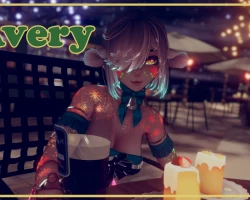
Avery The Darling Deer
To download the model, you need to log in.
Description
Package includes PC FULL, PC WHOLESOME, QUEST
All versions have ARKIT Face Tracking & Gogo Loco!
(Face tracking type is ARKIT. Face tracking is only usable by PC but will display to quest standalone users)
PC VERSION:
Toggles:
11 Clothing Toggles - Wrapped Choker, Choker Ribbon, Wrapped Top, Wrapped Harness, One Piece, Arm Bands, Cream Soda, Skirt, Leg Bands, Socks, Shoes
6 Animal/Species Toggles - Antlers, Wired Ears, Elf Ears/Human Ears, Deer Ears, Deer Tail, Long Tail
2 Underclothes Toggles
Customisation:
Hair - Bang Length, Hair Brightness, Hair Saturation, Hair Hue, Emission Brightness, Emission Hue, Emission Saturation, Hair Emission RGB, Hair Shine
Clothing Hues - Fabric Brightness, Fabric Saturation, Fabric Hue, Wrapped Brightness, Wrapped Saturation, Wrapped Hue, Metal Brightness, Metal Saturation, Metal Hue, Fluff White/Black, Skirt Transparent, Closet RGB
Body & Settings - Eye Hue Left, Eye Hue Right, Upper Body Slider, Lower Body slider, Skin Tone, Nail Hue, Body Outline, Avatar Brightness, Head Contacts, Expressions Disabled
Tattoo - Tattoo Always Shown, Face Tattoo, Body Tattoo, Tattoo Hue, Tattoo RGB
QUEST VERSION:
Toggles:
10 Clothing Toggles - Wrapped Choker, Choker Ribbon, Wrapped Top, Wrapped Harness, One Piece, Arm Bands, Skirt, Leg Bands, Socks, Shoes
6 Animal/Species Toggles - Antlers, Wired Ears, Elf Ears/Human Ears, Deer Ears, Deer Tail, Long Tail
2 Underclothes Toggles
Customisation:
Hair - Bang Length
Body & Settings - Upper Body Slider, Lower Body slider, Skin Tone, Head Contacts, Expressions Disabled
Other:
Gogo Loco
Quest has NO hue changes in-game. These are easy to change in unity. Reach out in discord if you need help customising them.
(Note: Tattoo is designed to be glow in the dark and hides in brighter lights, there is a toggle to show it all the time.)
Other:
Gogo Loco
ARKIT Face Tracking
Wholesome
REQUIRED:
Unity 2022.3.22
Vrchat Creator Companion
Poiyomi Toon 9.0+
VRCFury (Quest Support, Wholesome + GogoLoco + VRCFT)
Installation:
1. Using the Vrchat Creator Companion, add in Poiyomi Toon 9.0+ and VRCFury
2. Once they have finished importing, add in the avatar unity package.
3. Open the provided scene and upload the desired avatar.
3a. (OPTIONAL) I highly recommend locking all materials before uploading. Right click the model's name in the hierarchy in scene view (Left of unity) and go to Thyr> Materials > Lock All
Note: If you are uploading quest, you will need to swap the project to android and match the blueprint ID.
Instructions also included with .zip on download.
