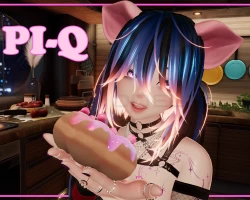


Model info
Content type:Avatars
Сreated by: Rue
SDK: 3.0 (VRChat)
Unity version: Unity 2022
Platform:
PC + Quest
Рhysbones: Yes
Face Tracking: Yes
Full body: Yes
Nsfw: Yes
DРS \ SPS : No
Views: 24 378
PI-Q
To download the model, you need to log in.
Description
Toggles:
2 Bangs - Messy, Neat
3 Hairstyles - Short, Buns, Pigtails
3 Tops - Hoodie, Sweater, Dress
2 Bottoms - Shorts, Jeans
2 Socks - Stockings, Socks
3 Shoe Types - Sneakers, Platforms, Boots
3 Head Accessories - Horns, Headphones, Headphones around neck
8 Body Accessories - Choker, Necklace, Shoulder Harness, Chest Belt, Torso Belts, Left Leg Belt, Right Leg Upper Belt, Right Leg Lower Belt
5 Arm Accessories - Backpack, Sleeves, Left Bracelet, Right Bracelet, Rings
4 Underclothes Options
3 Animal Parts - Pig Ears, Pig Snout, Pig Tail
3 Food - Drink, Celery, Donut
1 Pig Plushie - Tony the Italian Pig
SP / Lollipop included
Customisation:
Hair - Hair Brightness, Hair Hue, Alt Hair Hue, Emission Brightness, Emission Hue, Hair Shine, Bangs Shorter
Clothing Hue - 1 Global hue slider that changes all accents on the specific clothing
Eye Menu - Left Eye Hue, Right Eye Hue, Black Sclera
Body Menu - Upper Torso Slider, Lower Torso Slider, Flat Chest, Femboy, Skin tone Slider, Pointy Ears, Body Outline
Tattoo Menu: Tattoo On, Tattoo Hue
Settings: Audio Link, Face Emotes, Head Contacts, Face Expressions Disabled
QUEST VERSION:
Toggles:
2 Bangs - Messy, Neat
3 Hairstyles - Short, Buns, Pigtails
3 Tops - Hoodie, Sweater, Dress
2 Bottoms - Shorts, Jeans
2 Socks - Stockings, Socks
3 Shoe Types - Sneakers, Platforms, Boots
3 Head Accessories - Horns, Headphones
8 Body Accessories - Choker, Necklace, Shoulder Harness, Chest Belt, Torso Belts, Left Leg Belt, Right Leg Upper Belt, Right Leg Lower Belt
5 Arm Accessories - Backpack, Sleeves, Left Bracelet, Right Bracelet, Rings
4 Underclothes Options
3 Animal Parts - Pig Ears, Pig Snout, Pig Tail
3 Food - Drink, Celery, Donut
1 Pig Plushie - Tony the Italian Pig
SP / Lollipop included
Customisation:
Hair - Hair Hue, Emission Hue, Bangs Shorter
Clothing Hue - 1 Global hue slider that changes all accents on the specific clothing
Eye Menu - Eye Hue
Body Menu - Upper Torso Slider, Lower Torso Slider, Flat Chest, Femboy Bulge, Skintone Slider, Pointy Ears
Settings: Head Contacts, Face Expressions Disabled
Quest Phys Bones - Messy Bangs, Pigtails, Pig Ears, Pig Tail, Upper Torso, Lower Torso
REQUIRED:
Unity 2022.3.22
Vrchat Creator Companion
Poiyomi Toon 9.0.60
VRCFury (Quest Support, Wholesome + GogoLoco + VRCFT)
Installation:
1. Using the Vrchat Creator Companion, add in Poiyomi Toon 9.0.60 and VRCFury.
2. Once they have finished importing, add in the avatar unity package.
2a. (OPTIONAL) I highly recommend locking all materials before uploading. Locate and right click on the RUE/PI-Q/FILES/MATERIALS). Select Thry > Materials > Lock Folder
3. Open the provided scene and upload the desired avatar.
Note: If you are uploading quest, you will need to swap the project to android and match the blueprint ID.
Instructions also included with .zip on download.
2 Bangs - Messy, Neat
3 Hairstyles - Short, Buns, Pigtails
3 Tops - Hoodie, Sweater, Dress
2 Bottoms - Shorts, Jeans
2 Socks - Stockings, Socks
3 Shoe Types - Sneakers, Platforms, Boots
3 Head Accessories - Horns, Headphones, Headphones around neck
8 Body Accessories - Choker, Necklace, Shoulder Harness, Chest Belt, Torso Belts, Left Leg Belt, Right Leg Upper Belt, Right Leg Lower Belt
5 Arm Accessories - Backpack, Sleeves, Left Bracelet, Right Bracelet, Rings
4 Underclothes Options
3 Animal Parts - Pig Ears, Pig Snout, Pig Tail
3 Food - Drink, Celery, Donut
1 Pig Plushie - Tony the Italian Pig
SP / Lollipop included
Customisation:
Hair - Hair Brightness, Hair Hue, Alt Hair Hue, Emission Brightness, Emission Hue, Hair Shine, Bangs Shorter
Clothing Hue - 1 Global hue slider that changes all accents on the specific clothing
Eye Menu - Left Eye Hue, Right Eye Hue, Black Sclera
Body Menu - Upper Torso Slider, Lower Torso Slider, Flat Chest, Femboy, Skin tone Slider, Pointy Ears, Body Outline
Tattoo Menu: Tattoo On, Tattoo Hue
Settings: Audio Link, Face Emotes, Head Contacts, Face Expressions Disabled
QUEST VERSION:
Toggles:
2 Bangs - Messy, Neat
3 Hairstyles - Short, Buns, Pigtails
3 Tops - Hoodie, Sweater, Dress
2 Bottoms - Shorts, Jeans
2 Socks - Stockings, Socks
3 Shoe Types - Sneakers, Platforms, Boots
3 Head Accessories - Horns, Headphones
8 Body Accessories - Choker, Necklace, Shoulder Harness, Chest Belt, Torso Belts, Left Leg Belt, Right Leg Upper Belt, Right Leg Lower Belt
5 Arm Accessories - Backpack, Sleeves, Left Bracelet, Right Bracelet, Rings
4 Underclothes Options
3 Animal Parts - Pig Ears, Pig Snout, Pig Tail
3 Food - Drink, Celery, Donut
1 Pig Plushie - Tony the Italian Pig
SP / Lollipop included
Customisation:
Hair - Hair Hue, Emission Hue, Bangs Shorter
Clothing Hue - 1 Global hue slider that changes all accents on the specific clothing
Eye Menu - Eye Hue
Body Menu - Upper Torso Slider, Lower Torso Slider, Flat Chest, Femboy Bulge, Skintone Slider, Pointy Ears
Settings: Head Contacts, Face Expressions Disabled
Quest Phys Bones - Messy Bangs, Pigtails, Pig Ears, Pig Tail, Upper Torso, Lower Torso
REQUIRED:
Unity 2022.3.22
Vrchat Creator Companion
Poiyomi Toon 9.0.60
VRCFury (Quest Support, Wholesome + GogoLoco + VRCFT)
Installation:
1. Using the Vrchat Creator Companion, add in Poiyomi Toon 9.0.60 and VRCFury.
2. Once they have finished importing, add in the avatar unity package.
2a. (OPTIONAL) I highly recommend locking all materials before uploading. Locate and right click on the RUE/PI-Q/FILES/MATERIALS). Select Thry > Materials > Lock Folder
3. Open the provided scene and upload the desired avatar.
Note: If you are uploading quest, you will need to swap the project to android and match the blueprint ID.
Instructions also included with .zip on download.
