Home » Avatars » Yeen Synth Edit

Model info

Content type:Avatars
Сreated by: HighCD
SDK: 3.0 (VRChat)
Unity version: Unity 2022
Platform: PC
Рhysbones: Yes
Face Tracking: Yes
Full body: Yes
Nsfw: No
DРS \ SPS : No
Views: 21 642
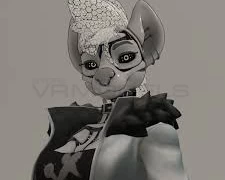
Yeen Synth Edit

To download the model, you need to log in.

Description


Instead of telling you the things on the original Hyenid that are available on the Synth version, let me tell you what ISN'T:
  • Fishnets
  • Eye shapes (as in the physical eyes, shapekeys related to the eyelids are there)
  • Body fluff
  • Muscular Chest shape
  • Breathing and nose twitch

Anything that is not on that list, it's probably supported in the synth version, so in other words: Every feature on the original Hyenid that wasn't listed above is supported in this version!

Roughly 20mb of VRAM can be shaved off by removing the emission map from the clothing and pin materials in the Hyenid's materials, as it is unused by my edited menus.

INSTRUCTIONS:


Download the Hyenid from its OFFICIAL store page and download its dependency shader Mochies.
Download the Synth Hyenid package and free version of Poiyomi found in the downloads after purchasing.
Open the VCC and make a new project.
(Optional) If you plan to use the Face-Tracking version, make sure you install VRCFury and Jerry's Template module into your project.
Open your new project and import the following IN THIS ORDER:
Mochies Shader
Poiyomi Shader
Synth Hyenid
Hyenid
The Synth Hyenid package MUST be installed BEFORE the original Hyenid otherwise it WILL break. This has to do with Unity GUID garbage, so just be sure you install the original Hyenid last.
Under the "Tools" tab at the top of the Unity should be an option called "HighCD" inside of there is a patcher which will open a small unity window where you just need to click a button.
In your project assets, inside "Assets > HighCD > Hyenid" should be a scene file with the Synth Hyenid already set up.
Ready for upload.
Screenshots of model Yeen Synth Edit in the game
Comments: 12
Add comment

Information

To add your comment you need to log in.

  • foto
    AvtorNtet (user blocked for violating site rules) #12
    when trying to patch, it gives the error fbx that could not be patched, check that you are using huinid, downloaded the clean version, but 1.16 and the error remains, how do I solve it?
    9 June 2025 04:55
  • foto
    ReallyV #11
    0
    Does anyone have the base yeen
    5 February 2025 13:04
  • foto
    AnnaCodit #10
    0
    Can someone just share simple .vrm file of this beautiful model to use in vseeface or warudo? pls 🙏
    7 January 2025 00:49
  • foto
    LAZERCATS #9
    0
    hell yeah time to make a cyberpunk yeen
    4 January 2025 10:36
  • foto
    XedtheDead #8
    0
    Interesting
    30 December 2024 11:02
  • foto
    Redman123 #7
    +1
    Hey. Sorry for lack of clarity/help. Had trouble getting this up to the site in the first place so had to experiment with leaving (text) stuff out.

    !! IMPORTANT!!
    these are REQUIREMENTS.

    !!!!!! ORIGINAL!!!!! UP TO DATE!!!!!! HYENID IS NEEDED!!!!! FULLY UP TO DATE!!!!!

    !!!! POYOMI VERSION "7.3.50 to 8.1.167" IS NEEDED!!!!

    MOCHI SHADER IS NEEDED

    A BRAND NEW FRESH UNITY 2022 FILE WITH CREATOR COMPANION

    VRC FURY IS REQUIRED

    JERRY FACE TRACKING IS OPTIONAL

    I'm not 100% sure if audio link is required but I used it on mine and mine works.

    I also use gesture manager so I know that doesn't break it.

    THE FILE IS NOT AN FBX!!!! IT'S A CONVERTER THAT CONVERTS THE ORRIGINAL HYENID FBX INTO THE SYNTH. hyenid textures are NOT COMPATIBLE. TO GET THE FBX RUN THE CONVERSION ON UNITY FIRST!

    There is no substance painter. But you can make your own after the conversion converts the FBX.
    Please follow the instructions in the description. If you don't. Then it won't work.
    Again YOU NEED THE ORIGINAL HYENID. UP TO DATE.
    if issues persist. Check original product description on jinxy. Sorry for the unclear description. Should be a video showing how to use the converter on this post.
    OH BTW the imposter generated for quest has a random set of extra legs for some reason. Ngl. Not smart enough to fix it. I'm personally not gonna make mine quest compatable because the bug is halarious to me.
    29 December 2024 10:26
  • foto
    Redman123 #6
    0
    Vanxto, yes I'm so sorry! I tried multiple times to upload. But whenever i tried to type it It wouldn't let me upload it! With some weird error. so let me be clear. YOU NEED THE ORIGINAL HYENID FILE FOR THIS.
    I RECOMMEND READING THE DISCRIPTION OF THE ORRIGINAL PRODUCT
    29 December 2024 08:52
  • foto
    ForheadKisses #5
    0
    Not really into using Yeen avis but I gotta say the first pic looks fucking crazy, props to the guy who put all the effort into modeling that
    29 December 2024 00:45
  • foto
    Evgeniy l #4
    Thanks
    28 December 2024 23:58
  • foto
    oogaboogaunga #3
    0
    ***comment deleted***
    28 December 2024 10:14
  • foto
    Vanxto #2
    0
    oogaboogaunga, Probably because you also have to import the original base model with it? It says it right when you download.
    OP should add that mention in the description.
    28 December 2024 08:48
  • foto
    oogaboogaunga #1
    +1
    dont bother this doesnt work
    28 December 2024 07:57