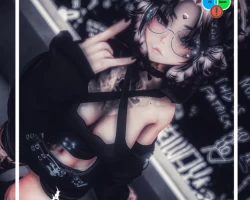


Model info
Content type:Avatars
Сreated by: Scarletvrc
SDK: 3.0 (VRChat)
Unity version: Unity 2022
Platform:
PC + Quest
Рhysbones: Yes
Face Tracking: No
Full body: Yes
Nsfw: No
DРS \ SPS : No
Views: 41 971
Minx
To download the model, you need to log in.
Description
Uploading Instructions:
Instructions for PC:
• Use VCC 2022
• Import latest POI Shaders.
• Import VRCFury (NEEDED)
• Import Minx PC Package.
• And upload!
Instructions for Quest:
• Use VCC 2022
• Switch PC build to Android.
• Unhide/select the quest side.
• Copy and paste PC versions ID onto the quest.
• And upload!
---------------------------------------------------
Avatar Includes:
FBT ready.
Quest compatible.
Physbones in all the right places.
Fake index.
Gogoloco.
-------------------------------------
Menu: Hair Menu, Clothing Menu, Puppy Menu, Accessories, Extras, Contacts, Gogo, GumboyRun Toy menu.
Contacts: Kiss, Boop, Headpat, High Five.
Hair Menu: Short fluffy, Long fluffy, Pigtails, Ponytail, Hair mat swaps, hair hue (PC only)
Outfit stuff: Outfit radial for mix and match of different outfits.
Shoes and extras: Sneakers, Heart pumps, Skele arm warmers, Skele leg warmers, Leg warmers.
Puppy Menu: Ears, Tail, Treat, Bone, Bell collar, Dog toy, Hand paws.
Puppy animation toggles: Tail wag, ear twitch (PC/Quest compat)
Extras: Skin tones (Quest compat), Eye hue (PC Only)
Accessories: Choker, Head gem, Earrings, Glasses, Ball chain, Headphones, Flow toy (Quest compat)
Gumbody: Console toggle, Jump button (gumboy dino game), Swap hands, World drop.
Quest does not have Hue shifts as they are PC Only!
Instructions for PC:
• Use VCC 2022
• Import latest POI Shaders.
• Import VRCFury (NEEDED)
• Import Minx PC Package.
• And upload!
Instructions for Quest:
• Use VCC 2022
• Switch PC build to Android.
• Unhide/select the quest side.
• Copy and paste PC versions ID onto the quest.
• And upload!
---------------------------------------------------
Avatar Includes:
FBT ready.
Quest compatible.
Physbones in all the right places.
Fake index.
Gogoloco.
-------------------------------------
Menu: Hair Menu, Clothing Menu, Puppy Menu, Accessories, Extras, Contacts, Gogo, GumboyRun Toy menu.
Contacts: Kiss, Boop, Headpat, High Five.
Hair Menu: Short fluffy, Long fluffy, Pigtails, Ponytail, Hair mat swaps, hair hue (PC only)
Outfit stuff: Outfit radial for mix and match of different outfits.
Shoes and extras: Sneakers, Heart pumps, Skele arm warmers, Skele leg warmers, Leg warmers.
Puppy Menu: Ears, Tail, Treat, Bone, Bell collar, Dog toy, Hand paws.
Puppy animation toggles: Tail wag, ear twitch (PC/Quest compat)
Extras: Skin tones (Quest compat), Eye hue (PC Only)
Accessories: Choker, Head gem, Earrings, Glasses, Ball chain, Headphones, Flow toy (Quest compat)
Gumbody: Console toggle, Jump button (gumboy dino game), Swap hands, World drop.
Quest does not have Hue shifts as they are PC Only!
