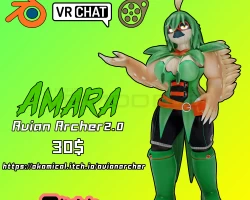


Model info
Content type:Avatars
Сreated by: Okamical
SDK: 3.0 (VRChat)
Unity version: Unity 2022
Platform:
PC
Рhysbones: Yes
Face Tracking: No
Full body: Yes
Nsfw: Yes
DРS \ SPS : Yes
Views: 7 460
Amara Avian Archer
To download the model, you need to log in.
Description
Thank you so much for buying my model!
the instructions should be the same for all versions besides the passwords
------
NOTICE: THIS PRODUCT IS NOT ALLOWED FOR REDISTRIBUTION, ANY FILES IN BLENDER, FBX, VRCHAT, OR SFM ARE TO BE KEPT
PRIVATELY. THIS MODEL IS ALLOWED FOR RENDER, ANIMATION USE AND ARTIST COMMISSION USE ONLY WITH CREDIT GIVEN TO THE ORIGINAL MODEL MAKER.
UNLESS EXCEPTION IS ALLOWED.
THE MODEL IS ALSO NOT ALLOWED TO BE UPLOADED TO VRCHAT IN A PUBLIC STATE.
YOU ARE ONLY ALLOWED TO UPLOAD IT IN A PRIVATE STATE AND ARE NOT ALLOWED TO SHARE MODEL.
SFM Port by Dransvitry
Blender:
-Blender 3.4 IK File with packed textures into the .blend file
-Texture Swap in Driver Menu for Alt Skins for Eyes and Body and Clothing
-IK Rigging Support
-Transformative Wing and Butt Rig
-Facial ShapeKeys are on an Menu for easy access. (Its the purple square above the model, the square will not be rendered as its disabled in render view)
-Genital rigging
-Multiple Outfits that can be used for the model.
-Different Styles of Hair, Ponchos, Clothing, EyeLashes, and More
----
SFM:
-BodyGroups to swap into different textures
-Genital rigging
-Multiple Outfits that can be used for the model.
-Different Styles of Hair, Ponchos, Clothing, EyeLashes, and More
-Shapekey on body to help fit into clothing better
----
VRChat:
The unitypackage requires you to import the latest version of the VRCSDK into the project
-Full Body Support VRChat unity package.
-3.0/Advanced Menu outfits support
-CasualOutfit Menu
-PonchoOutfit Menu
-Hoodies/Hair Menu
-Cape/Tail Menu
-Phys Bones (Jiggle Physics)
-Squish and Stretch Bones
-GogoLoco
-SPS Support
-Phys Bones Support (VRChat)
VRCHAT INSTALL INTRUCTIONS:
Step 1: Make New Project in Unity 2022.3.6f1/VCC
Step 2: Import Latest VRCSDK for 2022.unitypackage
Step 3: Import VRCFury.unitypackage
Step 4: Import Okamical Amara AvianArcher2 VRC.unitypackage
Step 5: Load "Okamical AvianArcher" Scene in the Scenes Folder
You will see two Avatars
One with SPS and One without SPS
Step 6(No SPS): If you don't want SPS you can upload from there to your account, make sure to select the thumbnail within the project folder as the avatar preview
Step 6(SPS): Due to a bug with VRCFury you might encounter an issue when uploading the SPS version that will prevent you from uploading. Heres how to bypass it
In the project Go to Packages/VRChat SDK - Base/package.json, and in the inspector, change the version number from 3.5.0 to 3.5.2.
From there you can upload
----
Password is included in the instructional notepad upon purchase
the instructions should be the same for all versions besides the passwords
------
NOTICE: THIS PRODUCT IS NOT ALLOWED FOR REDISTRIBUTION, ANY FILES IN BLENDER, FBX, VRCHAT, OR SFM ARE TO BE KEPT
PRIVATELY. THIS MODEL IS ALLOWED FOR RENDER, ANIMATION USE AND ARTIST COMMISSION USE ONLY WITH CREDIT GIVEN TO THE ORIGINAL MODEL MAKER.
UNLESS EXCEPTION IS ALLOWED.
THE MODEL IS ALSO NOT ALLOWED TO BE UPLOADED TO VRCHAT IN A PUBLIC STATE.
YOU ARE ONLY ALLOWED TO UPLOAD IT IN A PRIVATE STATE AND ARE NOT ALLOWED TO SHARE MODEL.
SFM Port by Dransvitry
Blender:
-Blender 3.4 IK File with packed textures into the .blend file
-Texture Swap in Driver Menu for Alt Skins for Eyes and Body and Clothing
-IK Rigging Support
-Transformative Wing and Butt Rig
-Facial ShapeKeys are on an Menu for easy access. (Its the purple square above the model, the square will not be rendered as its disabled in render view)
-Genital rigging
-Multiple Outfits that can be used for the model.
-Different Styles of Hair, Ponchos, Clothing, EyeLashes, and More
----
SFM:
-BodyGroups to swap into different textures
-Genital rigging
-Multiple Outfits that can be used for the model.
-Different Styles of Hair, Ponchos, Clothing, EyeLashes, and More
-Shapekey on body to help fit into clothing better
----
VRChat:
The unitypackage requires you to import the latest version of the VRCSDK into the project
-Full Body Support VRChat unity package.
-3.0/Advanced Menu outfits support
-CasualOutfit Menu
-PonchoOutfit Menu
-Hoodies/Hair Menu
-Cape/Tail Menu
-Phys Bones (Jiggle Physics)
-Squish and Stretch Bones
-GogoLoco
-SPS Support
-Phys Bones Support (VRChat)
VRCHAT INSTALL INTRUCTIONS:
Step 1: Make New Project in Unity 2022.3.6f1/VCC
Step 2: Import Latest VRCSDK for 2022.unitypackage
Step 3: Import VRCFury.unitypackage
Step 4: Import Okamical Amara AvianArcher2 VRC.unitypackage
Step 5: Load "Okamical AvianArcher" Scene in the Scenes Folder
You will see two Avatars
One with SPS and One without SPS
Step 6(No SPS): If you don't want SPS you can upload from there to your account, make sure to select the thumbnail within the project folder as the avatar preview
Step 6(SPS): Due to a bug with VRCFury you might encounter an issue when uploading the SPS version that will prevent you from uploading. Heres how to bypass it
In the project Go to Packages/VRChat SDK - Base/package.json, and in the inspector, change the version number from 3.5.0 to 3.5.2.
From there you can upload
----
Password is included in the instructional notepad upon purchase
