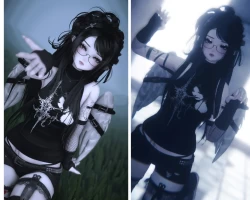
Home » Avatars » ʚ♡ɞ Akari [VRCFT]

Model info

Content type:Avatars
Сreated by: goldmoonfish
SDK: 3.0 (VRChat)
Unity version: Unity 2022
Platform: PC + Quest
Рhysbones: Yes
Face Tracking: Yes
Full body: Yes
Nsfw: No
DРS \ SPS : No
Views: 67 316
ʚ♡ɞ Akari [VRCFT]

To download the model, you need to log in.

Description

LONG SLEEVE SEE THROUGH CARDIGAN HAS BEEN REMOVED
Screenshots of model ʚ♡ɞ Akari [VRCFT] in the game
Comments: 23
Add comment

Information

To add your comment you need to log in.

  • foto
    kitty_2 #23
    0
    Kosei Kumiho, can i clone her off you? my unity is bugged lol
    12 November 2025 11:01
  • foto
    Kosei Kumiho #22
    0
    For all having the issue with the jiggly white pc head bubble, there is a comment saying changing Material_23 to LilToon works but i had issues with that. Changing it to VRChat default worked for me!
    28 July 2025 17:24
  • foto
    Flower (blossom) #21
    0
    SuperChris, reload sdk or reimport all the stuff u put in ur project in vcc then try again it worked for me
    15 July 2025 16:58
  • foto
    prettiestbeard #20
    0
    shimoneta, OUUUU okay. thanks for lmk!! <3
    29 April 2025 11:05
  • foto
    Yender #19
    0
    foxinonabox, lil toon 1.7.3
    27 April 2025 11:13
  • foto
    SuperChris #18
    0
    HI guys itryed to upoload the model and it didnt let me cause it doesnt have a blueprint script and it took it of when i started the sdk console any ideas of how to fix it
    1 April 2025 23:54
  • foto
    Stinkyxx #17
    0
    Glytch Puppy, im pretty sure it is a light source when u grab it and move it changes the shadows on ur model
    24 March 2025 13:14
  • foto
    MamaLlama #16
    0
    I had zero issues uploading her for pc and quest. thank u!<3
    15 March 2025 08:08
  • foto
    amanda_1310 #15
    0
    foxinonabox, ik this is kinda late but if you havent figured it out, i couldnt get the ft one to switch to liltoon. i had to use the reg pc one and it finally worked lol
    25 February 2025 19:09
  • foto
    shimoneta #14
    +2
    prettiestbeard,
    I went to the source itself and seems like there's no color wheel for the FT
    25 February 2025 08:56
  • foto
    prettiestbeard #13
    0
    The Vrcft color wheel for the clothes doesnt work TT
    9 February 2025 16:26
  • foto
    Yender #12
    0
    foxinonabox, I used the one in package
    3 February 2025 11:46
  • foto
    Helgelending #11
    foxinonabox, i mean it's literally in the package holy shit open your eyes!!!! anime149
    3 February 2025 07:28
  • foto
    foxinonabox #10
    0
    Yender, What Liltoon do you use I can't get it to work
    3 February 2025 07:09
  • foto
    Yender #9
    0
    foxinonabox, Click on body, and look at all the shaders on the side. Theres a random gray one (Labeled like Material 23), I set it to Liltoon and it fixed it!
    3 February 2025 05:24
  • foto
    foxinonabox #8
    0
    white thing attached to head. how do i fix it?
    2 February 2025 19:22
  • foto
    Glytch Puppy #7
    0
    Sooo, the back of the head has this giant white bubble that's attached to it somehow. Whenever you move (on pc) this bubble goes side to side and its bouncy. Not sure what it is but it's not fun lol
    1 February 2025 13:54
  • foto
    RRRRRRRRRRRRAAAAAAAAAAAH #6
    +1
    Fallen_knight, Are you on quest? because on pc it works as it should
    31 January 2025 18:33
  • foto
    IllyaLya #5
    0
    quest has no toggles
    31 January 2025 04:41
  • foto
    Fallen_knight #4
    0
    this avi so broken or I have no clue how to upload it
    31 January 2025 02:25
  • foto
    Sigmakid #3
    0
    Ty for upload but she looks so bad on quest in my opinion
    30 January 2025 19:08
  • foto
    Papsy #2
    +1
    thank you for upload her yukibun <3
    30 January 2025 17:20
  • foto
    RRRRRRRRRRRRAAAAAAAAAAAH #1
    0
    lovely
    30 January 2025 07:04