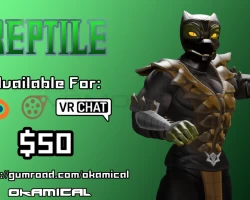


Model info
Content type:Avatars
Сreated by: Okamical
SDK: 3.0 (VRChat)
Unity version: Unity 2022
Platform:
PC
Рhysbones: Yes
Face Tracking: No
Full body: Yes
Nsfw: Yes
DРS \ SPS : No
Views: 6 027
MK Reptile
To download the model, you need to log in.
Description
Thank you so much for buying my model!
the instructions should be the same for all versions besides the passwords
------
NOTICE: THIS PRODUCT IS NOT ALLOWED FOR REDISTRIBUTION, ANY FILES IN BLENDER, FBX, VRCHAT, OR SFM ARE TO BE KEPT
PRIVATELY. THIS MODEL IS ALLOWED FOR RENDER, ANIMATION USE AND ARTIST COMMISSION USE ONLY WITH CREDIT GIVEN TO THE ORIGINAL MODEL MAKER.
UNLESS EXCEPTION IS ALLOWED.
THE MODEL IS ALSO NOT ALLOWED TO BE UPLOADED TO VRCHAT IN A PUBLIC STATE.
YOU ARE ONLY ALLOWED TO UPLOAD IT IN A PRIVATE STATE AND ARE NOT ALLOWED TO SHARE MODEL.
-------
MKReptile Model Pack Includes:
Blender:
-Blender 3.0 IK File with packed textures into the .blend file
-All textures and Alternative textures are held in there folder names
-IK Rigging Support
-Facial ShapeKeys are on an Menu for easy access. (Its the purple square above the model, the square will not be rendered as its disabled in render view)
-Alternative CEL Shaded version in different .blend file
-Genital rigging
-Multiple Outfits that can be used for the model.
VRChat:
The unitypackage already includes version VRCSDK3-AVATAR-2022.10.27.00.35_Public in the reptile unitypackage.
Just make a new project and import the package and it should be ready for uploading
If the SDK becomes outdated just update the VRCSDK with the latest version
The CEL Shaded version and Realistic version are held in seperate unitypackages
-Full Body Support VRChat unity package.
-3.0/Advanced Menu outfits support
-BodyOutfit Menu
-VestOutfit Menu
-Hoodies/Mask Menu
Mix and match to best fit your desired outfit.
Becareful when mixing clothes of the Outfits menus. Some of the outfits are not meant to be fitted together.
-3.0 genitals radial puppet
-Phys Bones Support (VRChat)
When Uploading make sure to copy the MainCamera Transform component values into the VRChat Camera Transform component values to have
your avatar thumbnail display the plane mesh that shows the thumbnail.
NOTE: I AM NOT RESPONSIBLE FOR ANY TERMS OF SERVICE BREAKS ON VRCHAT. Please use this avatar responsibility as using this model
irresponsibility in a public world can get you banned, this model is not supported for VRChat Quest Users.
Please report to Okamical if there's any issues with the model.
----
Password is included in the instructional notepad upon purchase
the instructions should be the same for all versions besides the passwords
------
NOTICE: THIS PRODUCT IS NOT ALLOWED FOR REDISTRIBUTION, ANY FILES IN BLENDER, FBX, VRCHAT, OR SFM ARE TO BE KEPT
PRIVATELY. THIS MODEL IS ALLOWED FOR RENDER, ANIMATION USE AND ARTIST COMMISSION USE ONLY WITH CREDIT GIVEN TO THE ORIGINAL MODEL MAKER.
UNLESS EXCEPTION IS ALLOWED.
THE MODEL IS ALSO NOT ALLOWED TO BE UPLOADED TO VRCHAT IN A PUBLIC STATE.
YOU ARE ONLY ALLOWED TO UPLOAD IT IN A PRIVATE STATE AND ARE NOT ALLOWED TO SHARE MODEL.
-------
MKReptile Model Pack Includes:
Blender:
-Blender 3.0 IK File with packed textures into the .blend file
-All textures and Alternative textures are held in there folder names
-IK Rigging Support
-Facial ShapeKeys are on an Menu for easy access. (Its the purple square above the model, the square will not be rendered as its disabled in render view)
-Alternative CEL Shaded version in different .blend file
-Genital rigging
-Multiple Outfits that can be used for the model.
VRChat:
The unitypackage already includes version VRCSDK3-AVATAR-2022.10.27.00.35_Public in the reptile unitypackage.
Just make a new project and import the package and it should be ready for uploading
If the SDK becomes outdated just update the VRCSDK with the latest version
The CEL Shaded version and Realistic version are held in seperate unitypackages
-Full Body Support VRChat unity package.
-3.0/Advanced Menu outfits support
-BodyOutfit Menu
-VestOutfit Menu
-Hoodies/Mask Menu
Mix and match to best fit your desired outfit.
Becareful when mixing clothes of the Outfits menus. Some of the outfits are not meant to be fitted together.
-3.0 genitals radial puppet
-Phys Bones Support (VRChat)
When Uploading make sure to copy the MainCamera Transform component values into the VRChat Camera Transform component values to have
your avatar thumbnail display the plane mesh that shows the thumbnail.
NOTE: I AM NOT RESPONSIBLE FOR ANY TERMS OF SERVICE BREAKS ON VRCHAT. Please use this avatar responsibility as using this model
irresponsibility in a public world can get you banned, this model is not supported for VRChat Quest Users.
Please report to Okamical if there's any issues with the model.
----
Password is included in the instructional notepad upon purchase
