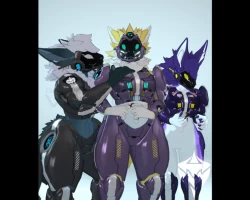


Model info
Content type:Avatars
Сreated by: T I G E R M A F I A + Sturmwolf
SDK: 3.0 (VRChat)
Unity version: Unity 2022
Platform:
PC
Рhysbones: Yes
Face Tracking: No
Full body: Yes
Nsfw: No
DРS \ SPS : No
Views: 40 848
Metro Protogen
To download the model, you need to log in.
Description
Features:
73k Polys
REQUIRES POIYOMI TOON 9.0.61
Two Base Textures
Full-Body Proto Armor (comes with toggles to hide parts of the armor)
Ear Puppet Controls
Tail Puppet Controls
Tongue Puppet Controls
Paw Puppet Controls
Hue, Saturation, and Brightness adjustment sliders
HOW TO UPLOAD (PC) (Click here for a video to help you.)
Step 1. Go to VRchat.com, download the latest SDK or VRChat Creator Companion, create a new project, and import the Avatar 3.0 VRCSDK into the scene.
Step 2. If you do not have Poiyomi Toon/Pro_9.0.61 or higher (this model uses Poiyomi Toon_9.0.61 if you use any older vers. reset the materials). (Click here) Join Poiyomi's Discord and download the latest version. Once you have acquired the correct version of Poiyomi, import it into your project.
Step 3. Import the avatar's unity package into your project. Once the avatar is imported, you can customize it to your liking. When you are finished, upload the avatar using the Vrchat Control Panel (here's a picture to help you find it), and you are done. (you need VRCfury)
73k Polys
REQUIRES POIYOMI TOON 9.0.61
Two Base Textures
Full-Body Proto Armor (comes with toggles to hide parts of the armor)
Ear Puppet Controls
Tail Puppet Controls
Tongue Puppet Controls
Paw Puppet Controls
Hue, Saturation, and Brightness adjustment sliders
HOW TO UPLOAD (PC) (Click here for a video to help you.)
Step 1. Go to VRchat.com, download the latest SDK or VRChat Creator Companion, create a new project, and import the Avatar 3.0 VRCSDK into the scene.
Step 2. If you do not have Poiyomi Toon/Pro_9.0.61 or higher (this model uses Poiyomi Toon_9.0.61 if you use any older vers. reset the materials). (Click here) Join Poiyomi's Discord and download the latest version. Once you have acquired the correct version of Poiyomi, import it into your project.
Step 3. Import the avatar's unity package into your project. Once the avatar is imported, you can customize it to your liking. When you are finished, upload the avatar using the Vrchat Control Panel (here's a picture to help you find it), and you are done. (you need VRCfury)
