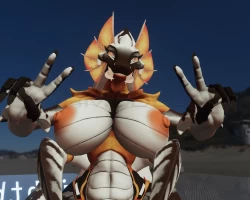
Home » Avatars » XENA

Information

Unregistered users cannot view the original image. This is because they need to verify their age.*
To view this screenshot, you need to log in.

Model info

Content type:Avatars
Сreated by: LizzyGlizzy
SDK: 3.0 (VRChat)
Unity version: Unity 2022
Platform: PC
Рhysbones: Yes
Face Tracking: No
Full body: Yes
Nsfw: Yes
DРS \ SPS : Yes
Views: 89 499
XENA

To download the model, you need to log in.

Description

Xena LYGY VR Chat Avatar v1.2.0
-A Unity scene with XENA ready for you to upload. (with tutorial)
-Fun jiggly bits!
-Full-body tracking compatible
-Multiple toggles for Cloth/Props etc... (Can be fully nude)
-2 size sliders to control breast and butt size
-Even more goodies! GO FIND THEM! ;)
Screenshots of model XENA in the game
Comments: 57
Add comment

Information

To add your comment you need to log in.

  • foto
    NitroLovin #57
    0
    can someone do a step by step guide on how to fix the eyes please. in game the eyes are not in there sockets lol please and thank you
    8 March 2026 08:39
  • foto
    taekwo #56
    0
    Creature Lady! x3
    25 August 2025 21:18
  • foto
    Creeper_Hunter3 (user blocked for violating site rules) #55
    Did You Scroll All The Way Down On The Inspector/Right Side Of The Screen? It's Kinda Hidden Because Of That, It Should Be Just Above The Transform Segment
    19 July 2025 12:20
  • foto
    MythicWyrm #54
    0
    @Snommm When i open properties on the rig, it onlly gives me options to change position, nothing says apply
    30 March 2025 14:11
  • foto
    FluffyMiwnty #53
    +1
    The fixing didn't work at all, i tried doing as everyone said to relocate eyes in play mode - It did nothing, it doesn't even save it at all, when i managed to somehow move them.

    1 - So when i enter play mode, yes they off from eyelids at top, i try to move them both = Nothing happens, they staying steady, i tried to delete them and then return them = I was able to move them after that move, but i cannot save the changes in playmode, it doesn't let me?
    30 March 2025 12:59
  • foto
    Snommm #52
    0
    Fixed it, you need to find the rig and go to its properties then select the head and move the eyes back into the right spots then hit apply at the bottom of the popup window.
    23 March 2025 23:09
  • foto
    vrcwarrior #51
    0
    why are the eyes not in the head when it uploads to vrc ingame?
    21 March 2025 04:20
  • foto
    bruh its kevin #50
    0
    okay they stop arguing, like damn nigga that fucking long😭
    28 February 2025 14:29
  • foto
    ValortheDragon #49
    0
    Detonator, Same here.
    19 February 2025 06:24
  • foto
    Howdoiwalk #48
    +3
    LilithTheKitten, No-no my friend, I implore you heed my advice and leave people to enjoy things. As you say, everyone has a right to an opinion, and mine's that you should be somewhere else instead of a place that makes you upset.
    18 February 2025 16:02
  • foto
    LilithTheKitten (user blocked for violating site rules) #47
    Howdoiwalk, take your own advice instead of assuming someone is upset over an opinion
    18 February 2025 14:59
  • foto
    Howdoiwalk #46
    +1
    LilithTheKitten, Please, take a break from the internet friend. It's not worth getting this upset over a avatar.
    18 February 2025 12:21
  • foto
    LilithTheKitten (user blocked for violating site rules) #45
    Howdoiwalk, you keep commenting by projecting yourself tbh go cry about it kiddo and touch grass
    18 February 2025 07:48
  • foto
    Howdoiwalk #44
    +1
    LilithTheKitten, If you weren't upset you wouldn't still be here
    16 February 2025 01:42
  • foto
    LilithTheKitten (user blocked for violating site rules) #43
    Howdoiwalk, who said I was upset all I said was my opinion you’re the one who’s getting triggered over someone’s opinion which is pretty pathetic now you’re using manipulation tactics
    16 February 2025 00:58
  • foto
    Detonator #42
    +1
    someone,upload new update for avatar,fix this eyes,i tried to fix that,change position eyes,but its not help
    15 February 2025 15:17
  • foto
    Howdoiwalk #41
    +1
    LilithTheKitten, Might I remind you, you're getting this upset over being told to just go somewhere else?
    14 February 2025 21:26
  • foto
    LilithTheKitten (user blocked for violating site rules) #40
    Howdoiwalk, womp womp all I hear is crying from an attention seeking kid and what bad behavior just because I said my opinion on something “calling someone being triggered” the last time I’ve checked you were projecting your own triggers over someone’s opinion tbh go cry about to someone who actually gives a fuck and go touch grass
    14 February 2025 20:43
  • foto
    bruh its kevin #39
    +1
    bro stop with the arguments nigga like damn😭
    13 February 2025 10:20
  • foto
    Howdoiwalk #38
    +3
    LilithTheKitten, Is human rights and calling people triggered the only excuses you have for your bad behavior? People keep flexing that, but freedom of speech only means the government isn't going to go after you for your opinions, it doesn't mean freedom of consequences.
    13 February 2025 04:17
  • foto
    LilithTheKitten (user blocked for violating site rules) #37
    Howdoiwalk, you clearly don’t understand the internet or human rights everyone has the right to their opinion if you comment the person you commented on has the right to comment back stop the manipulative gaslighting “I’ve asked you to stop talking to me” where there oh right there it’s nowhere to be seen if you’re that desperate for attention go ask your parents for some attention don’t seek for any on the internet by acting all triggered over someone’s opinion
    13 February 2025 03:41
  • foto
    Avalara79 (user blocked for violating site rules) #36
    it'd still be nice for someone to at least upload the fixed version. there's a lot of people out there with no unity knowledge missing out on the wonderful Avi and spreading bug democracy XD
    12 February 2025 18:35
  • foto
    Venskryl #35
    +4
    Thank you for the fix, wildan hafifi. I set the Left eye position to x -0.0003702847, y 0.0006524877, z 0.0004563393 and the right eye to x 0.0003702228, y 0.0006524877, z 0.0004563896 --- after setting this on the rig, the eyes did indeed fix themselves in play!
    12 February 2025 17:18
  • foto
    Howdoiwalk #34
    +3
    LilithTheKitten, Awwww, it was too much to ask, wasn't it? I'm terribly sorry, I expected too much of you my brother; clearly human decency is an alien concept to someone with a mindset like yours.

    I wish you well and hope you do better.
    12 February 2025 09:39
  • foto
    LilithTheKitten (user blocked for violating site rules) #33
    Howdoiwalk, not asking anything also this is the internet so deal with it lastly you’re projecting about how you’re projecting all I hear is whining from someone who doesn’t get love from their parents
    12 February 2025 05:56
  • foto
    Howdoiwalk #32
    +2
    LilithTheKitten, Or, hear me out here. You can be an adult and let people enjoy things instead of being triggered by someone asking you to not bother people. Is that too to ask?
    10 February 2025 23:01
  • foto
    LilithTheKitten (user blocked for violating site rules) #31
    Howdoiwalk, go learn what an opinion is then come back and say something you’re literally getting triggered over someone’s opinion which people have the right to have
    10 February 2025 22:43
  • foto
    Howdoiwalk #30
    +1
    LilithTheKitten, You're the one crying my dude
    10 February 2025 09:52
  • foto
    LilithTheKitten (user blocked for violating site rules) #29
    Howdoiwalk, womp womp go cry about it kiddo
    10 February 2025 08:50
  • foto
    Living Teddy #28
    0
    Yall stop arguing and help us with the eyes 😭
    10 February 2025 03:58
  • foto
    Howdoiwalk #27
    +1
    LilithTheKitten, If you don't like it, then go somewhere else my guy. No one's forcing you to be here.
    9 February 2025 08:38
  • foto
    LilithTheKitten (user blocked for violating site rules) #26
    Notaripper, I can tho sexualizing furries is disgusting
    9 February 2025 07:00
  • foto
    WolfGaming #25
    0
    The eyes are still way too high please fix it when you have the time its annoying
    8 February 2025 15:43
  • foto
    TheCatInYourWalls #24
    0
    What is the original source for this model? Ive been looking for it everywhere
    7 February 2025 22:28
  • foto
    Snommm #23
    0
    how do i fix this thing. (explain in a dumbed down way ive only been using unity for like 4 and a half months)
    7 February 2025 14:49
  • foto
    LAZERCATS #22
    0
    wildan hafifi, looking at the animator its a mess cause the large body types are on by default and the alternate body txts also dont work and i dont have enough knowledge to change or make new ones so if you know how to fix these or get an updated ver that would be nice
    7 February 2025 06:14
  • foto
    Cabrian #21
    ***comment deleted***
    6 February 2025 23:59
  • foto
    Detonator #20
    0
    Guys, please publish a photo or video instruction, I don’t understand how to lower my eyes, I don’t understand much about Unity, especially in terms of setting up avatars(
    6 February 2025 23:34
  • foto
    wildan hafifi (user blocked for violating site rules) #19
    LAZ3RCATS, probably u need to check animator and check the weight, if 0 slide it to 1
    6 February 2025 19:06
  • foto
    LAZERCATS #18
    0
    The General, its listed in the comments

    also the sliders do not work on the avi and could also use general menu polish
    6 February 2025 19:03
  • foto
    The General #17
    0
    Model is great! but there is an issue with the eyes not aligning correctly to the head. Would you be able to upload a version of the files with this issue fixed please? or at least could someone be kind enough to tell me how to fix?
    6 February 2025 18:46
  • foto
    wingedragon1002 #16
    0
    wildan hafifi, AnuKun's just saying to fix the base model, repackage the model into a .unitypackage and give a new link with the fixed model, no need to get the 1.2.1 if you don't need to

    Hope I help in any way.
    6 February 2025 17:38
  • foto
    wildan hafifi (user blocked for violating site rules) #15
    AnuKun, i dont have 1.2.1 version tho, is easy fix btw u can do it if u want to learn
    6 February 2025 16:35
  • foto
    Avalara79 (user blocked for violating site rules) #14
    I feel if possible to save people the trouble and time of having to fix the eyes reupload her with the eyes fixed, maybe?
    6 February 2025 16:28
  • foto
    wildan hafifi (user blocked for violating site rules) #13
    Xrannos, i checked myself too on unity and yes it worked and its same method lol

    6 February 2025 16:15
  • foto
    Xrannos #12
    0
    See my post of the fix is posted here as well lol
    6 February 2025 16:11
  • foto
    wildan hafifi (user blocked for violating site rules) #11
    Ravenhurst1161, constrain position the eyes individually to empty game objects in the same position

    wildan hafifi, So I did a different method with editing the rig itself, saw the positions of the eyes changed for some reason in play mode in unity. With play mode off I checked the numbers on the left and right eyes positions and made screen shots of both. Then went into the XENA folder then Prefab and clicked the rig right arrow to check all prefabs in the avatar. The human shaped one thats blue named XENA LYGY VR Chat v 1.0 Avatar (Avatar) and in the inspector I went to configure Avatar which opens the bones. From there I located the eyes on the avatar and saw the position numbers were the ones while it was in play mode, so changed them to the position numbers I took a screen shot of outside of play mode and when I went into play mode they were in the spots they were suppose to. Hope that helps
    6 February 2025 16:06
  • foto
    「ᴢᴀɴᴇᴛʜᴇᴘᴀɪɴ」1 #10
    any idea on how to fix xenas eyes?
    6 February 2025 14:31
  • foto
    Ravenhurst1161 #9
    +1
    The eyes are misaligned after upload.
    6 February 2025 14:26
  • foto
    Howdoiwalk #8
    0
    DarkVoid569 f775, use VRC quest tools as i said in my previous comment
    6 February 2025 14:25
  • foto
    DarkVoid569 f775 #7
    0
    @Howdoiwalk How do u make a quest version

    Howdoiwalk, How do u make a quest version
    6 February 2025 14:10
  • foto
    Notaripper #6
    +4
    LilithTheKitten, Ong you cant talk “Kitten”
    6 February 2025 13:41
  • foto
    「ᴢᴀɴᴇᴛʜᴇᴘᴀɪɴ」1 #5
    Eyeless Andrea, its easy to make it quest. ill drop my files with the quest side once i convert it
    6 February 2025 13:27
  • foto
    LilithTheKitten (user blocked for violating site rules) #4
    I don’t mind furries but this is pushing the limits
    6 February 2025 12:55
  • foto
    Darknessfallen #3
    0
    ***comment deleted***

    Howdoiwalk, it wont work sadly it uses poi alpha settings for most of the toggles
    6 February 2025 11:40
  • foto
    Howdoiwalk #2
    0
    Eyeless Andrea, There is VRC quest tools that can convert it to quest for you, with some minor input needed here n there, hell it's what I use on the grand majority of my avatars to have a quest alternative
    6 February 2025 11:06
  • foto
    Eyeless Andrea #1
    0
    I like the design and it's very beautiful, but sadly i can't use it because i'm on quest
    6 February 2025 11:01