

Model info
Content type:Avatars
Сreated by: TeddyGQ
SDK: 3.0 (VRChat)
Unity version: Unity 2022
Platform:
PC
Рhysbones: Yes
Face Tracking: Yes
Full body: Yes
Nsfw: Yes
DРS \ SPS : No
Views: 44 512
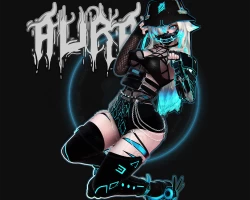
AURA
To download the model, you need to log in.
Description
Features
ꕥ Face tracking !
ꕥ Hair, body and clothing Hueshift and multiple colors to choose from!
ꕥ Unique Dissolve Toggles
ꕥ FBT ready
ꕥ Particle Steps as you walk
ꕥ Custom AFK animation
ꕥ Gogo Locomotion For desky & halfbody users!
ꕥ Rainbow RGB and normal Hues
ꕥ AudioLink
ꕥ Multiple outfit options and customizations
ꕥ Flow toy for dancing, with multiple shape options
Menu's include;
Clothing
- Bucket hat, Jacket, bottoms, Platform boots, shorts, sleeves, socks, suit, tech pants
- Loose top, side bags, Top.
Accessories
- Robot Arm, Bandaids, gloves,
horns, mask, waist bag, Hood up/down
Customize
- Bottom ears, top ears,
Hair options ( Short bob, shaggy, pigtail braids, long)
- Rainbow/RGB
- Hair color
- Hueshift
- Skin shift
- Body sliders
Toys Menu
- Flow toy ON/OFF
- Flowtoy Size
- FlowToy shape
- Particle steps ON/OFF
Gogo Locomotion (All) Menu
(For PC only)
-Sitting/prone posing
- Clapping, dance, point, wave, cheer, die, backflip animations
- Height adjustment and animation speeds.
- Fullybody glide & walk included / ect.
No uploads
This package requires you to Import
> VRCSDK3 - newest version using Creator Companion
> Import Avatar 3.0 Manager (In creator companion)
> Import VRCFury
> Import Poi_Toon_7.3.50_UpTo_9.0.54 ( Not included in package.)
> Avatar package
ꕥ Face tracking !
ꕥ Hair, body and clothing Hueshift and multiple colors to choose from!
ꕥ Unique Dissolve Toggles
ꕥ FBT ready
ꕥ Particle Steps as you walk
ꕥ Custom AFK animation
ꕥ Gogo Locomotion For desky & halfbody users!
ꕥ Rainbow RGB and normal Hues
ꕥ AudioLink
ꕥ Multiple outfit options and customizations
ꕥ Flow toy for dancing, with multiple shape options
Menu's include;
Clothing
- Bucket hat, Jacket, bottoms, Platform boots, shorts, sleeves, socks, suit, tech pants
- Loose top, side bags, Top.
Accessories
- Robot Arm, Bandaids, gloves,
horns, mask, waist bag, Hood up/down
Customize
- Bottom ears, top ears,
Hair options ( Short bob, shaggy, pigtail braids, long)
- Rainbow/RGB
- Hair color
- Hueshift
- Skin shift
- Body sliders
Toys Menu
- Flow toy ON/OFF
- Flowtoy Size
- FlowToy shape
- Particle steps ON/OFF
Gogo Locomotion (All) Menu
(For PC only)
-Sitting/prone posing
- Clapping, dance, point, wave, cheer, die, backflip animations
- Height adjustment and animation speeds.
- Fullybody glide & walk included / ect.
No uploads
This package requires you to Import
> VRCSDK3 - newest version using Creator Companion
> Import Avatar 3.0 Manager (In creator companion)
> Import VRCFury
> Import Poi_Toon_7.3.50_UpTo_9.0.54 ( Not included in package.)
> Avatar package
