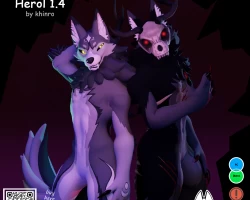


Model info
Content type:Avatars
Сreated by: KhinroAvatar
SDK: 3.0 (VRChat)
Unity version: Unity 2022
Platform:
Opti + Quest
Рhysbones: Yes
Face Tracking: Yes
Full body: Yes
Nsfw: No
DРS \ SPS : No
Views: 23 378
Herol
To download the model, you need to log in.
Description
Content
Hey everyone ! Herol 1.4 is up to grab !!
I hope you'll like it !
_____________________
Instructions:
- Create a new unity 2022 project (Use vrchat creator companion if you can, it's easier)
- Import poiyomi (included below, not required for quest)
- Import VRCFury (I used 1.1171.0)
- Import VRCFT Jerry's template
- Import Herol
- Open the scene and import your avatar using the sdk menu !
_____________________
What's new ?
- Face tracking update with ARKit blenshapes using Jerry's template
- added gogoloco system (by Franada)
- Shoulders, arms and forearms shapekeys with an ingame slidder
- Few clipping shapekey if you wish to add clothing with vrcfury that might help you to avoid clipping
- Wendigo skull and spine now on the main herol as a toggle
- Wendigo version got fully updated to the 1.4 version along with the wolf and german shepherd.
- Wendigo textures got improved (no more mask errors in 4k)
- The skull asset now is merged and works with blendshapes to reduce mesh count. The spine also works with herol's body customization (its not perfect however and you might experience some clipping with few options)
- Now have a FT and a non FT version in the scene with digitigrade and plantigrade options , please take note that the FT version doesn't have gogoloco, the tail puppet, the claws and tail scale and the arms slidders (to have enough parameters space for the face tracking)
- New substance files with all textures in one file, including clothes and the wendigo version.
- Merged psd textures files
- Opti green and quest version got also updated to the 1.4 too. Please take note that the quest version and opti green version has less feature than the full version because of Vrchat limitations.
_____________________
Usefull things to know:
- Please read the TOS where most common questions are answered
- If you don't like the leg's limitation and don't mind the collapsing, to remove it, find your fbx > rig > configure > muscles settings > change your "lower leg stretch" from 0:80 to -80;80 for both legs
- If you import a new fbx and you'd like to get it setup on unity, do not forget to parent your hair's armature to your head bones, to configure your right legs bones depending if you'd like a digi or a planti version, change in the same muscle settings menu as above for both of your legs your lowerleg twisting in and out from -90;90 to 0;0 and your "lower leg stretch" from -80:80 to 0;80 to add the limitation. You'll need also to add the fingers limitation like on the screenshot below to avoid any claws clipping.
Hey everyone ! Herol 1.4 is up to grab !!
I hope you'll like it !
_____________________
Instructions:
- Create a new unity 2022 project (Use vrchat creator companion if you can, it's easier)
- Import poiyomi (included below, not required for quest)
- Import VRCFury (I used 1.1171.0)
- Import VRCFT Jerry's template
- Import Herol
- Open the scene and import your avatar using the sdk menu !
_____________________
What's new ?
- Face tracking update with ARKit blenshapes using Jerry's template
- added gogoloco system (by Franada)
- Shoulders, arms and forearms shapekeys with an ingame slidder
- Few clipping shapekey if you wish to add clothing with vrcfury that might help you to avoid clipping
- Wendigo skull and spine now on the main herol as a toggle
- Wendigo version got fully updated to the 1.4 version along with the wolf and german shepherd.
- Wendigo textures got improved (no more mask errors in 4k)
- The skull asset now is merged and works with blendshapes to reduce mesh count. The spine also works with herol's body customization (its not perfect however and you might experience some clipping with few options)
- Now have a FT and a non FT version in the scene with digitigrade and plantigrade options , please take note that the FT version doesn't have gogoloco, the tail puppet, the claws and tail scale and the arms slidders (to have enough parameters space for the face tracking)
- New substance files with all textures in one file, including clothes and the wendigo version.
- Merged psd textures files
- Opti green and quest version got also updated to the 1.4 too. Please take note that the quest version and opti green version has less feature than the full version because of Vrchat limitations.
_____________________
Usefull things to know:
- Please read the TOS where most common questions are answered
- If you don't like the leg's limitation and don't mind the collapsing, to remove it, find your fbx > rig > configure > muscles settings > change your "lower leg stretch" from 0:80 to -80;80 for both legs
- If you import a new fbx and you'd like to get it setup on unity, do not forget to parent your hair's armature to your head bones, to configure your right legs bones depending if you'd like a digi or a planti version, change in the same muscle settings menu as above for both of your legs your lowerleg twisting in and out from -90;90 to 0;0 and your "lower leg stretch" from -80:80 to 0;80 to add the limitation. You'll need also to add the fingers limitation like on the screenshot below to avoid any claws clipping.
