Home » Avatars » Gooby Gator, Furry avatar for VRC

Model info

Content type:Avatars
Сreated by: Vulthra
SDK: 3.0 (VRChat)
Unity version: Unity 2022
Platform: PC + Quest
Рhysbones: Yes
Face Tracking: No
Full body: Yes
Nsfw: No
DРS \ SPS : No
Views: 29 302
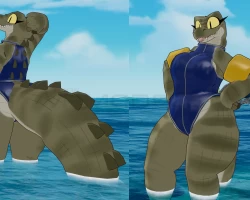
Gooby Gator, Furry avatar for VRC

To download the model, you need to log in.

Description

A Gator/Crocodile avatar base to use in VRChat!
Comes with texture variations and toggles! I highly encourage you to mix and match them or even make your own edits out of any of them!

"GOOD" PC PERFORMANCE RATING!!!!
QUEST COMPATIBLE
This includes:
5 Body textures (with hue/saturation sliders!)
4 Clothes textures
Feminine/Masculine body radials
5 Eye shapes! (with eyeshadow toggles/hue sliders)
Customizable outfits
Tail size radial
Claw toggles
Clothes
top, shorts, fishnets, underwear, pasties, swimsuit, ARM FLOATIES!!!
NO SUBSTANCE FILES, all texture work is done in clip studio/photoshop

PACKAGE INCLUDES:
Ready-to-upload Unity package for PC and Quest
Instructions on how to upload
PSD texture files
Blender file
Avatar 3.0 Controls
2D Eye Animations
Physbones!
Clothes Toggles
sliders for feminine/masculine versions!
Supports Full Body Tracking!
GogoLoco!

REQUIREMENTS:
Unity 2022.3.22f1
VRChat SDK 3.0
Poiyomi Toon Shader
version 9.1.23
GogoLoco 1.8.6/VRCFury <------

Screenshots of model Gooby Gator, Furry avatar for VRC in the game
Uploaded by

Anonymous


Comments: 28
Add comment

Information

To add your comment you need to log in.

  • foto
    Cross-Slash Oni #28
    0
    Any updates yet?
    14 June 2026 18:55
  • foto
    Digit1823 #27
    0
    KITTYSOFTPAWZ , may I ask what you did to get the eyes working?
    5 October 2025 12:04
  • foto
    KITTYSOFTPAWZ #26
    0
    Has anybody figured out how to get the clothes, different eye shapes, and colors to work on quest, i've tried everything at this point😭
    8 September 2025 19:50
  • foto
    CherryRadio_ #25
    0
    Digit1823, im trying to find free time, genuinely, ive been caught up in so much lately and im trying to make some free time for myself
    9 August 2025 09:53
  • foto
    Digit1823 #24
    0
    ***comment deleted***

    CherryRadio_, wanted to ask if your able to send the fixed model yet, been a long while
    8 August 2025 13:50
  • foto
    Digit1823 #23
    0
    CherryRadio_, Alrighty, Just wanted to check in free a few days and all
    21 July 2025 04:40
  • foto
    CherryRadio_ #22
    0
    Digit1823, iiimm working on it, i do have other things going on as well lmao
    21 July 2025 02:23
  • foto
    Digit1823 #21
    0
    CherryRadio_, heyy!-Just a small bump to remind you about this and all, just making sure everything is still going smoothly
    20 July 2025 11:42
  • foto
    Digit1823 #20
    0
    CherryRadio_, Ah thank you for this one congrats, take your time and I'll try to check in everyone and then till your able to post it
    16 July 2025 03:32
  • foto
    CherryRadio_ #19
    0
    Digit1823, once i get it working yeah, ill put it up on pixeldrain or google drive. Sorry for taking so long btw!! i was focusing on college and i just graduated yesterday.. x3
    15 July 2025 23:52
  • foto
    Digit1823 #18
    0
    CherryRadio_, thatd be lovely, do you have a way to send the file?
    15 July 2025 11:03
  • foto
    CherryRadio_ #17
    0
    Digit1823, uhhmm..
    i can most likely try just setting the avatar up for you and send you the files if you'd like
    7 July 2025 00:26
  • foto
    Digit1823 #16
    0
    CherryRadio_, so i got this to work butt! how did you connect the eyes and avi? mine are way above its head sadly
    6 July 2025 14:50
  • foto
    Digit1823 #15
    0
    id like to ask for a full fire honestly, im still having issues with the eyes
    6 July 2025 14:30
  • foto
    Cupcakemuncher #14
    0
    There arent any psd's TWT
    1 June 2025 19:54
  • foto
    Nemcro #13
    +1
    Its stated on the official page that in order for colour changes and whatnot to appear ingame, you have to do them within unity first !
    14 May 2025 03:36
  • foto
    daddymilkrsbitttccchhhh #12
    0
    VerifiedRoseus, i'm having the same issue
    8 May 2025 22:19
  • foto
    L00n1 #11
    +1
    Do the different color options for the body and clothes not work on quest? I've seen them work on pc but not on quest. I'm also not the most experienced with unity so I could very well be doing something wrong without knowing.
    24 April 2025 08:48
  • foto
    CherryRadio_ #10
    0
    Quote: Marshmallowsoup
    How do i fix the eyes on quest haha-

    try setting the eyes to "Multiply" in VRChat/Mobile/Particles
    It will make the eyes look dark, but thats the only fix i know of so far
    The other 2 particle shaders apparently dont want to work with Quest standalone, VRChat downright refuses it saying "Only use shaders from VRChat/Mobile", despite Alpha Blended and whatever the other one is are in VRChat/Mobile/Particles (so its under the mobile second)

    TLDR: Use "Multiply" under VRChat/Mobile/Particles

    kiranic, npp :3
    31 March 2025 22:57
  • foto
    kiranic #9
    0
    CherryRadio_, it worked tysm!^^
    31 March 2025 02:54
  • foto
    kiranic #8
    0
    pinkpissglitter, sadly no

    CherryRadio_, ooh kk ill try that tyty
    31 March 2025 02:43
  • foto
    Marshmallowsoup #7
    0
    How do i fix the eyes on quest haha-
    30 March 2025 15:42
  • foto
    CherryRadio_ #6
    0
    Corcor,
    untick the "decal 0" box
    30 March 2025 06:18
  • foto
    pinkpissglitter #5
    0
    Corcor, did you ever figure it out?
    29 March 2025 11:40
  • foto
    sleepyssss #4
    0
    sonabat, there are no substance files you have to edit in photoshop/clip studio.
    27 March 2025 16:08
  • foto
    kiranic #3
    0
    dose anyone know how to fix the eyes for the pc side?
    27 March 2025 10:53
  • foto
    ZeeZeeBeats #2
    +1
    YES another vulthra!!!
    27 March 2025 08:54
  • foto
    sonabat #1
    0
    anyone got like substance files on this one or no?
    27 March 2025 06:00