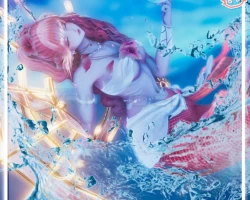


Model info
Content type:Avatars
Сreated by: NovaPie
SDK: 3.0 (VRChat)
Unity version: Unity 2022
Platform:
PC + Quest
Рhysbones: Yes
Face Tracking: Yes
Full body: Yes
Nsfw: Yes
DРS \ SPS : Yes
Views: 28 822
Nymari
To download the model, you need to log in.
Description
Need a upload done for you? Uploads are available by giving $5 to my verified uploader Kitrion! KITRION TIP JAR LINK
Open a ticket in our server with screenshots of both purchases for an upload!
≽^•⩊•^≼
Instructions:
Find my upload tutorial here for a video to follow along!
REQUIRED:
Poiyomi Shader 7.3.50 up to 9.1.28 - Find here
sdk Version 3.7.6
1.Make a 2022 avatar unity project through the vrchat avatar companion.
2.import shaders that are listed above in required first.
3.once shaders are imported you can import the model project.
4.Once the model is imported locate the OPEN ME scene in the project files.
5.Drag and drop OPEN ME to the Hierarchy.
6.Navigate to the vrchat sdk at the top and open the control panel.
7.in the control panel popup navigate to Builder.
8.fill out the info in the builder and press Build and publish at the bottom!
Quest
1.Make a 2022 avatar unity project through the vrchat avatar companion.
2.Navigate to files at top left corner and click build settings.
3.Click the Android option and click switch platform at bottom right corner.
4.import the model package.
5.Once the model is imported locate the OPEN ME scene in the project files.
6.Drag and drop OPEN ME to the Hierarchy.
7.Navigate to the vrchat sdk at the top and open the control panel.
8.in the control panel popup navigate to Content Manager- find the models pc side(you can search what you named it)
9.under that model click copy ID.
10.Navigate to the avatar in the hierarchy and click.
11.on the right under the inspector locate the pipeline manager.
12.paste the ID you copied under the pipeline manager and click attach.
13.follow steps 6-8 from pc side.
Unity 2022.3.6f1
sdk 3.7.6
Poiyomi toon 7.3.50 up to 9.1.28
last updated: 4/30/2025 - fixed importing issue!
GoGo
Sunrise World Drop
Sunrise Size
Floor Collider Toggle
Floor Collider Height Adjust
Cloud Portals
Plush Menu - SARDINE
Open a ticket in our server with screenshots of both purchases for an upload!
≽^•⩊•^≼
Instructions:
Find my upload tutorial here for a video to follow along!
REQUIRED:
Poiyomi Shader 7.3.50 up to 9.1.28 - Find here
sdk Version 3.7.6
1.Make a 2022 avatar unity project through the vrchat avatar companion.
2.import shaders that are listed above in required first.
3.once shaders are imported you can import the model project.
4.Once the model is imported locate the OPEN ME scene in the project files.
5.Drag and drop OPEN ME to the Hierarchy.
6.Navigate to the vrchat sdk at the top and open the control panel.
7.in the control panel popup navigate to Builder.
8.fill out the info in the builder and press Build and publish at the bottom!
Quest
1.Make a 2022 avatar unity project through the vrchat avatar companion.
2.Navigate to files at top left corner and click build settings.
3.Click the Android option and click switch platform at bottom right corner.
4.import the model package.
5.Once the model is imported locate the OPEN ME scene in the project files.
6.Drag and drop OPEN ME to the Hierarchy.
7.Navigate to the vrchat sdk at the top and open the control panel.
8.in the control panel popup navigate to Content Manager- find the models pc side(you can search what you named it)
9.under that model click copy ID.
10.Navigate to the avatar in the hierarchy and click.
11.on the right under the inspector locate the pipeline manager.
12.paste the ID you copied under the pipeline manager and click attach.
13.follow steps 6-8 from pc side.
Unity 2022.3.6f1
sdk 3.7.6
Poiyomi toon 7.3.50 up to 9.1.28
last updated: 4/30/2025 - fixed importing issue!
GoGo
Sunrise World Drop
Sunrise Size
Floor Collider Toggle
Floor Collider Height Adjust
Cloud Portals
Plush Menu - SARDINE
