

Model info
Content type:Avatars
Сreated by: ItsGuusy
SDK: 3.0 (VRChat)
Unity version: Unity 2022
Platform:
PC
Рhysbones: Yes
Face Tracking: No
Full body: Yes
Nsfw: No
DРS \ SPS : No
Views: 15 793
The Callisto Bear
To download the model, you need to log in.
Description
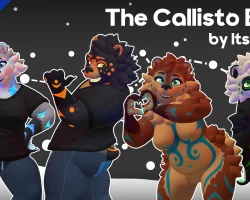
Introducing The Callisto Bear! A Fluffy/Furry Mama and Papa Bear Avatar Base!
Callisto Bears are big fluff balls who greet the world with open arms! From the Soft and Nurturing to the Strong and Protective and even the Goofy and Clumsy, Callisto Bears are all unique in their personality! Made with Ease of Use and Customization in mind, The Callisto Bear is perfect for feeling big and cozy while being yourself!
Huge Thanks to TubbyTubs for all her support and input on this project, and to EepyCoco for their Winterbold art used on the included clothing!
The Callisto Bear is built for VRChat, but It can be used in other applications such as Resonite, ChilloutVR, Warudo, Etc. but does not currently have official installation packages or support.
The Callisto Bear is designed to work both on PC and Quest / Android! Nearly all features are supported on both platforms unless otherwise specified!
Quick Feature Overview
The Callisto Bear Brings More Than Just The Bare Necessities!
-PC and Quest/Mobile Compatible
-Full Unified Expressions Face Tracking
-40 MMD Blendshapes
-Extremely Mixable Gesture Expressions
-Included Clothing and Interactive Honey Pot Accessories
-8 Included Material Swaps
-4 With Glowing Markings, 4 Without to resemble a natural bear
-Separated Masc and Breast toggles
-Super Simple to Use and Upload
-Shrink/Hide Blendshapes for Each Body Part and Tuft Of Fur
-Makes for easy clothing fitting and customization!
Uploading for PC
-Within VRChat Creator Companion, create a new Avatar Project for your Callisto Bear. Name it whatever you like!
-Once inside the project, import VRCFury and Poiyomi Shader into the project.
-If you downloaded the unitypackages manually for each, simply double click or drag and drop them into unity
-You can also utilize the VRChat Creator Companion’s package manager in the “Manage Project” section to help keep your packages up to date via github link
-Import the Callisto Bear .unitypackage
-Navigate to the Callisto Bear folder and double click the “Callisto Bear Scene PC” scene object to upload a PC version of the avatar
-In the VRChat SDK tab at the top of your screen, select “Show Control Panel”
-Log into your account and choose Builder
-From here, set a name, thumbnail, etc. for your avatar.
-Select Build and Publish to publish the PC version of the avatar
The Callisto Bear comes with a number of accessories. These are included as separate .unitypackage files in your downloads.
In order to add one or all of these packages, simply import the .unitypackage into your project, navigate to the newly created folder, and drag & drop the package file into your avatar’s hierarchy. Thanks to VRCFury the asset will be automatically installed when you publish the avatar.
Generally these packages will come in the form of a “Prefab” file, and are located at the root of the package’s folder. Be sure to choose the PC version for PC uploads and the Quest version for Quest/Android/Mobile uploads!
Please be aware that the order of the assets in your avatar’s hierarchy DOES MATTER when uploading between PC and Quest! Having a non-matching hierarchy across platforms can cause parameter desyncing, This is especially important for Face Tracking installations.
Callisto Bears are big fluff balls who greet the world with open arms! From the Soft and Nurturing to the Strong and Protective and even the Goofy and Clumsy, Callisto Bears are all unique in their personality! Made with Ease of Use and Customization in mind, The Callisto Bear is perfect for feeling big and cozy while being yourself!
Huge Thanks to TubbyTubs for all her support and input on this project, and to EepyCoco for their Winterbold art used on the included clothing!
The Callisto Bear is built for VRChat, but It can be used in other applications such as Resonite, ChilloutVR, Warudo, Etc. but does not currently have official installation packages or support.
The Callisto Bear is designed to work both on PC and Quest / Android! Nearly all features are supported on both platforms unless otherwise specified!
Quick Feature Overview
The Callisto Bear Brings More Than Just The Bare Necessities!
-PC and Quest/Mobile Compatible
-Full Unified Expressions Face Tracking
-40 MMD Blendshapes
-Extremely Mixable Gesture Expressions
-Included Clothing and Interactive Honey Pot Accessories
-8 Included Material Swaps
-4 With Glowing Markings, 4 Without to resemble a natural bear
-Separated Masc and Breast toggles
-Super Simple to Use and Upload
-Shrink/Hide Blendshapes for Each Body Part and Tuft Of Fur
-Makes for easy clothing fitting and customization!
Uploading for PC
-Within VRChat Creator Companion, create a new Avatar Project for your Callisto Bear. Name it whatever you like!
-Once inside the project, import VRCFury and Poiyomi Shader into the project.
-If you downloaded the unitypackages manually for each, simply double click or drag and drop them into unity
-You can also utilize the VRChat Creator Companion’s package manager in the “Manage Project” section to help keep your packages up to date via github link
-Import the Callisto Bear .unitypackage
-Navigate to the Callisto Bear folder and double click the “Callisto Bear Scene PC” scene object to upload a PC version of the avatar
-In the VRChat SDK tab at the top of your screen, select “Show Control Panel”
-Log into your account and choose Builder
-From here, set a name, thumbnail, etc. for your avatar.
-Select Build and Publish to publish the PC version of the avatar
The Callisto Bear comes with a number of accessories. These are included as separate .unitypackage files in your downloads.
In order to add one or all of these packages, simply import the .unitypackage into your project, navigate to the newly created folder, and drag & drop the package file into your avatar’s hierarchy. Thanks to VRCFury the asset will be automatically installed when you publish the avatar.
Generally these packages will come in the form of a “Prefab” file, and are located at the root of the package’s folder. Be sure to choose the PC version for PC uploads and the Quest version for Quest/Android/Mobile uploads!
Please be aware that the order of the assets in your avatar’s hierarchy DOES MATTER when uploading between PC and Quest! Having a non-matching hierarchy across platforms can cause parameter desyncing, This is especially important for Face Tracking installations.
