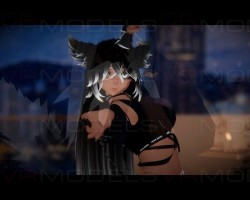


Iris
 The link to the model was removed from the site at the request of the copyright holder
Description
How to use this package and upload to VRChat.
1. Open Unity 2018.4.20f1.
2. Import VRChat Avatar SDK within the package (3.0).
3. Import a Shader you want to use, Poiyomi is recommended.
4. Import Dynamic Bones.
5. Import The Avatar Package.
Avatar Special Features
- Dissolve Effect for most Toggles
- Radial Puppet for Hair Length, Tail Length and PP Length (uwu)
- WetCat's LocomotionFix + Actionlayer
- Dynamic Bones for Breast, Chains, Tongue, Hair, Ears, Tail, Ass, etc.
- Colliders (Floor, Arms, Hips, Chest, Legs, Head, etc)
- 7 Gestures
- Menu Toggle:
Head: Elf Ears, Switch Eye Texture, Ear Menu, Face Chains, Chaincollar, Hairlength
Ears Menu: Cat, Fennec, no ears
Upper Body: Straptop, Top, Pasties, Fishnet, ArmSleeve
Lower Body: Pants, Panties, Thigh Highs, Shoes, Tail, Tail Length
Lewd Menu: PP, PP Length
Colors Menu: Hue Toggle, Color Slider
1. Open Unity 2018.4.20f1.
2. Import VRChat Avatar SDK within the package (3.0).
3. Import a Shader you want to use, Poiyomi is recommended.
4. Import Dynamic Bones.
5. Import The Avatar Package.
Avatar Special Features
- Dissolve Effect for most Toggles
- Radial Puppet for Hair Length, Tail Length and PP Length (uwu)
- WetCat's LocomotionFix + Actionlayer
- Dynamic Bones for Breast, Chains, Tongue, Hair, Ears, Tail, Ass, etc.
- Colliders (Floor, Arms, Hips, Chest, Legs, Head, etc)
- 7 Gestures
- Menu Toggle:
Head: Elf Ears, Switch Eye Texture, Ear Menu, Face Chains, Chaincollar, Hairlength
Ears Menu: Cat, Fennec, no ears
Upper Body: Straptop, Top, Pasties, Fishnet, ArmSleeve
Lower Body: Pants, Panties, Thigh Highs, Shoes, Tail, Tail Length
Lewd Menu: PP, PP Length
Colors Menu: Hue Toggle, Color Slider
