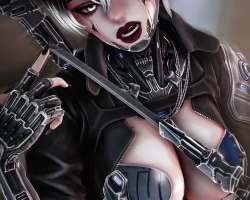


Model info
Content type:Avatars
Сreated by: Meechu
SDK: 3.0 (VRChat)
Unity version: Unity 2022
Platform:
PC
Рhysbones: Yes
Face Tracking: Yes
Full body: Yes
Nsfw: Yes
DРS \ SPS : No
Views: 35 928
Nova Legendary
To download the model, you need to log in.
Description
Customization:[/u]
Multiple hair options to choose from
Option to dye the entire hair, or just the highlights
Customize the hue, saturation, and value of each individual color on Nova's style
Change the color of emissions, with separate emission radials for hair and eyes
Choose between two optional face tattoos, and a optional body tattoo
Create the perfect look with skin tone and post processing radials
Change Nova's body proportions to match your own preferences
Nova's Weapons System[u]
The Katana and Tanto:[/b]
Flip and roll your blades using motion controls
Switch between forward and reverse grips
Toss weapons between your empty hands
Slash the air and collide with the world to create sparke
Control how you manipulate the blades via menu or menu-less controls
Custom GPU Particle System:[/i]
Push the button on each blade to activate its particle form
Replace your arm with a particle one with the menu or after launching it away
Configure the particles' behavior with options like turbulence, speed, and size
Hue shift them into any color you want
Enable free mode to manipulate the particles with your hands
[b]Cyber Arm System:
Launch arm into the world and create a collision on impact
Puppet your arm to mimic its movements
Select the distance the arm is sent away for puppeting
Manipulate the puppet arm in world space of locally offset from you
Operate with the menu or menu-less for a more immersive experience
Wield either blades freely even when your arm is detached
Upload Instructions:[i]
1. Create/Open a Unity Project with the VRChat SDK - Avatars package (version 3.8.0 or later) - https://vrchat.com/home/download
2. Import Poiyomi Toon Shader (tested on version 9.1.30) - https://www.poiyomi.com/download
3. Import VRCFury via the VRChat Creator Companion (tested on version 1.1227.0) - https://vrcfury.com/download
4. (Optional) Import VRCFT - Jerry's Templates to upload FaceTracking versions (tested on version 6.7.2) - https://adjerry91.github.io/VRCFaceTracking-Templates/
5. Import Nova Unity Package
6. Open the scene located at Assets/!NovaByMeechu/
*Nova's animations will work once all the materials are locked, so attempt an upload at least once, or manually lock them yourself before testing via AV3 Emulator or Gesture Manager.
