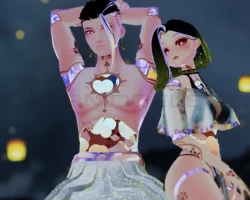


Model info
Content type:Avatars
Сreated by: LilMissPasta
SDK: 3.0 (VRChat)
Unity version: Unity 2022
Platform:
PC + Quest
Рhysbones: Yes
Face Tracking: No
Full body: Yes
Nsfw: Yes
DРS \ SPS : Yes
Views: 7 276
Imari
To download the model, you need to log in.
Description
"Drink up, Sweetheart"
⚜️ FBT ready, with Gogo Loco setup
⚜️ Phys bones and colliders in all the right places
⚜️ Full inventory system, with dissolves*
⚜️ Big bubbles of tea, that dynamically float through the body*
⚜️ Fully functioning tea set; fill and drink from your cup, and pick your favorite flavor
⚜️ Tea set is compatible with China; you can fill her cup, drink from it, and vice versa
⚜️ Cheers with China for a cute sound and splash effect*
⚜️ Handpainted fine china textures
⚜️ DPS compatible*
⚜️ Hue shift control, 5 different porcelain types and 7 different tea flavors*
⚜️ ASMR boiling tea sound with on/off toggle and adjustable audio radius*
⚜️ Hair toggle
⚜️ Custom BJD-style body mods
⚜️ Sleep mode that locks your gestures into peaceful rest
⚜️ Easy access theme presets
⚜️ Nose boop and headpat particles*
⚜️ Blinks when you poke his eyes
⚜️ Plunger
⚜️ Only 13 MB upload
* Marked features are PC only
Gesture instructions:
The tea pot is intuitive to use; simply tilt it to pour tea, do an "open right hand" gesture to put down the tea pot, and a "close right fist" gesture to pick it up again. The porcelain of the pot is synced to the body texture, and will change with it; as will the tea inside. The pot always pours tea of the same color as the tea that runs through Imari himself.
Imari's tea cup fills when the pot is tilted overtop of it, and empties when it's brought close to his mouth. It can be put down or picked up in the same way as the tea pot; do an "open left hand" gesture to put down the cup, and a "close left fist" gesture to pick it up again. Imari has interactability with China, and can fill or drink from her cup. Similarly, she can fill or drink from his.
To cheers with China or another Imari, bring your cups together for a cute sound and a little splash effect
You have control over the settings for each material directly (silk, clothes, skin, tea and hair) in the "color control" submenu. Alternatively, you can use one of the 7 presets in the "presets" menu, which set the color control radials for you, to a curated setup.
The boiling water sound is on by default, but can only be heard when listening directly to the chest or stomach. You can adjust the audible radius to your liking through the "misc" menu.
Before purchasing, please ensure that you have:
Unity 2022.3.6f1
VRChat Creator Companion (VCC, VRChat website)
Poiyomi 9.1.30
Additionally, please have basic knowledge of how to upload an avatar to VRChat.
PC upload Instructions:
1. Create a new Unity Avatar project using VCC (Latest SDK!)
2. Import Poiyomi
3. Import the Imari Avatar Package
4. Open the "OPEN ME" scene in "Assets"
Ready to upload!
Quest upload instructions:
1. Create a new Unity Avatar project using VCC (Latest SDK!)
2. Import the Imari Avatar Package
3. Open the "Imari" scene in "Assets"
4. Remember to Copy/paste the blueprint ID from your PC upload to this one, for the fallback to sync
Ready to upload!
