Home » Avatars » Elsie

Model info

Content type:Avatars
Сreated by: KOTA
SDK: 3.0 (VRChat)
Unity version: Unity 2022
Platform: PC
Рhysbones: Yes
Face Tracking: Yes
Full body: Yes
Nsfw: Yes
DРS \ SPS : Yes
Views: 43 289
Elsie

To download the model, you need to log in.

Description

90+ TOGGLES!
FaceTracking is INCLUDED! (Uses UE Blendshapes)
SPS AND WHOLESOME LOLIPOP
Uses UV Tile Discards and blendshape toggling
Optimized version INCLUDED!!!
Lots of clothes for a lot of mismatch and customizing!!
Presets for the models
multiple color options for more cusomizing!
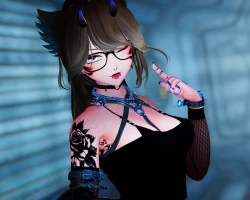
Screenshots of model Elsie in the game
Comments: 19
Add comment

Information

To add your comment you need to log in.

  • foto
    NaniCake #19
    0
    Optimized version is missing.
    7 October 2025 14:34
  • foto
    WispyXO #18
    0
    How do i fix the body issue where the body is way too bright? I tried the Greyscale stuff but it doesn't do anything?
    20 July 2025 18:53
  • foto
    PropMaster #17
    0
    I keep getting missing scrips when trying to upload
    16 July 2025 22:29
  • foto
    Jemmie #16
    0
    ***comment deleted***
    14 July 2025 20:45
  • foto
    Yuno_X #15
    0
    None of her toggles work for me
    9 July 2025 03:03
  • foto
    deathx90 #14
    0
    What packages does the avi need? i keep getting missing shaders.
    8 July 2025 11:41
  • foto
    meritoc1234 #13
    Awesome Avi, thanks
    7 July 2025 14:59
  • foto
    SodaAddict (user blocked for violating site rules) #12
    face looks pretty weird ngl
    6 July 2025 18:43
  • foto
    Rivie #11
    0
    Valumi, turn the grayscale lighting to max in poi
    6 July 2025 18:06
  • foto
    Goldenboi42 #10
    +1
    .Nox., I could kiss you
    6 July 2025 14:29
  • foto
    valve #9
    0
    :)
    6 July 2025 06:46
  • foto
    Valumi #8
    0
    The face color and body color is a bit diffrent how to fix it?
    6 July 2025 01:35
  • foto
    .Nox. #7
    +2
    for everyone who cannot download the avatar, the work around is when you click download and get sent to same page as the image given below, press the 3 dots on the top right and click "Add to starred" then go to your drive, make a folder and click the star on the folder you have created, now you have both avatar file and folder in your starred tab, drag your avatar you cant download into the folder then download the folder, you now have the avatar!


    5 July 2025 21:52
  • foto
    industro0001 #6
    0
    industro0001, Also if you're having trouble uploading, perhaps you should uncheck this option upon importing avatar. I had it unchecked and it uploaded for me.

    5 July 2025 19:10
  • foto
    WXXF #5
    0
    nnaniya, There may be a blendeshape that changes them
    5 July 2025 18:59
  • foto
    industro0001 #4
    0
    ***comment deleted***
    5 July 2025 18:42
  • foto
    nnaniya #3
    0
    idk what they did to her eyebrow style but its ruinedanime32
    5 July 2025 14:55
  • foto
    Goldenboi42 #2
    +1
    I gotta wait for tomorrow, too many downloads :[
    good model
    5 July 2025 12:15
  • foto
    Shadownight15 #1
    0
    i try uploading this it not working
    5 July 2025 04:07