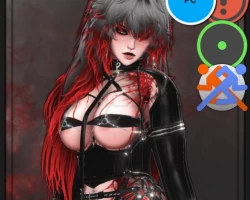


Model info
Content type:Avatars
Сreated by: Morti
SDK: 3.0 (VRChat)
Unity version: Unity 2022
Platform:
PC
Рhysbones: Yes
Face Tracking: Yes
Full body: Yes
Nsfw: Yes
DРS \ SPS : Yes
Views: 18 799
Sekhara
To download the model, you need to log in.
Description
Requirements:
VRChat Creator Companion
Unity version 2022.3.22f1
VRCFury
Stats:
Unity Package size: 1GB | Tris: 681k | In-game: 70MB |
Uncompressed: 246MB | Texture Memory: 163MB |
Skinned Meshes: 40 | Material Slots: 76.
Some Features
⛧ PC ONLY.
⛧ Index Gestures.
⛧ GogoLoco.
⛧ Auto-Hotdog.
⛧ Pet Cage.
⛧ Dancing Fans.
⛧ Dissolve Toggles.
⛧ SPS / PCS setup with custom blendshapes.
⛧ Idle blinking, ear twitch, and tail sway.
⛧ Headpat purring and butt smack contacts.
⛧ Colliders for hair, chains, and breasts to interact more accurately with the body.
⛧ Jiggle in necessary places.
⛧ Lighting sliders for brighter and darker.
⛧ Realistic materials for more world-accurate lighting.
Toggles/Features on the optimized versions:
(These are already on the full version)
⛧ Gogo loco + index ges
⛧ Blink idle
⛧ Hair colors / emissions / hues
⛧ Eye hues / black sclera
⛧ Tattoo toggles / emissions / hues
⛧ Glitter sliders
⛧ Scalers for breasts/tummy/butt/thighs
⛧ Nail hues
⛧ Physbones in breasts, butt, and hair.
⛧ Elf ear toggle (Fancy version only)
⛧ Fangs toggle
⛧ Eye shape slider
⛧ Skin tone slider
⛧ Lighting sliders
How to upload:
Create new 2022 avatar project with the Creator Companion.
Add VRCFury, this is important! (you may get a harmless error if you don't also add Gesture Manager, don't worry about it.)
Open project, then import most recent Poiyomi Toon version (9.1.31 was used) (can be added manually or through the VCC Repository, do NOT have them both at the same time)
Import the avatar package.
Find the folder titled !SEKHARA, open it, then double click the Unity symbol titled "!OPENME Sekhara."
Look at the tabs at the very top of your Unity window and click "VRChat SDK" then "show control panel"
In the SDK control panel, name it and select a thumbnail (You can chose any thumbnail)
At the bottom of the control panel, click the "3. Build" drop down and select the big "build & publish" button!
And you're good to go! Keep in mind, I will not teach you anything else but uploading!
VRChat Creator Companion
Unity version 2022.3.22f1
VRCFury
Stats:
Unity Package size: 1GB | Tris: 681k | In-game: 70MB |
Uncompressed: 246MB | Texture Memory: 163MB |
Skinned Meshes: 40 | Material Slots: 76.
Some Features
⛧ PC ONLY.
⛧ Index Gestures.
⛧ GogoLoco.
⛧ Auto-Hotdog.
⛧ Pet Cage.
⛧ Dancing Fans.
⛧ Dissolve Toggles.
⛧ SPS / PCS setup with custom blendshapes.
⛧ Idle blinking, ear twitch, and tail sway.
⛧ Headpat purring and butt smack contacts.
⛧ Colliders for hair, chains, and breasts to interact more accurately with the body.
⛧ Jiggle in necessary places.
⛧ Lighting sliders for brighter and darker.
⛧ Realistic materials for more world-accurate lighting.
Toggles/Features on the optimized versions:
(These are already on the full version)
⛧ Gogo loco + index ges
⛧ Blink idle
⛧ Hair colors / emissions / hues
⛧ Eye hues / black sclera
⛧ Tattoo toggles / emissions / hues
⛧ Glitter sliders
⛧ Scalers for breasts/tummy/butt/thighs
⛧ Nail hues
⛧ Physbones in breasts, butt, and hair.
⛧ Elf ear toggle (Fancy version only)
⛧ Fangs toggle
⛧ Eye shape slider
⛧ Skin tone slider
⛧ Lighting sliders
How to upload:
Create new 2022 avatar project with the Creator Companion.
Add VRCFury, this is important! (you may get a harmless error if you don't also add Gesture Manager, don't worry about it.)
Open project, then import most recent Poiyomi Toon version (9.1.31 was used) (can be added manually or through the VCC Repository, do NOT have them both at the same time)
Import the avatar package.
Find the folder titled !SEKHARA, open it, then double click the Unity symbol titled "!OPENME Sekhara."
Look at the tabs at the very top of your Unity window and click "VRChat SDK" then "show control panel"
In the SDK control panel, name it and select a thumbnail (You can chose any thumbnail)
At the bottom of the control panel, click the "3. Build" drop down and select the big "build & publish" button!
And you're good to go! Keep in mind, I will not teach you anything else but uploading!
