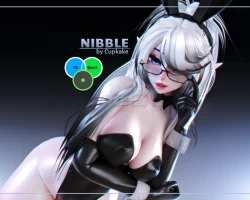


Model info
Content type:Avatars
Сreated by: Cupkake
SDK: 3.0 (VRChat)
Unity version: Unity 2022
Platform:
PC
Рhysbones: Yes
Face Tracking: No
Full body: Yes
Nsfw: Yes
DРS \ SPS : Yes
Views: 18 133
Nibble
To download the model, you need to log in.
Description
- Basics:
- All gestures/idle animations/ etc, FBX+Prefab included.
- Phys bones in: Bunny Headband, Hair, Chest, Butt, Thighs, Bunny Bodysuit Tail, Glasses chain
- Colliders on whole body + floor collider for hair
- Toggles available on the model:
┗ Clothing menu: Headband, Glasses, Collar, Socks, Gloves, Cuffs, Shoes, Bodysuit, Ballgag, Elf ears
- Custom edited/drawn textures, custom made/edited and rigged parts
- FBT ready
- Extra features:
- LOTS of Color Customizations!
┗ Hair menu: Hair Color Preset Options [includes 10 different presets!], Saturation slider, Brightness slider, Hair Hue shift and Hair Emission Hue shift!
┗ Eyes Hue Shift!
┗ Outfit menu, Socks and Gloves menu: ALL come with Black, White, Color options and Hue shift for the color!
- Interactive glasses feature! (You can grab and position the glasses however you like on the head! They also slightly jiggle and respond to touching!)
- EXTRA features!: Chest size slider, Butt size slider, 2 Different types of bangs - Straight and Sideswept!
- Comes with GoGo Loco!
- Comes with SPS setup!
- Can purchase version with a GREEN OPTI package!
- Custom blink animation! (A custom made blink animation to give the avatar a more cutesy vibe!)
- Wiggly tongue with drool!(Works great with the ballgag! uwu)
- Contact interactions! (Headpat, Nose boop, Both Eye touches/pokes!+a toggle to turn these interactions off!)
- GREEN OPTI Ver comes ONLY with:
┗ ALL Color customizations listed!
┗ GoGoLoco
┗ Toggles: Headband, Glasses UP, Glasses OFF
┗ Chest size radial, Butt size radial
┗ Opti version is fully SFW!
Unity Package for Unity 2022
Upload Instructions
• Use VCC!
• Must have VRCFury in project
• Import Poiyomi Toon 8.0.295
• Import Avatar package
All in that order.
[Note: MAKE SEPARATE PROJECTS FOR EACH PACKAGE!]
[Note2: Upload Instructions are valid for ALL packages of this avatar!]
- All gestures/idle animations/ etc, FBX+Prefab included.
- Phys bones in: Bunny Headband, Hair, Chest, Butt, Thighs, Bunny Bodysuit Tail, Glasses chain
- Colliders on whole body + floor collider for hair
- Toggles available on the model:
┗ Clothing menu: Headband, Glasses, Collar, Socks, Gloves, Cuffs, Shoes, Bodysuit, Ballgag, Elf ears
- Custom edited/drawn textures, custom made/edited and rigged parts
- FBT ready
- Extra features:
- LOTS of Color Customizations!
┗ Hair menu: Hair Color Preset Options [includes 10 different presets!], Saturation slider, Brightness slider, Hair Hue shift and Hair Emission Hue shift!
┗ Eyes Hue Shift!
┗ Outfit menu, Socks and Gloves menu: ALL come with Black, White, Color options and Hue shift for the color!
- Interactive glasses feature! (You can grab and position the glasses however you like on the head! They also slightly jiggle and respond to touching!)
- EXTRA features!: Chest size slider, Butt size slider, 2 Different types of bangs - Straight and Sideswept!
- Comes with GoGo Loco!
- Comes with SPS setup!
- Can purchase version with a GREEN OPTI package!
- Custom blink animation! (A custom made blink animation to give the avatar a more cutesy vibe!)
- Wiggly tongue with drool!(Works great with the ballgag! uwu)
- Contact interactions! (Headpat, Nose boop, Both Eye touches/pokes!+a toggle to turn these interactions off!)
- GREEN OPTI Ver comes ONLY with:
┗ ALL Color customizations listed!
┗ GoGoLoco
┗ Toggles: Headband, Glasses UP, Glasses OFF
┗ Chest size radial, Butt size radial
┗ Opti version is fully SFW!
Unity Package for Unity 2022
Upload Instructions
• Use VCC!
• Must have VRCFury in project
• Import Poiyomi Toon 8.0.295
• Import Avatar package
All in that order.
[Note: MAKE SEPARATE PROJECTS FOR EACH PACKAGE!]
[Note2: Upload Instructions are valid for ALL packages of this avatar!]
