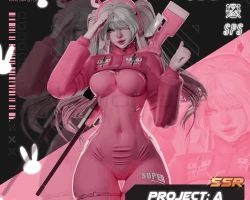


Model info
Content type:Avatars
Сreated by: Diraccoonr
SDK: 3.0 (VRChat)
Unity version: Unity 2022
Platform:
PC
Рhysbones: Yes
Face Tracking: No
Full body: Yes
Nsfw: Yes
DРS \ SPS : Yes
Views: 37 172
Project A
To download the model, you need to log in.
Description
General Features:
Toggles:
Extra Menu: Sniper Rifle - Sniper Rifle toggle, back equip, grab in hand, drop in world, 5-round ammo system, manual reload, eject mag with left hand, bolt pull, scope zoom slider, desktop support, thumbs up fire mode, sounds and particles
Body Size Menu: Ass, Boobs, Tummy, Thigh
Hair Menu: Pigtails, Long, Braids
Accessories: Garters, Headphones, Bands Arms, Tail, Ears, Cuffs, Collar, Choker, Carrot Clips, Syringe, Strap, Glasses, Hat, Rings
Outfit Menu: General Outfit, Underwear Outfit, Bunny Outfit, Nurse Outfit
Toggles Menu: Full Bodysuit, Suit, Bra, Harness, Heels, Boots, Stocking, Socks, Sneakers, Top Belt, Pink Jacket, Dress
NSFW Menu: Pasties, Panties
Contacts:
Boop, Headpat, Butt Left, Butt Right
Color Customization:
Hair: Hair Color, Hue Hair, Emission Color, Emission Strength, Emission Hue
Eyes: Eyes Hue, Eyes Saturation
Skin / Global: Skintone, Light, Hue All, Saturation All, RGB Mode
Upload Requirements:
REQUIRES:
UNITY Version 2022.3.22f1
VRChat Creator Companion
Poiyomi Toon 9.0.61+
VRCFury most recent version
Toggles:
Extra Menu: Sniper Rifle - Sniper Rifle toggle, back equip, grab in hand, drop in world, 5-round ammo system, manual reload, eject mag with left hand, bolt pull, scope zoom slider, desktop support, thumbs up fire mode, sounds and particles
Body Size Menu: Ass, Boobs, Tummy, Thigh
Hair Menu: Pigtails, Long, Braids
Accessories: Garters, Headphones, Bands Arms, Tail, Ears, Cuffs, Collar, Choker, Carrot Clips, Syringe, Strap, Glasses, Hat, Rings
Outfit Menu: General Outfit, Underwear Outfit, Bunny Outfit, Nurse Outfit
Toggles Menu: Full Bodysuit, Suit, Bra, Harness, Heels, Boots, Stocking, Socks, Sneakers, Top Belt, Pink Jacket, Dress
NSFW Menu: Pasties, Panties
Contacts:
Boop, Headpat, Butt Left, Butt Right
Color Customization:
Hair: Hair Color, Hue Hair, Emission Color, Emission Strength, Emission Hue
Eyes: Eyes Hue, Eyes Saturation
Skin / Global: Skintone, Light, Hue All, Saturation All, RGB Mode
Upload Requirements:
REQUIRES:
UNITY Version 2022.3.22f1
VRChat Creator Companion
Poiyomi Toon 9.0.61+
VRCFury most recent version
