

Model info
Content type:Avatars
Сreated by: Wolfs Den 3D
SDK: 3.0 (VRChat)
Unity version: Unity 2022
Platform:
PC
Рhysbones: Yes
Face Tracking: No
Full body: Yes
Nsfw: Yes
DРS \ SPS : Yes
Views: 38 011
Ahi
To download the model, you need to log in.
Description
•────────────────────⋅☾ Ahi ☽⋅────────────────────•
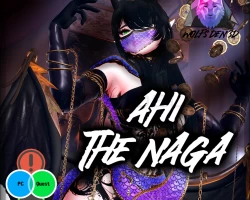
The Naga Ahi is a physically gifted assassin-type from the middle-eastern regions, featuring multiple outfits for traversing the harsh environments of the desert or meddling with the folk, ranging from the common folk to royalty.
Enjoy a huge amount of customization: 50+ toggles & sliders on top of outfits, hairstyles and a bunch of accessories - you're guaranteed to find your style!
Our Naga features alternate snake parts with puppet controls, slither around to your heart's content.
Her flowy outfits, multiple props and vast amount of different looks ensure you'll be able to use her for any occasion.
──────────────────────────────────────────────────
──────────────────────────────────────────────────
❱❱▶ Included files
Fully set up unity packages with all the different versions: PC, PC Opti, Quest x2
❱❱▶ Set up a separate project for PC with the following assets:
VRChat Creator Companion (VCC) + Unity 2022.3.22f1
Poiyomi Toon 9.1.20
VRCFury 1.1185.0
❱❱▶ Set up a separate project for Quest with the following assets:
VRChat Creator Companion (VCC) + Unity 2022.3.6f1
VRCFury 1.1185.0
──────────────────────────────────────────────────
❱❱▶ Customize Your Avatar
• Mix and match toggles: 3 different hairstyles (Long, Short, Alt), Multiple outfits for every occasion: Main Outfit (Main Jacket, Hood, Mask, Gloves, Shoes, Lower Top, Pants, Lower Pants, Bag), Casual Outfit (Shirt, Pants, Kneepads, Shoes, Gloves, Lower Top, Lower Pants), Alternate Outfit (Mask, Arms, Top, Pants, Skirt, Jewelry Body, Lower Top, Lower Pants), Outfit Quickchanges, Accessories (Golden Scales, Wings, Tail, Piercings [Ear, Eyebrow, Nose, Septum, Fangs, Chest], Jewelry [Ears, Forehead, Belly, Necklace, Chest])
• Shapes and Colors: Inclusive physique adjustments via sliders, Abs slider, Horn Size, Nail length, 4 alt makeup and 1 no makeup look, Makeup Color, Human Skintone Range (Pale - Tan - Dark), Full Fantasy Skintone Range, Body Markings, Black Scalera, Eye Color (Each eye separately), 4 Eye alt tex, Hair Color + Emission, 8 Hair alt tex, Outfit/Main Hue + Saturation, Metallics Hue + Saturation, Acc Hue + Saturation, Tanlines, Shader Settings (Brightness, Shadow Strength, Wet Skin, Sweat, Glitter, Outline)
❱❱▶ Extras
• Props and addons: Fist Weapons, Coin Ribbon, Comfy Tent with Bed, Pillows and Carpet, Prop set, Lollipop, Allow Interaction toggle, GoGo Loco basic
❱❱▶ Avatar Dynamics
• Interactions & Idles: Face Idle, Tail idle, Tail Puppet, Tail Coil, Tongue Puppet, Proper Physics & Collisions that adjust with body shapes, Contact Toggles, Expression Particles Toggle, Headpat, Nose boop, Ear pull, Tummy rub, Upper Body, Neck touch, Lower Body
• 12 different expressive gestures : Slow Blink via Trigger (Fist R, Fist L), Happy (Open R), Sleepy (Open L), Confused (Fingerpoint R), Sad (Fingerpont L), Shy Flirty (Victory R), Confident Flirty (Victory L), Annoyed (RockNRoll R), Angry (RockNRoll L), Smug (Handgun R), Timid (Handgun L), Surprised (ThumbsUp R), Blep (ThumbsUp L), Breath particles toggle for Flirty, Heart particles toggle for Headpet & Tummy Rub
•─────────────────────────────────────────────────•
The Naga Ahi is a physically gifted assassin-type from the middle-eastern regions, featuring multiple outfits for traversing the harsh environments of the desert or meddling with the folk, ranging from the common folk to royalty.
Enjoy a huge amount of customization: 50+ toggles & sliders on top of outfits, hairstyles and a bunch of accessories - you're guaranteed to find your style!
Our Naga features alternate snake parts with puppet controls, slither around to your heart's content.
Her flowy outfits, multiple props and vast amount of different looks ensure you'll be able to use her for any occasion.
──────────────────────────────────────────────────
──────────────────────────────────────────────────
❱❱▶ Included files
Fully set up unity packages with all the different versions: PC, PC Opti, Quest x2
❱❱▶ Set up a separate project for PC with the following assets:
VRChat Creator Companion (VCC) + Unity 2022.3.22f1
Poiyomi Toon 9.1.20
VRCFury 1.1185.0
❱❱▶ Set up a separate project for Quest with the following assets:
VRChat Creator Companion (VCC) + Unity 2022.3.6f1
VRCFury 1.1185.0
──────────────────────────────────────────────────
❱❱▶ Customize Your Avatar
• Mix and match toggles: 3 different hairstyles (Long, Short, Alt), Multiple outfits for every occasion: Main Outfit (Main Jacket, Hood, Mask, Gloves, Shoes, Lower Top, Pants, Lower Pants, Bag), Casual Outfit (Shirt, Pants, Kneepads, Shoes, Gloves, Lower Top, Lower Pants), Alternate Outfit (Mask, Arms, Top, Pants, Skirt, Jewelry Body, Lower Top, Lower Pants), Outfit Quickchanges, Accessories (Golden Scales, Wings, Tail, Piercings [Ear, Eyebrow, Nose, Septum, Fangs, Chest], Jewelry [Ears, Forehead, Belly, Necklace, Chest])
• Shapes and Colors: Inclusive physique adjustments via sliders, Abs slider, Horn Size, Nail length, 4 alt makeup and 1 no makeup look, Makeup Color, Human Skintone Range (Pale - Tan - Dark), Full Fantasy Skintone Range, Body Markings, Black Scalera, Eye Color (Each eye separately), 4 Eye alt tex, Hair Color + Emission, 8 Hair alt tex, Outfit/Main Hue + Saturation, Metallics Hue + Saturation, Acc Hue + Saturation, Tanlines, Shader Settings (Brightness, Shadow Strength, Wet Skin, Sweat, Glitter, Outline)
❱❱▶ Extras
• Props and addons: Fist Weapons, Coin Ribbon, Comfy Tent with Bed, Pillows and Carpet, Prop set, Lollipop, Allow Interaction toggle, GoGo Loco basic
❱❱▶ Avatar Dynamics
• Interactions & Idles: Face Idle, Tail idle, Tail Puppet, Tail Coil, Tongue Puppet, Proper Physics & Collisions that adjust with body shapes, Contact Toggles, Expression Particles Toggle, Headpat, Nose boop, Ear pull, Tummy rub, Upper Body, Neck touch, Lower Body
• 12 different expressive gestures : Slow Blink via Trigger (Fist R, Fist L), Happy (Open R), Sleepy (Open L), Confused (Fingerpoint R), Sad (Fingerpont L), Shy Flirty (Victory R), Confident Flirty (Victory L), Annoyed (RockNRoll R), Angry (RockNRoll L), Smug (Handgun R), Timid (Handgun L), Surprised (ThumbsUp R), Blep (ThumbsUp L), Breath particles toggle for Flirty, Heart particles toggle for Headpet & Tummy Rub
•─────────────────────────────────────────────────•
