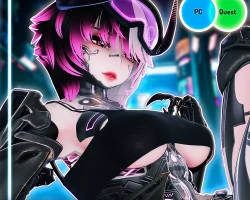


Model info
Content type:Avatars
SDK: 3.0 (VRChat)
Unity version: Unity 2022
Platform:
PC + Quest
Рhysbones: Yes
Face Tracking: Yes
Full body: Yes
Nsfw: Yes
DРS \ SPS : No
Views: 80 592
Cyber Auta
To download the model, you need to log in.
Description
Update v1.1: 8/4/25
(Q) Split hair toggle added
(PC/Q) RGB global color change loop toggle added
(PC/Q) Shuriken system added
(PC/Q) Dynamic voice volume visualizer
Update v1.2: 8/5/25
VRCFT PC/Quest versions included in the packages
(Q) Mip mapping texture improvements
Toggles
Hood | Shirt | Upper harness | Lower harness | Shorts | Mask | Bodysuit | Crop jacket | Wings | Horns | Tail | Spine | Decal | Glasses | Goggles | Arm hue | Arm saturation | Arm value | Body emission hue | Body emission saturation | Body emission value | Hair hue | Hair saturation | Hair val | Hair emission hue | Hair emission saturation | Hair emission value | Goggles hue | Goggles saturation | Eye hue | Eye saturation | Eye value | Eye emission hue | Eye emission saturation | Eye emission value | Clothing hue | Clothing saturation | Clothing value | Skeleton hue | Skeleton saturation | Spine hue | Spine saturation | Spine value | Cyber hue | Cyber saturation | Cyber value | Fallback metallics | Fangs | Split hair color | Floor collision | Headpat | Kiss | Eye poke R/L/Both | Butt smack | Gestures left hand | Gestures right hand | Gestures disabled | Skin tone radial | Light skin | Tan skin | Tanner skin | Dark skin | Minimum light | Light multiply | Greyscale light | Light drone | Light drone angle | Light drone power | Light drone range | Rainbow auto shifting emissions (QUEST Compat) | Shuriken throwing
Light Drone:
Personal local only flashlight drone
Range, strength, angle adjustments for the light
Due to realtime lights incurring performance cost, this is local only
Checkpoint Preset System:
Save and load presets for clothing and all color hue shift combinations
Save your combination and load it at back anytime
Soft reset button to reset back to default without wiping all your saves
Handled locally and costs no additional synced memory
Skin Tone Options:
4 skintones to choose from via dedicated toggles
Blending between any skintones with the skintone radial
4 Skintone prefabs options for quest
Quest Compatible HSV + Rainbow Looping:
Hue, saturation and value radial controls with quest compatibility
Global rainbow autoshifting toggle with quest support
Shuriken Throwing:
Liindy shuriken throwing system with quest compatibility
Local only reticle aiming view toggle for better precision
Single or triple throwing mode
Download: 21MB
Texture Memory: 44MB
Materials: 13
Phys Components: 8
Phys Transforms: 39
Collision Checks: 62
Tri Count: 170k
Skinned Meshes: 5
Memory: 112
✦ Some unity knowledge is required ✦
Requires:
- Unity 2022.3.6
- VRC Creator Companion App
- Latest Poiyomi 9.0 Shader (9.2.69)
- VRCFury
- VRLabs Final IK Stub
Optional:
- Poiyomi Pro Shader (not recommend)
- Final IK
(Q) Split hair toggle added
(PC/Q) RGB global color change loop toggle added
(PC/Q) Shuriken system added
(PC/Q) Dynamic voice volume visualizer
Update v1.2: 8/5/25
VRCFT PC/Quest versions included in the packages
(Q) Mip mapping texture improvements
Toggles
Hood | Shirt | Upper harness | Lower harness | Shorts | Mask | Bodysuit | Crop jacket | Wings | Horns | Tail | Spine | Decal | Glasses | Goggles | Arm hue | Arm saturation | Arm value | Body emission hue | Body emission saturation | Body emission value | Hair hue | Hair saturation | Hair val | Hair emission hue | Hair emission saturation | Hair emission value | Goggles hue | Goggles saturation | Eye hue | Eye saturation | Eye value | Eye emission hue | Eye emission saturation | Eye emission value | Clothing hue | Clothing saturation | Clothing value | Skeleton hue | Skeleton saturation | Spine hue | Spine saturation | Spine value | Cyber hue | Cyber saturation | Cyber value | Fallback metallics | Fangs | Split hair color | Floor collision | Headpat | Kiss | Eye poke R/L/Both | Butt smack | Gestures left hand | Gestures right hand | Gestures disabled | Skin tone radial | Light skin | Tan skin | Tanner skin | Dark skin | Minimum light | Light multiply | Greyscale light | Light drone | Light drone angle | Light drone power | Light drone range | Rainbow auto shifting emissions (QUEST Compat) | Shuriken throwing
Light Drone:
Personal local only flashlight drone
Range, strength, angle adjustments for the light
Due to realtime lights incurring performance cost, this is local only
Checkpoint Preset System:
Save and load presets for clothing and all color hue shift combinations
Save your combination and load it at back anytime
Soft reset button to reset back to default without wiping all your saves
Handled locally and costs no additional synced memory
Skin Tone Options:
4 skintones to choose from via dedicated toggles
Blending between any skintones with the skintone radial
4 Skintone prefabs options for quest
Quest Compatible HSV + Rainbow Looping:
Hue, saturation and value radial controls with quest compatibility
Global rainbow autoshifting toggle with quest support
Shuriken Throwing:
Liindy shuriken throwing system with quest compatibility
Local only reticle aiming view toggle for better precision
Single or triple throwing mode
Download: 21MB
Texture Memory: 44MB
Materials: 13
Phys Components: 8
Phys Transforms: 39
Collision Checks: 62
Tri Count: 170k
Skinned Meshes: 5
Memory: 112
✦ Some unity knowledge is required ✦
Requires:
- Unity 2022.3.6
- VRC Creator Companion App
- Latest Poiyomi 9.0 Shader (9.2.69)
- VRCFury
- VRLabs Final IK Stub
Optional:
- Poiyomi Pro Shader (not recommend)
- Final IK
