

Model info
Content type:Avatars
Сreated by: LotyBunny
SDK: 3.0 (VRChat)
Unity version: Unity 2022
Platform:
PC + Quest
Рhysbones: Yes
Face Tracking: No
Full body: Yes
Nsfw: No
DРS \ SPS : No
Views: 34 422
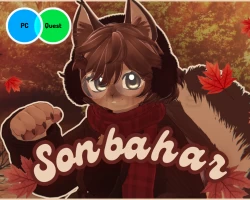
Sonbahar
To download the model, you need to log in.
Description
♡ Quest ver included!
♡ Gogo Loco!
♡ With and without fur options for the warmers and earmuffs!
₊˚ ‿︵୨୧ · · Toggles · · ୨୧‿︵ ˚₊
♡BODY♡
⤷ Alternative Cry
⤷ Tail Wag on/off
⤷ Ear Twitch on/off
⤷ Boob Slider
⤷ Fluff
♡WARDROBE♡
⤷ Sweater
⤷ Shirt
⤷ Killer Sweater
⤷ Shorts
⤷ Leg Warmers
⤷ Socks
⤷ Boots
⤷ ♡UNDERWEAR♡
⤷ Bikini
⤷ Panties
⤷ ♡ACCESSORIES♡
⤷ Earmuffs
⤷ Glasses
⤷ Bag
⤷ Scarf
⤷ Hair Pins
♡MISC♡
⤷ Floor Collider on/off
⤷ Headpat on/off
⤷ Boop on/off
⤷ Maple leaf particles on/off
⤷ ♡ITEMS♡
⤷ Acorn Plush
⤷ Takeout Coffee (Starbucks)
⤷ Coffee Mug
₊˚ ‿︵୨୧ · · ♡ · · ୨୧‿︵ ˚₊
REQUIREMENTS:
♡ Latest version of poiyomi shaders
♡ VRCfury
♡ GoGo Loco
♡ Unlit_WF_ShaderSuite for fur (optional!)
How to upload:
Step 1- Open a new VCC avatar project
Step 2- Import Poiyomi, Modular Avatar and VRCfury (also import GoGo Loco if it isn't in the scene)
Step 3- Import the avatar package / packages into the project
Step 4- Locate VRChat SDK and click "show control panel"
Step 5- Log in, go into builder
Step 6- Fill out the avatar details and click upload
♡ Gogo Loco!
♡ With and without fur options for the warmers and earmuffs!
₊˚ ‿︵୨୧ · · Toggles · · ୨୧‿︵ ˚₊
♡BODY♡
⤷ Alternative Cry
⤷ Tail Wag on/off
⤷ Ear Twitch on/off
⤷ Boob Slider
⤷ Fluff
♡WARDROBE♡
⤷ Sweater
⤷ Shirt
⤷ Killer Sweater
⤷ Shorts
⤷ Leg Warmers
⤷ Socks
⤷ Boots
⤷ ♡UNDERWEAR♡
⤷ Bikini
⤷ Panties
⤷ ♡ACCESSORIES♡
⤷ Earmuffs
⤷ Glasses
⤷ Bag
⤷ Scarf
⤷ Hair Pins
♡MISC♡
⤷ Floor Collider on/off
⤷ Headpat on/off
⤷ Boop on/off
⤷ Maple leaf particles on/off
⤷ ♡ITEMS♡
⤷ Acorn Plush
⤷ Takeout Coffee (Starbucks)
⤷ Coffee Mug
₊˚ ‿︵୨୧ · · ♡ · · ୨୧‿︵ ˚₊
REQUIREMENTS:
♡ Latest version of poiyomi shaders
♡ VRCfury
♡ GoGo Loco
♡ Unlit_WF_ShaderSuite for fur (optional!)
How to upload:
Step 1- Open a new VCC avatar project
Step 2- Import Poiyomi, Modular Avatar and VRCfury (also import GoGo Loco if it isn't in the scene)
Step 3- Import the avatar package / packages into the project
Step 4- Locate VRChat SDK and click "show control panel"
Step 5- Log in, go into builder
Step 6- Fill out the avatar details and click upload