

Model info
Content type:Avatars
Сreated by: ❀LittleSaku❀
SDK: 3.0 (VRChat)
Unity version: Unity 2022
Platform:
PC
Рhysbones: Yes
Face Tracking: Yes
Full body: Yes
Nsfw: Yes
DРS \ SPS : No
Views: 43 514
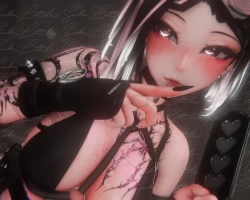
⋆Edith⋆ The Sniper Girl
To download the model, you need to log in.
Description
┏━━━━°⌜ ☆⌟°━━━━┓
-ˋˏ [Bang Bang baby] ˎˊ-
┗━━━━°⌜ ☆ ⌟°━━━━┛
This avi was made for the 2022.3.22f1 unity version!!
☆・Quest compatible !!
☆・Custom Menu Icons!!
☆・Toggles for everything!! You can customaze as your liking!
☆・Hair Swaps, Hair colours (+ 4), Hair Hue, Scellar Swap, White Mode, Wet Skin + Light Adjust/Grayscale
☆・Functional Hunting Rifle, Yooga Ball, Knife, Steppies, Claw Trails + Kinky Toys
☆・Face tracking + expressions+ more than 30 toggles!
☆・NEW Gogogloco!!
˗ˏˋ How to upload ´ˎ˗
☆ What do you need ? ☆
Avatar Creator Companion (CC) and VRCFURY
Poyomi (You can use poyomi pro or poyomi toon but i used poi_Pro_7.3.50_UpTo_9.3.36 for this avatar
This avatar DOESN'T INCLUDE SPS OR DPS! if you want to add those kind of things to the avatar, please, do it yourself.
VRCFT - Jerry's Templates it's a MUST if you want face tracking! YOU CAN FIND THE ADDON HERE
Avatar Gesture Manager ( if you want to test it in unity)
☆ Step by step ☆
-PC Version-
Open a NEW project in your CREATOR COMPANION and use the AVATAR UNITY 2022 AVATAR PROJECT
In to the manager add:
- Gesture Manager (to test the avi in unity)
- Av3Emulator (to test the avi in unity)
-Avatar 3.0 Manager (to test the avi in unity)
- VRCFT - Jerry's Templates
-VRCFURY
Open the project and wait for it to load fully (yes, it could take a time) and add the poyomi shaders you want to use. I used poi_Pro_7.3.50_UpTo_9.3.36
Import the avatar package and click the open me!
!PLEASE MAKE SURE THAT YOU HAVE TH PREFAB OF TH EVRCFACETRACKING I ADDED IN THE 3.0 FOLDER!! (i adjusted the eye rotation only so don't worry for the ones that work with the prefabs)
Open the tab of the vrchat SDK and LOG IN
!MAKE SURE THE BLUEPRINT OF THE AVATAR BEFORE UPLOAD IS CLEAR!
Click UPLOAD and you have it!
-QUEST Version-
Open a NEW project in your CREATOR COMPANION and use the AVATAR UNITY 2022 AVATAR PROJECT
In to the manager add:
- Gesture Manager (to test the avi in unity)
- Av3Emulator (to test the avi in unity)
-Avatar 3.0 Manager (to test the avi in unity)
- VRCFT - Jerry's Templates
-VRCFURY
NO SHADERS NEEDED (quest doesn't suport poyomi)
Import the avatar package and click the open me!
!PLEASE MAKE SURE THAT YOU HAVE TH PREFAB OF TH EVRCFACETRACKING I ADDED IN THE 3.0 FOLDER!! (i adjusted the eye rotation only so don't worry for the ones that work with the prefabs)
Open the tab of the vrchat SDK and LOG IN
GO TO THE CONTENT MANAGER TAB AND COPY AND PASTE IN THE BLUEPRINT OF THE QUETS AVI THE BLUEPRINT ID OF THE PC ONE SO IT CAN SYNC AND MATCH
Click UPLOAD and you have it!
